Guide for Persistent Storage over NFS/SMB for OCI-based LXCs?

Sep 1, 2022
577
219
68
42
Hello,

I'd like to experiment with the new OCI container-in-LXC support in PVE 9. I've got a relatively simple container picked out to try (basically, an internet uptime monitor to detect WAN disconnects), but it's going to need a bit of external storage.

I know I can do this with bind-mounts, but I'm not sure how to configure everything. Usually, I'd set up a container's bind mount in Docker compose if I'm using a Docker image. I know I can add a bind mount to an NFS or SMB share on the host to an LXC, but I'm not sure how to tell the OCI image to actually use the bind mount as its data directory.

I know I'd need to edit something in the LXC's config file, but I wanted to ask here if there's a good introductory guide to doing simple setups like this before I just started YOLO'ing it.
 
Last edited:
There is no OCI-specific volume wiring to learn. You do not tell the image to use the mount. You mount storage where the image already writes.

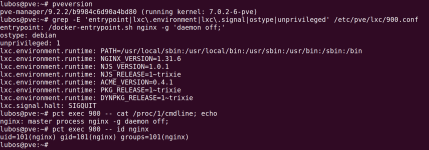
I ran this on PVE 9.2.2 rather than guess at it. Pulling docker.io/library/nginx as an example with Pull from OCI Registry and then running pct create gives you a normal container config. The image config turns into native LXC keys:

Code:
entrypoint: /docker-entrypoint.sh nginx -g 'daemon off;'
ostype: debian
unprivileged: 1
lxc.environment.runtime: PATH=...
lxc.signal.halt: SIGQUIT

1789605088820.png

Note what is missing: there is no volume key. The nginx image declares no Volumes and no WorkingDir in its config blob, and most images are the same. So storage is just an ordinary mount point:

Code:
pct set 900 -mp0 /tank/oci-test,mp=/usr/share/nginx/html

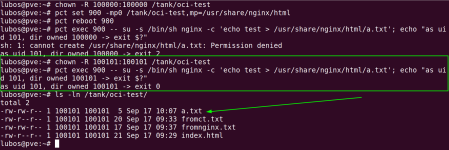
The part that will cost you time is uid mapping, not the mount. In an unprivileged container the image's process is often not root. nginx runs its master as uid 0 but its workers as uid 101, so the host path has to be owned by 100101, not 100000. Owned by 100000 the write is denied. Owned by 100101 it works:

1789605131318.png

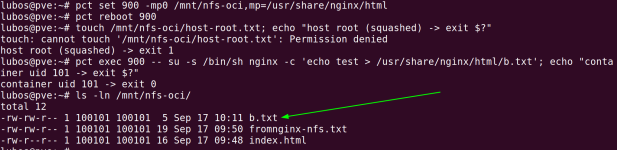
For your NFS case the fix goes on the NFS server, not on the PVE host. root_squash is not what is stopping you, because the container never writes as root. Host root gets squashed and denied, while the container's uid 101 arrives at the server as 100101 and writes fine once the exported directory is owned by 100101:

1789605153080.png

SMB behaves differently, and it is worth knowing before you start. Ownership is decided by the cifs mount options on the host, not by the server:

Code:
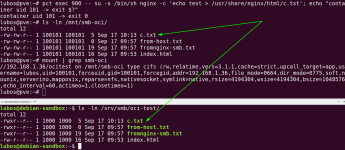
mount -t cifs //server/share /mnt/smb-oci -o username=x,password=y,uid=100101,gid=100101,file_mode=0664,dir_mode=0775

The host then shows every file as 100101 and the container can use it. On the server those same files are owned by the Samba user (uid 1000 here), and the container's uid never crosses the wire. So chown on the server does nothing for the mapping. If writes fail, it is because the Samba user has no write permission on the underlying directory. That is what caught me out:

1789605171483.png

Short version for your uptime monitor: find the uid the image's process runs as, add 100000, and make the storage owned by that. Local and NFS need a chown, SMB needs the right mount options.

Hope this helps
Lubos
 
  • Like
Reactions: SInisterPisces
Thanks. I'll have to cogitate on all that a bit more to make sure I understand it, but I really appreciate the detailed explanation.

I also realize that I failed to explain my original question properly. The above isn't exactly what I was worried about. I'm actually trying to figure out how to replicate the persistent storage provided by Docker bind mounts, since the only way to update a container is to destroy it and recreate it with a new template.

So, using Smokeping as an example again, here's its Docker compose file:
YAML:
---
services:
  smokeping:
    image: lscr.io/linuxserver/smokeping:latest
    container_name: smokeping
    hostname: smokeping #optional
    environment:
      - PUID=1000
      - PGID=1000
      - TZ=Etc/UTC
      - MASTER_URL=http://<master-host-ip>:80/smokeping/ #optional
      - SHARED_SECRET=password #optional
      - CACHE_DIR=/tmp #optional
    volumes:
      - /path/to/smokeping/config:/config
      - /path/to/smokeping/data:/data
    ports:
      - 80:80
    restart: unless-stopped

Specifically, I'm looking at this part:
YAML:
 volumes:
      - /path/to/smokeping/config:/config
      - /path/to/smokeping/data:/data

When I bring up the container, I want some way to tell the LXC that the internal /config and /data directories need to be mapped to specific places on my host's storage, just like I would with the above Docker compose file.

I know I can set environment variables from the PVE GUI, but unless I'm missing something, there's not a way to mimic the Docker bind mount setup before the container spins up. That complicates both initial setup and any potential upgrade when a new version of of the container drops.

EDIT: If this isn't possible yet, that's cool, too. I'm sure something like this will be possible eventually if it's not possible now.
 
Last edited:
Got it, that makes more sense. Yes, this works, but you need the command line for it.

The GUI can't add a bind mount to a host path. Its mount point dialog only lets you pick a storage pool, which creates a new volume owned by the container. I tested that too: when you destroy the container, that volume is deleted with it. So for your use case, don't use the GUI for this.

First create the host folders. The owner must be the container uid plus 100000, so with PUID=1000 that is 101000:

Code:
mkdir -p /tank/smokeping/config /tank/smokeping/data
chown -R 101000:101000 /tank/smokeping

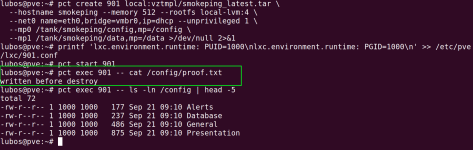
With pct you can add the bind mounts when you create the container, so they are there before it starts the first time. This is the same idea as the volumes: part of your compose file:

Code:
pct create 901 local:vztmpl/smokeping_latest.tar \
  --hostname smokeping --memory 512 --rootfs local-lvm:4 \
  --net0 name=eth0,bridge=vmbr0,ip=dhcp --unprivileged 1 \
  --mp0 /tank/smokeping/config,mp=/config \
  --mp1 /tank/smokeping/data,mp=/data

Then add the environment variables to /etc/pve/lxc/901.conf before starting it:

Code:
lxc.environment.runtime: PUID=1000
lxc.environment.runtime: PGID=1000

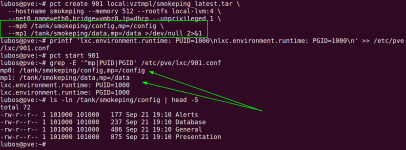
I tested the full upgrade cycle with the linuxserver smokeping image. After starting it, the image filled /config on the host by itself. Wait until it has fully booted before checking.

1789982875335.png

Then I wrote a file from inside the container, destroyed the container, and the file was still on the host:

1789982889006.png

Then I created a new container with the same --mp0/--mp1 lines. It sees the old file, and the existing config was used as is, not replaced with defaults. The files show as 1000 inside the container and 101000 on the host because of the uid mapping.

1789982926811.png

So updating is: pull the new image, destroy the old container, create a new one with the same mount lines and environment variables.

Hope this helps
Lubos
 
  • Like
Reactions: SInisterPisces
Thanks so much for taking the time to test and document all that, @lubosr . :) I'm glad to know it's possible, though I'm not gonna lie--I really hope that functionality gets exposed in the GUI at some point. It's not hard at all once the process is laid out so nicely, but it's just tedious enough to be prone to errors if you're not used to doing it.

On the VM and regular LXC side of things, a lot of options were config-file only until they percolated up to the GUI, so I look forward to seeing the OCI setup elements in the GUI develop more.

Where did you find the documentation that explains how to do all this? I clearly missed something in my reading.

I'm also interested in binding specific exposed ports in the docker container to specific virtual NICs on the LXC; I suspect there's also a way to do that with the config file. I really need to re-read the docs.

One thing I'm really boggled by is the 100000 offset when referring to internal-to-the-LXC GUIDs and UIDs. I've never really had to worry about manipulating those before (I've never tried to run Docker or Podman in an LXC, for instance), so I've never seen anything like that.

Is that specific to OCI, or a quirk of LXCs more generally?
 
Where did you find the documentation that explains how to do all this?

Mostly testing, but the uid part is documented, just not where you'd look. It's on the wiki rather than in the admin guide: https://pve.proxmox.com/wiki/Unprivileged_LXC_containers

That page covers bind mounts and custom mappings too. The admin guide's Unprivileged Containers section only says uid 0 is mapped to an unprivileged user, without the number. The OCI section is about four sentences, so the rest came from testing.

Two options I didn't use but that may suit you better than chown, both in the pct options reference:

idmap= on the mount point maps IDs per mount instead of shifting everything, e.g. u:1000:1000:1 so your host folders keep normal ownership. That's the ID Mapping field in the GUI mount point dialog. keepattrs=1 inherits UID, GID and mode from the host folder if it already exists. I haven't tested either.

Is that specific to OCI, or a quirk of LXCs more generally?

Not OCI, it applies to every unprivileged LXC, and it's a kernel user namespaces thing rather than a Proxmox one.

Root is uid 0. If root in the container were uid 0 on the host too, anything escaping the container would own your host. So the container gets its own map, shifted by 100000:

Code:
container uid 0    ->  host uid 100000
container uid 1000 ->  host uid 101000

Root inside is uid 100000 outside, which owns nothing.

It shows up in storage because the mapping applies to processes, not to files already on disk. A bind mount brings in files with host uids, the processes arrive with shifted uids, and the permission check happens in host terms. Hence PUID=1000 needs the folder owned by 101000. In my screenshots the same files read 1000 inside and 101000 outside.

The number isn't magic, it's just where the range in /etc/subuid starts (root:100000:65536, see man 5 subuid).

I'm also interested in binding specific exposed ports in the docker container to specific virtual NICs on the LXC

I tried this and it doesn't seem to work, because there's nothing to bind. PVE reads ExposedPorts from the image and ignores it, nothing about ports lands in the container config. The container just has its own IP on your bridge and the service listens on it, so there's no -p step to point at a NIC. I added a second NIC and apache stayed on :::80, answering on both addresses.

To restrict it you'd do it in the service's own config (Listen 192.168.1.201:80, which lives in your bind-mounted /config) or with the PVE firewall per interface.

Sorry not sure if this is of much help to you.

Lubos