Grub rescue prompt upon reboot

scurrier

Well-Known Member
Sep 9, 2017
30
5
48
73
Hello,

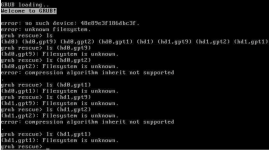
Today I rebooted my Proxmox 7 Proxmox VE 8.2.7 server and was greeted with the grub rescue prompt. I have (had?) a 2-disk ZFS mirror configuration, but now it's not booting. I am not experienced with troubleshooting boot issues with ZFS. What should I do?

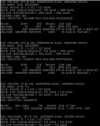
The screenshot shows the commands I've run so far to look ways to boot. Not sure if that is useful or not.

This failure kills me because I was waiting for TrueNAS Scale to go stable so I could set up a Proxmox Backup Server on a fresh VM on it rather than having to migrate. Foolish.
1745894596723.png
 
Last edited:
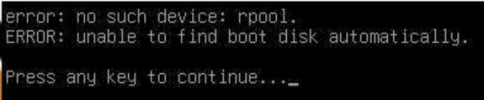
I tried booting to the Proxmox VE 7.4 iso and found the Rescue Boot option. No success though, it's giving this error:
1745899933467.png
 
Sorry, @Kingneutron, I tried zfsbootmenu's recovery image and I don't get it. I formatted a USB stick as FAT32 and dropped the EFI file in EFI/boot/Bootx64.efi, then ran that several different ways via my motherboard's boot menu. Best I can get is that it seems to run the efi file, but ultimately says "Failed to find bootable partition." I'm not sure if that's coming from zfsbootmenu or UEFI. Not sure what to expect from zfsbootmenu.
 
I also tried the non-recovery image of zfsbootmenu, but to the same effect. I might be making my USB stick wrong. I give up for today.
 
issues like this are the reason PVE switched away from letting Grub boot directly from ZFS.. if you have an ESP on your disk(s) that is big enough, you can initialize it using "proxmox-boot-tool" (after booting a live CD and chrooting into the PVE rootfs). if you don't, you might need to use some non-ZFS disk (or an USB drive) to store the ESP?
 
issues like this are the reason PVE switched away from letting Grub boot directly from ZFS.. if you have an ESP on your disk(s) that is big enough, you can initialize it using "proxmox-boot-tool" (after booting a live CD and chrooting into the PVE rootfs). if you don't, you might need to use some non-ZFS disk (or an USB drive) to store the ESP?
Thanks. I will try that after work today. Is it clear what the problem is? I assumed disk failure but maybe not since theses were mirrored and known healthy as of a few weeks ago.

Looks like maybe the "proxmox-boot-tool refresh" command is what I need.
 
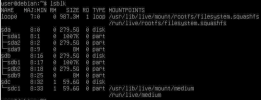
To get an idea of what kind of partitions I'm dealing with according to @fabian's comment, I booted a live Debian from USB and ran lsblk:
1745977897910.png

sda and sdb are my mirrored ZFS disks. sdc is the USB disk.

...from the partitions listed, I conclude that I do not have a big enough ESP for the proxmox-boot-tool @fabian mentioned - agree?

Is the problem clear at this point? What should I do next? Somehow I need to "initialize" it using an ESP on some other disk?

Thanks in advance.
 
yeah, there isn't really space for an ESP there.. you could put the ESP on a third drive if you have a free slot, or an USB drive otherwise..
 
Please help me understand what happened and what the end goal is (at a lower level than "make it boot again").

I installed ZFS in my Debian live USB and scrubbed the rpool, which resulted in zero errors found. So, the pool and disks appear fine. Still, it seems there was some kind of spontaneous problem with booting. I don't know how to diagnose that or what the end goal is. What is the consequence of where this ESP partition is stored?

In the absence of any other advice, I suppose I will see what zfsbootmenu can do for me.
 
Not sure how I missed it originally, but esteemed and generous forum member @Kyle did a write up that seems to be exactly what I need. Will try this soon. Thanks Kyle!

 
I ended up using this: https://qlr.ro/fix-proxmox-zfs-boot-issues-grub-device-not-found/

I did it without using the iso they mentioned because the link is dead. Instead, I used the Proxmox USB's > Advanced Options > Install Proxmox VE (Terminal, Debug) and ctrl + d to a prompt. I had to set up network and apt install fdisk. I also had to substitute the command "grub-mkconfig -o /boot/grub/grub.cfg" for update-grub. Other than that it was smooth sailing. Proxmox is now booting again with the downside that now I have to leave an external drive plugged in for the boot partition.

I didn't use Kyle's tutorial because he had a third drive that was identical to the two in the Proxmox boot mirror.

I didn't use the other method that someone else described in Kyle's thread because it sounded like there could be some unfinished business in the script it uses and I don't know partition alignment well enough to venture that direction.

I appreciate everyone who attempted to make this easier for other. Thank you!

My next steps will be to backup and restore onto a fresh installation.
 
it uses serial console by default
I believe this means a serial console in parallel to the regular one, as is the case for the regular systemrescuecd as shown here. The note you read on the Github about compiling refers to if you want different serial settings:
A serial terminal is enabled out of the box on ttyS0/COM1 at 115,200 baud. If these settings are unsuitable, adjust the configuration of the appropriate bootloader and the kernel, then build a new image.

I use the regular systemrescuecd regularly, and it is extremely versatile, specifically setting it up as a graphical GUI with VNC access etc.
 
I believe this means a serial console in parallel to the regular one, as is the case for the regular systemrescuecd as shown here. The note you read on the Github about compiling refers to if you want different serial settings:


I use the regular systemrescuecd regularly, and it is extremely versatile, specifically setting it up as a graphical GUI with VNC access etc.
Cool, good to know!