No disk I/O is involved during such lookup.
So...the lookup happens in RAM?
Just out of curiosity - how much RAM does the CRUSH map usually consume?
The copy of CRUSH map in OSD is used for replicas, EC, recovery, etc (OSDs are responsible of keeping replicas/EC k,m fragments), not for client I/O.
Got it.
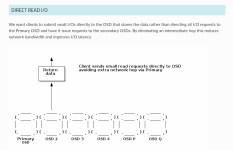
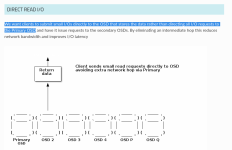
Then why did the ceph devs (in the Erasure Coding Enhancement document) quote:
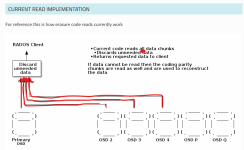
"We want clients to submit small I/Os directly to the OSD that stores the data rather than
directing all I/O requests to the Primary OSD and have it issuerequests to the secondary OSDs."
?
(
emphasis mine)
If the copy of the CRUSH map isn't for client I/O, then why did the ceph devs write/say "...rather than directing all I/O requests to the primary OSD"?
I don't understand why the ceph devs would write this, if it isn't true.
So no, Ceph client have to query nothing but its own CRUSH map to lookup where any given object is, Ceph client already knows which OSD to speak with thanks to the deterministic nature of the RADOS algorithm for a given cluster with a given amount of hosts, OSD, pools, CRUSH rules and PG count.
If the Ceph client just has to check the copy of the CRUSH map that's in the client's (presumably) RAM, and the Ceph client just has to check its local (RAM) copy of said CRUSH map, then I don't understand why the ceph devs would write that quote: "...rather than directing all I/O requests to the primary OSD".
That would mean that what the ceph devs wrote here is incorrect and said ceph devs should probably change it.
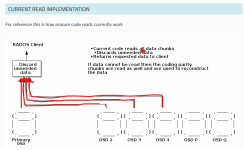
Regarding EC reads: up to 19.2 Squid, Ceph has to read from all "k" OSD holding data even if the read IO size is < than stripe width (which is typically 4KB*k, so 16k in a k=4, m=2). On 20.2 Tentacle, partial reads has been implemented via allow_ec_optimizations, which allows read IO smaller than stripe width to read just from the OSD that holds that data, reducing I/O load on disks and latency.
Yeah, I saw that.
Direct reads will allow to access the OSD holding the needed shard directly, without going through the Primary OSD. AFAIK this isn't implemented yet.
This is my understanding as well.
That said, I stopped reading most of this thread the moment you based your complaint on a performance comparison against an old PVE setup running Ceph 17.2 with an EC <span>k=2,m=1</span> HDD pool. That was never a performant or recommended storage backend for VMs.
Whilst it is true that it isn't performance nor recommended, but the other data that has been supplied with configurations that
are support to be recommend for performance, as their data shows, out of the potential performance capacity/capability of the drives that are being used, less than 1% of said performance capability is actually achieved, in their (his) actual (business/commercial) deployment.
Therefore; whilst yes, I can only test with what I have available, the data from production ceph deployments also shows that even with a "real" deployment, it doesn't really get significantly better than what I have observed/recorded in regards to performance utilisation (% of the drive's performance that I am able to achieve).
The best that I've seen (shared by other users) is about 8% of a drive's performance capability, on a deployment that should follow the deployment recommendations and guidelines to get the most (performance) out of a ceph cluster.
That's still only 3% better than what I'm able to get out of my EC(2,1) with 13 year old HDDs, which is a far cry from the 26% I'm able to get with the same HDDs, using Gluster.
And the people who have shared their large scale, business/commercial deployments (which again, presumably has been configured properly, per the recommendations so that it will be performant) - many of those who have shared their data/results can't explain why they're only getting a fraction of what their drives should be capable of, in terms of performance.
And whilst you might be able to get 180 GB/s with 300 drives, but that still means that each drive is only contributing a max of 600 MB/s, which, if the drive is capable of 12000 MB/s (for a NVMe 5.0 x4 SSD), you're still getting/using only 5% of the performance capability of said drive and no one who has deploy ceph with such (large) deployments have been able to educate me on
why they're only getting 5% of the drive's rated performance.
That's the part that I don't understand
why they're only getting a fraction of what the drive is capable of. A given the lack of responses from the people who either helped or were responsible for overseeing said deployments, they don't really seem to know why neither.
Also, HDDs with Ceph are slow
There's no debate about that.
But this is also why I am talking about ceph performance
as a % of what the drive should be able to do. (Because if a HDD can only max out at like 150 MB/s, then 5% of that - I'm not going to expect more than 7.5 MB/s (each).
Similarly, if I have a NVMe 5.0 x4 SSD that's supposed to be capable of 12 GB/s sequential read/writes, and I'm
only getting 600 MB/s, yes, 600 MB/s is faster than 30 MB/s but 600 MB/s out of 12000 MB/s is still only 5%.
In other words, as a percentage of the drive's capability, the device class doesn't really seem to "magically" utilise 50% of a NVMe 5.0 x4's performance capability by switching from the HDD device class to the NVMe device class. It stays relatively low (max people have reported is about 8%).
Everyone knows that RocksDB on HDDs is hard because HDDs have inherently poor random-seek performance.
I think that even for random I/O performance, it's still <10% of what a U.2 or E1.S EDSFF NVMe 5.0 x4 SSD is supposed to be capable of.
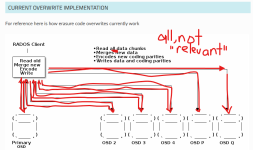
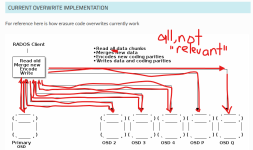
Previously, a write I/O smaller than the stripe size involved expensive read-modify-write behavior: Ceph had to read the relevant existing stripe data/parity, modify the data in memory, recalculate the coding/parity information, and write the updated chunks back.
Agreed. The EC Enhancements doc talks about this.
The stronger argument for keeping PVE support for Gluster is that Gluster still provides benefits for your specific use case, rather than framing it as Ceph being “better” or “worse”.
Well, I'm looking at it from a drive performance capability usage/percentage POV.
If I can use 26% of a HDD, I go from 7.5 MB/s (each) to 39 MB/s (each). And thus, with k=2, I would, in theory, be able to go from 15 MB/s to 78 MB/s.
Now if I apply that to a U.2 or E1.S EDSFF NVMe SSD, if you are only getting 600 MB/s (5%) and you go up to 26%, then you're hitting 3.12 GB/s, which would be a HUGE performance benefit for whatever workload you're running.
And who wouldn't want their storage subsystem to be able to have higher sequential bandwidth and/or be able to handle/serve more random I/O requests, especially if you can achieve the same or very similar levels of performance that currently takes you 1250 drives down to just 250 drives (because the % of the drive's performance utilisation increased by 5x).
You'd save your company millions.
Who
wouldn't want that?
And if this is about Proxmox being a business, to serve the needs of businesses - just imagine what Proxmox marketing department can do with telling their prospective (and existing) customers "hey, I can cut your storage costs down by 80% by using this technology that we've integrated into our Proxmox Virtual Environment product".
it would be a huge marketing win for Proxmox.
(heck, even if you don't get 80% savings, and you get 40-50% savings, it'd still be better than NO savings.)






 (I was a lot more hard some years ago without the mclock qos scheduler).