ESXi → Proxmox migration: Host CPU vs x86-64-v4-AES performance & 10 Gbit VirtIO speeds

Jan 11, 2026
6
0
1
Hello,
I recently migrated from VMware ESXi to Proxmox VE and I’m still new to the platform.

Server (Hetzner Dedicated)
  • AMD EPYC 9454P (48C / 96T)
  • 512 GB DDR5
  • 4 × 1.92 TB NVMe (ZFS RAID10)
  • 10 Gbit uplin
Proxmox is installed on ZFS RAID10.
First VM is OPNsense, which handles all routing.

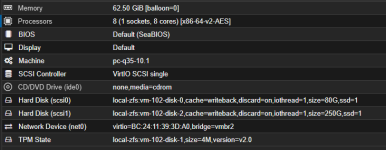
1) CPU Model – Host vs x86-64-v4-AES

I created a Windows Server 2025 VM for SQL Server.
  • With CPU model = host:
    • Windows felt very sluggish
    • SQL performance was extremely poor
  • After switching to x86-64-v4-AES:
    • Windows became smooth
    • SQL performance improved significantly

Most sources recommend using host CPU, but in my case it performed much worse.
1768131694701.png

Questions:
  • Which CPU model is recommended for AMD EPYC 9454P?
  • Is there a known issue with host CPU on Proxmox + AMD?
  • Any BIOS or Proxmox settings I should check?

2) 10 Gbit VirtIO Network
  • Windows VM shows 10 Gbit VirtIO NIC
  • Real-world tests:
    • Download ~2 Gbit
    • Upload ~1 Gbit
Traffic passes through OPNsense (VirtIO).

1768131740605.png
Questions:
  • Are these speeds normal?
  • Any recommended tuning (MTU, multi-queue, CPU pinning, offloading)?
 
It could be that Windows Server 2025 has Virtualization-Based Security (VBS) enabled by default. If the CPU type is set to Host, nested virtualization is passed through and VBS is active. To my knowledge, x86-64-v4-AES has nested virtualization disabled, which is why Windows cannot enable VBS.

However, you can simply stick with x86-64-v4-AES. The difference in performance should be minimal.

Regarding network throughput: OPNsense could be the bottleneck here. Unfortunately, BSD has lower routing performance compared to the Linux kernel.
You can test the routing speed between the Proxmox host and Windows directly
 
  • Are these speeds normal?
transfer is limited to the slowest link in the chain. You NIC chip, driver, destination nic/driver, source disk, destination disk, etc. Sounds like you have some tracing to do.

Any recommended tuning (MTU, multi-queue, CPU pinning, offloading)?
change your HBA to virtio-scsi-single, with io-thread checked for disks.
 
It could be that Windows Server 2025 has Virtualization-Based Security (VBS) enabled by default. If the CPU type is set to Host, nested virtualization is passed through and VBS is active. To my knowledge, x86-64-v4-AES has nested virtualization disabled, which is why Windows cannot enable VBS.

However, you can simply stick with x86-64-v4-AES. The difference in performance should be minimal.

Regarding network throughput: OPNsense could be the bottleneck here. Unfortunately, BSD has lower routing performance compared to the Linux kernel.
You can test the routing speed between the Proxmox host and Windows directly

As you said, the problem seems to stem directly from VBS being activated. I don't understand why Host is still recommended in Best Practices; it confuses me. VBS is not active on x86-64 and it runs very fast. Even if I enabled Nested-Virt, the result didn't change; x86-64 is still faster for me.
 
@oogzz For context see https://forum.proxmox.com/threads/t...-of-windows-when-the-cpu-type-is-host.163114/ and https://forum.proxmox.com/threads/h...sage-on-idle-with-windows-server-2025.163564/ and other threads.

Re OpnSense, I’ve not used it but pfSense has some PVE specific suggestions [re: checksum offloading] so did you check OpnSense docs?

https://forum.opnsense.org/index.php?topic=44159.0

I followed the recommendations exactly. But the network congestion is still there, and I have no idea how I'm going to use the 10 Gbit right now.
 
So you tested the bandwidth like this: VM -> OPNsense (VM) -> VM?

Do you need OPNsense for a specific reason? Because even with bare metal, it's not easy to get 10Gbit routing speed out of OPNsense/pfSense. You can switch to a Linux-based FW distro (Openwrt, IPfire, Vyos), which should achieve these speeds with virtio-nic.
 
We observed similarly low network speeds with BSD-based router OSes running under PVE. Using OpenWrt as the OS of the router instead, the problems went away instantly. Might be a virtio-driver related issue on the BSDs, but we never bothered to conclusively investigate.
 
So you tested the bandwidth like this: VM -> OPNsense (VM) -> VM?

Do you need OPNsense for a specific reason? Because even with bare metal, it's not easy to get 10Gbit routing speed out of OPNsense/pfSense. You can switch to a Linux-based FW distro (Openwrt, IPfire, Vyos), which should achieve these speeds with virtio-nic.

My reason for choosing OpnSense/pfSense is that I heavily use features like firewall/NAT/haproxy. OpnSense and pfSense are struggling to reach 10 Gbit. OpenWrt probably thinks that some of the system's internal structure might be insufficient. However, the problem seems to be that OpnSense isn't the only one handling the traffic; it's directly using Proxmox, and the iperf behavior is limited to a maximum of 2.5 Gbit. My network settings are as follows; do you think I'm making a mistake?

Source /etc/network/interfaces.d/*

Automatic LO
iFace LO inet loopback
iFace LO inet6 loopback

Automatic ENP193S0F0NP0
iFace ENP193S0F0NP0 inet manual

iFace ENP193S0F1NP1 inet manual

iFace ENX92388CE0D645 inet manual
Automatic VMBR0
iFace VMBR0 inet static
Address xx.x.xxx.xx/32
Gateway xx.x.xxx.1
Bridge ports ENP193S0F0NP0
Bridge STP closed
Bridge FD 0
Point xx.x.xxx.1
Up sysctl -w net.ipv4.ip_forward=1
Up ip route add xx.xx.xxx.xx/28 dev vmbr1
#Main (host/admin)

automatic vmbr1
iface vmbr1 inet static
address xxx.xx.xxx.xx/28
bridge-ports none
bridge-stp off
bridge-fd 0
#Hetzner routed subnet (WAN)

auto vmbr2
iface vmbr2 inet static
address 10.0.0.2/24
bridge-ports none
bridge-stp off
bridge-fd 0
up ip route add 10.10.20.0/24 via 10.0.0.1 dev vmbr2
#Local LAN

auto vmbr3
iface vmbr3 inet manual
bridge-ports none
bridge-stp off
bridge-fd 0
#DMZ bridge for RDP isolation
 
How do you conduct performance tests? What method do you use, and are you using nested-virt with it enabled?
Ive used AIDA64 in a Win 11 24H2 VM and `sysbench cpu run` and `sysbench memory run` in a Debian 12 VM.

Actually "x86-64-v2-AES" was faster, but a few tests didnt work because of missing CPU features. Thats why we excluded it.

Looking at our Win11 VM right now it says "virtualization-based securety" is "not active". (Looking at the "System information" tool). The CPU flag "nested-virt" is in the middle position.
 
  • Like
Reactions: oogzz
Ive used AIDA64 in a Win 11 24H2 VM and `sysbench cpu run` and `sysbench memory run` in a Debian 12 VM.

Actually "x86-64-v2-AES" was faster, but a few tests didnt work because of missing CPU features. Thats why we excluded it.

Looking at our Win11 VM right now it says "virtualization-based securety" is "not active". (Looking at the "System information" tool). The CPU flag "nested-virt" is in the middle position.
As noticed by many Proxmox users, by using Host CPU with WIn11 or Windows Server 2025 there is a significant performance degradation. As you also noticed this is due to VBS - virt based security. It is actually Qemu/KVM problem not Proxmox per se.

I came across this video that explains QEMU+VBS in details: https://www.youtube.com/watch?v=MooRtyPkxXc

Hopefully in a near future, Qemu will integrate HW acceleration that is needed for VBS and this problem will be at least partially resolved.
 
  • Like
Reactions: oogzz
  • Like
Reactions: SteveITS and jtru