

Error fetching datastores - 500 can't connect

aidanngill

New Member
Jan 19, 2026
4
0
1
I've got two servers in my Proxmox datacentre. The first server has a VM running PBS. I've added PBS as shared storage to the datacentre connecting through a domain. I'm getting a valid certificate using Lets Encrypt with the Cloudflare DNS integration on PBS.

When listing information on the first server about the PBS storage, everything shows up correctly.
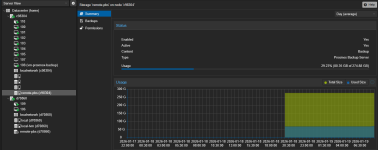
1768805563971.png

However, on the second server it shows up as "not available".
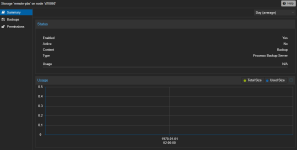
1768805588403.png

When listing the remote I get the following. On the first server it outputs a list of backups, as desired.

Code:
root@d70860:~# pvesm list remote-pbs
remote-pbs: error fetching datastores - 500 Can't connect to pbs.domain.tld:8007

This is also the message I get when trying to run backups on the second server.
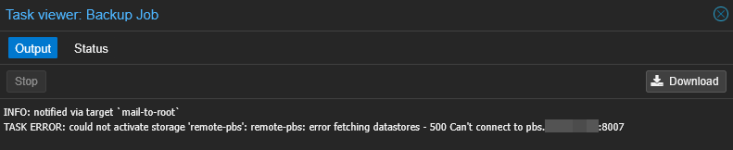
1768806235103.png

When using the Proxmox backup client:

Code:
root@d70860:~# proxmox-backup-client version --repository proxmox@pbs@pbs.domain.tld:8007:backup
Password for "proxmox@pbs": ****************
storing login ticket failed: $XDG_RUNTIME_DIR must be set
client version: 3.4.7
server version: 4.1.0

Code:
root@c98304:~# proxmox-backup-client version --repository proxmox@pbs@pbs.domain.tld:8007:backup
Password for "proxmox@pbs": ****************
client version: 3.4.7
server version: 4.1.0

My storage configuration is the same across each server:

Code:
pbs: remote-pbs
        datastore backup
        server pbs.domain.tld
        content backup
        port 8007
        prune-backups keep-all=1
        username proxmox@pbs

The subdomain resolves to the correct, internal IP on both servers.
 
Hi,
do you maybe have the firewall active and do not allow for connections? Further, check you can ping the PBS host from the PVE server unable to connect and make sure a basic connection can be established by e.g. openssl s_client -connect <PBS-IP>:8007
 
Hi,
do you maybe have the firewall active and do not allow for connections? Further, check you can ping the PBS host from the PVE server unable to connect and make sure a basic connection can be established by e.g. openssl s_client -connect <PBS-IP>:8007
Hey,

I've disabled the "firewall" option for all of my network interfaces on Proxmox. I'm using a firewall on my network but it isn't blocking any communications between devices in the network.

The output of the OpenSSL command is as follows, with domain and certificate redacted. I get the same result when using the domain instead of an IP address.

Code:
root@d70860:~# openssl s_client -connect 10.0.11.108:8007
CONNECTED(00000003)
Can't use SSL_get_servername
depth=2 C = US, O = Internet Security Research Group, CN = ISRG Root X1
verify return:1
depth=1 C = US, O = Let's Encrypt, CN = R12
verify return:1
depth=0 CN = pbs.domain.tld
verify return:1
---
Certificate chain
 0 s:CN = pbs.domain.tld
   i:C = US, O = Let's Encrypt, CN = R12
   a:PKEY: rsaEncryption, 4096 (bit); sigalg: RSA-SHA256
   v:NotBefore: Jan 15 13:06:17 2026 GMT; NotAfter: Apr 15 13:06:16 2026 GMT
 1 s:C = US, O = Let's Encrypt, CN = R12
   i:C = US, O = Internet Security Research Group, CN = ISRG Root X1
   a:PKEY: rsaEncryption, 2048 (bit); sigalg: RSA-SHA256
   v:NotBefore: Mar 13 00:00:00 2024 GMT; NotAfter: Mar 12 23:59:59 2027 GMT
---
Server certificate
-----BEGIN CERTIFICATE-----
...
-----END CERTIFICATE-----
subject=CN = pbs.domain.tld
issuer=C = US, O = Let's Encrypt, CN = R12
---
No client certificate CA names sent
Peer signing digest: SHA256
Peer signature type: RSA-PSS
Server Temp Key: X25519, 253 bits
---
SSL handshake has read 3671 bytes and written 377 bytes
Verification: OK
---
New, TLSv1.3, Cipher is TLS_AES_256_GCM_SHA384
Server public key is 4096 bit
Secure Renegotiation IS NOT supported
Compression: NONE
Expansion: NONE
No ALPN negotiated
Early data was not sent
Verify return code: 0 (ok)
---
 
So the connection can be established. Then check for errors in the systemd journal of the PBS host. Maybe that tells you why the client connection fails. Also double check your credentials and permission (ACLs).
 
So the connection can be established. Then check for errors in the systemd journal of the PBS host. Maybe that tells you why the client connection fails. Also double check your credentials and permission (ACLs).
When following the systemd journal and trying the commands from earlier (and attempting a backup), nothing more is logged. Is there any way I could see the contents of the 500 HTTP response that pvesm receives? When using the "list" subcommand of the proxmox-backup-client command I can actually list out the backups successfully, it's seemingly only pvesm that's having this issue.
 
When following the systemd journal and trying the commands from earlier (and attempting a backup), nothing more is logged. Is there any way I could see the contents of the 500 HTTP response that pvesm receives? When using the "list" subcommand of the proxmox-backup-client command I can actually list out the backups successfully, it's seemingly only pvesm that's having this issue.
No, there is no easy way to log the response. But did you maybe have a fingerprint set for the PBS storage on the PVE side? Note that this only needs to be set for self signed certificates.
 
No, there is no easy way to log the response. But did you maybe have a fingerprint set for the PBS storage on the PVE side? Note that this only needs to be set for self signed certificates.
I did not, as the certificate comes from Lets Encrypt. I tried adding the fingerprint from PBS's dashboard to PVE in any case and it still returns 500. I also tried editing my storage configuration file to use an IP address with the fingerprint and had the same issue.
 
Does it work when you restart systemctl restart pvestatd.service pveproxy.service on the PVE host unable to connect?