Enable AVX

thomasddiego

Member
Dec 17, 2021
26
2
8
Good morning,

I have a server with Proxmox VE 7.1-7, with all the updates applied, on it I have a VM with Ubuntu 20.04.6 LTS, which is a customized operating system where a Bit Defender antivirus system runs with MongoDB 4.4.4, I have to do an update and before that the message appears: AVX instructions were not detected on at least one of your database appliances. To update GravityZone, make sure the hardware is compatible and AVX instructions are enabled.

The processor of the physical server where the VM is installed is the Intel(R) Xeon(R) CPU E5630 and the VM has the processor in the Default option which is kvm64, but then I tested turning it off and changing it to other options, such as SandyDBridge, Host, qemu64, but all tests failed.

Can anyone tell me how to resolve this and enable AVX?
 
Usually the solution is to set as host as CPU or create a new virtual CPU by enabling the avx and avx2 flag (but this last solution never worked for me), but the processor you have doesn't have AVX instructions, I don't think you can virtualize them.
 
I found this post, but the response was not very clear: "..to set as host as CPU or create a new virtual CPU by enabling the avx and avx2 flag"

I am using Proxmox 8.0.4 enterprise via 3 nodes using INTEL CPUs (Xeon(R) CPU E5-2630, Xeon(R) CPU E5-2470, and CPU E5-2667 v2). On the Virtual Guest running Graylog-core, I enabled the CPU type to be SandyBridge. When I restarted the guest after making this change, MongoDB Database Server (service) started. I am using version 6.0.8 of Mongodb - community edition (for Graylog Core 5 - community edition)
(picture attached)
1692280447019.png


even this thread had issues: https://forum.proxmox.com/threads/feature-suggestion-avx-avx2-cpu-flags.114688/

Hope this post helps.
 
I found this post, but the response was not very clear: "..to set as host as CPU or create a new virtual CPU by enabling the avx and avx2 flag"

I am using Proxmox 8.0.4 enterprise via 3 nodes using INTEL CPUs (Xeon(R) CPU E5-2630, Xeon(R) CPU E5-2470, and CPU E5-2667 v2). On the Virtual Guest running Graylog-core, I enabled the CPU type to be SandyBridge. When I restarted the guest after making this change, MongoDB Database Server (service) started. I am using version 6.0.8 of Mongodb - community edition (for Graylog Core 5 - community edition)
(picture attached)
View attachment 54368


even this thread had issues: https://forum.proxmox.com/threads/feature-suggestion-avx-avx2-cpu-flags.114688/

Hope this post helps.
It works on k8s with those changes, thanks.
 
  • Like
Reactions: proxdang
To make this clear, if one gets the error message "requires a CPU with AVX support":
as in:

[10:24am] [mac@sparrow] /home/mac/devops/chat> docker logs -f --tail 10 chat-mongodb-1
see https://jira.mongodb.org/browse/SERVER-54407
see also https://www.mongodb.com/community/forums/t/mongodb-5-0-cpu-intel-g4650-compatibility/116610/2
see also https://github.com/docker-library/mongo/issues/485#issuecomment-891991814

WARNING: MongoDB 5.0+ requires a CPU with AVX support,and your current system does not appear to have that!
see https://jira.mongodb.org/browse/SERVER-54407
see also https://www.mongodb.com/community/forums/t/mongodb-5-0-cpu-intel-g4650-compatibility/116610/2
see also https://github.com/docker-library/mongo/issues/485#issuecomment-891991814


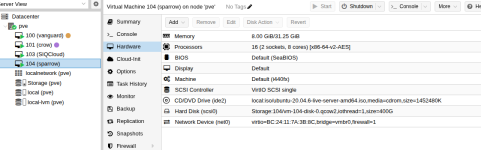
Looking at the config in proxmox for sparrow I had the processor type set to x86-64-v2-AES (which asks proxmox to emulate this particular cpu):

Screenshot from 2025-12-10 10-31-25.png


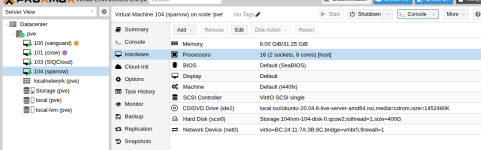
When I change the processor type to be 'host' (so proxmox simply exposes the underlying host processor with its features) instead of emulating a particular processor, as in:

Screenshot from 2025-12-10 10-39-47.png
Then the database works just fine:
[10:32am] [mac@sparrow] /home/mac/devops/chat> docker compose up -d rocketchat
[+] Running 2/2
✔ Container chat-mongodb-1 Running 0.0s
✔ Container chat-rocketchat-1 Running 0.0s
[10:32am] [mac@sparrow] /home/mac/devops/chat> docker logs -f --tail 10 chat-mongodb-1
{"t":{"$date":"2025-12-10T18:32:50.333+00:00"},"s":"I", "c":"NETWORK", "id":23015, "ctx":"listener","msg":"Listening on","attr":{"address":"0.0.0.0"}}
 
  • Like
Reactions: FrankList80