EFI Shell is missing

forumcamel

New Member
Apr 21, 2024
4
0
1
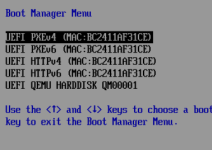
I want to access the EFI Shell but it seems to be missing.
CopyQ.bHUvyM.png1764673178684.png
Makefile:
# qm config 102
balloon: 4000
bios: ovmf
boot: order=ide2;net0
cores: 7
cpu: host
efidisk0: data2:vm-102-disk-2,efitype=4m,pre-enrolled-keys=1,size=4M
ide0: data2:vm-102-disk-1,size=1000G
ide2: none,media=cdrom
machine: pc-q35-10.0
memory: 7500
meta: creation-qemu=10.0.2,ctime=1762862653
name: pxe-test-1
net0: virtio=BC:24:11:AF:31:CE,bridge=vmbr0
numa: 0
ostype: win10
scsihw: virtio-scsi-single
smbios1: uuid=60f99dc7-0e55-4f2a-8084-d65430e64ae7
sockets: 1
vmgenid: 189924a5-173b-4d73-a9dc-6237e518a675

Makefile:
# pveversion -v
proxmox-ve: 9.0.0 (running kernel: 6.14.8-2-pve)
pve-manager: 9.0.3 (running version: 9.0.3/025864202ebb6109)
proxmox-kernel-helper: 9.0.3
proxmox-kernel-6.14.8-2-pve-signed: 6.14.8-2
proxmox-kernel-6.14: 6.14.8-2
ceph-fuse: 19.2.3-pve1
corosync: 3.1.9-pve2
criu: 4.1.1-1
frr-pythontools: 10.3.1-1+pve4
ifupdown2: 3.3.0-1+pmx9
intel-microcode: 3.20250512.1
ksm-control-daemon: 1.5-1
libjs-extjs: 7.0.0-5
libproxmox-acme-perl: 1.7.0
libproxmox-backup-qemu0: 2.0.1
libproxmox-rs-perl: 0.4.1
libpve-access-control: 9.0.3
libpve-apiclient-perl: 3.4.0
libpve-cluster-api-perl: 9.0.6
libpve-cluster-perl: 9.0.6
libpve-common-perl: 9.0.9
libpve-guest-common-perl: 6.0.2
libpve-http-server-perl: 6.0.3
libpve-network-perl: 1.1.6
libpve-rs-perl: 0.10.7
libpve-storage-perl: 9.0.13
libspice-server1: 0.15.2-1+b1
lvm2: 2.03.31-2
lxc-pve: 6.0.4-2
lxcfs: 6.0.4-pve1
novnc-pve: 1.6.0-3
proxmox-backup-client: 4.0.9-1
proxmox-backup-file-restore: 4.0.9-1
proxmox-backup-restore-image: 1.0.0
proxmox-firewall: 1.1.1
proxmox-kernel-helper: 9.0.3
proxmox-mail-forward: 1.0.2
proxmox-mini-journalreader: 1.6
proxmox-offline-mirror-helper: 0.7.0
proxmox-widget-toolkit: 5.0.4
pve-cluster: 9.0.6
pve-container: 6.0.9
pve-docs: 9.0.7
pve-edk2-firmware: 4.2025.02-4
pve-esxi-import-tools: 1.0.1
pve-firewall: 6.0.3
pve-firmware: 3.16-3
pve-ha-manager: 5.0.4
pve-i18n: 3.5.2
pve-qemu-kvm: 10.0.2-4
pve-xtermjs: 5.5.0-2
qemu-server: 9.0.16
smartmontools: 7.4-pve1
spiceterm: 3.4.0
swtpm: 0.8.0+pve2
vncterm: 1.9.0
zfsutils-linux: 2.3.3-pve1
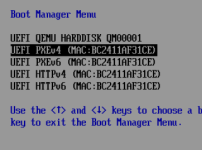
 
efidisk0: data2:vm-102-disk-2,efitype=4m,pre-enrolled-keys=1,size=4M
AFAIK the pre-enrolled-keys=1 is causing your issue. You won't be able to enter the EFI shell with that.

Workaround: Remove the efidisk0, create a new one with pre-enrolled-keys not selected, & you should be able to select the EFI shell for the next boot.

Make sure you have a tested backup of this VM before doing this.
 
tried this, still no improvment
efidisk0: data2:vm-102-disk-0,efitype=4m,size=4M
I'm guessing, that you just tried changing that now without actually deleting the original efidisk0 disk, that is not going to change that already-existing pre-enrolled state.

Delete the efidisk0 entirely & then recreate.

If that also fails, try first booting the VM without any efidisk, shutdown & recreate.
 
Delete the efidisk0 entirely & then recreate.

If that also fails, try first booting the VM without any efidisk, shutdown & recreate.
tried exactly as you instructed,
deleted the efidisk; booted the VM; shutdown; recreate without pre-enrolled-keys; boot again;
nothing changed :(
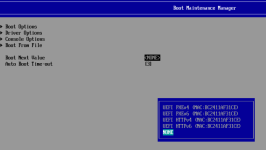
1764689276465.png

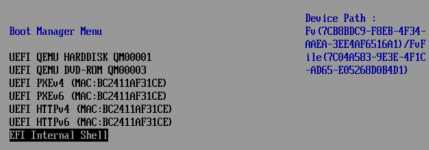
P.S: If I booted the VM without any EFI Disk, the EFI Shell is showing up and working fine but the OVMF display resoltuion is acting a little weird.
1764689503095.png
 
the efi shell got disabled as part of a CVE fix a while back.. maybe there is a way to get it back if secureboot is disabled @fiona ?
 
the efi shell got disabled as part of a CVE fix a while back.. maybe there is a way to get it back if secureboot is disabled @fiona ?
AFAIU, there is. We currently build all images as secure-boot-capable (even if not enrolling keys) which disables the shell. We'd need to follow: https://salsa.debian.org/qemu-team/edk2/-/commit/cdfde359f86895abb9c090fd7183d8182203a400

EDIT: But I guess if we follow it directly, it would break the workflow for people using the image without pre-enrolled keys to enroll their own keys for secure boot later.
 
Last edited:
  • Like
Reactions: gfngfn256
maybe there is a way to get it back if secureboot is disabled
Can confirm - testing with a newly created VM (matching as closely as possible to the OP's setup) - with SB disabled, +no pre-enrolled-keys; I only have the option of EFI Firmware Setup.
 
P.S: If I booted the VM without any EFI Disk, the EFI Shell is showing up and working fine but the OVMF display resoltuion is acting a little weird.
In this case, it's falling back to a default legacy EFI disk, which still has the shell enabled. You can also add an EFI disk with efitype=2m.

What is your use case for the shell?