HI, can you share the cron script? Thanks in advanceI also created an cron script to run every 45 minutes and if there's no connectivity it will reboot the machine.


e1000 driver hang
- Thread starter alatteri
- Start date
You are using an out of date browser. It may not display this or other websites correctly.
You should upgrade or use an alternative browser.
You should upgrade or use an alternative browser.
I also created an cron script to run every 45 minutes and if there's no connectivity it will reboot the machine. It's more a workaround that a resolution but should hopefully work till I install the new card.
No need to reboot. The NIC comes back to life if you remove and re-insert the network cable - so just need to automate that.
Someone posted a suggestion in this thread some time ago to run
systemctl restart networking, but in my case (Intel NUC10), that didn't help.I had another hang overnight, and what did fix it for me this morning was ifdown / ifup:
Bash:
# ifdown eno1
# ifup eno1I had another hang overnight, and what did fix it for me this morning was ifdown / ifup:
# ifdown eno1 # ifup eno1
Another hang again, my cron script detected the error, but /usr/sbin is not in root's PATH in cron - so it didn't actually do anything. Have now added full path to ifdown / ifup commands and hopefully it works next time.
FWIW, here is the code I use to detect the hang:
Bash:
# check system journal for recent hang
if ! hangcount=$(journalctl \
                    --since "2 minutes ago" _TRANSPORT=kernel \
                    _KERNEL_SUBSYSTEM=pci --priority=3 | \
                 grep -c "Detected Hardware Unit Hang:")
then
    echo "No network hang detected, exiting"
    exit 0
fi
If anyone is interested, my cron script and more info is available here.
Last edited:
the main idea is to stop the hanging by fixing it. rebooting is not a solution, better stick with ethtool solution for now.

I've been using an Intel X520-DA2 and no further issue. For those with the ability to add a separate NIC.
Still frustrating no fixes only work arounds for this bug.
Still frustrating no fixes only work arounds for this bug.
Workarounds are either script or additional hardware.Great, now I have the exact same problem. I got myself an EliteDesk 800 G6 so I can offload the VMs to, and sure enough, sometime during the night it hangs. Would it help if I ditch the built-in network card and get a new one?
If you can install a good quality PCI express NIC, go for it.
Okay, thank you very much. I have 2 EliteDesk 800 G6 here. One mini and one SFF. Do you perhaps have a recommendation for which NIC I should use so that everything runs smoothly? My other setup, ASRock DeskMini X300, has been running for 5 years without any problems, that's what I wish for the EliteDesk too.
For the mini are you using the Flex IO? I would check to make sure the one you purchase doesn't have the same intel chipset /driver. There are some Realtek ones, though Realtek chips do have some hate. I would avoid USB NICs.
For the SFF, Intel 226 will provide 2.5G and can be sourced 2nd hand. You can choose higher speeds, such as 10G but be aware of interface types and heat requierments.
For the SFF, Intel 226 will provide 2.5G and can be sourced 2nd hand. You can choose higher speeds, such as 10G but be aware of interface types and heat requierments.
First of all, thank you for the information.
I ran a few more tests yesterday.
With
post-up ethtool -K nic0 tso off
in the interfaces, it was a little better. Everything was fine during continuous operation, but when I made backups on the PBS, it kept crashing at a size of 200 GB.
I used a cheap PCI NIC card for testing, and everything works fine with that, but it's a little slower. I'll get a 2.5 GB card.
Is there any chance that Proxmox will be able to fix this at some point? Or do I just have to live with it? When I buy new hardware, the first thing I'll check is which chip is used for the NIC.
For testing purposes, I'll order the following NIC as an io port.
HP 2.5GbE LAN Flex Port Z2 Mini 169K0AA
I ran a few more tests yesterday.
With
post-up ethtool -K nic0 tso off
in the interfaces, it was a little better. Everything was fine during continuous operation, but when I made backups on the PBS, it kept crashing at a size of 200 GB.
I used a cheap PCI NIC card for testing, and everything works fine with that, but it's a little slower. I'll get a 2.5 GB card.
Is there any chance that Proxmox will be able to fix this at some point? Or do I just have to live with it? When I buy new hardware, the first thing I'll check is which chip is used for the NIC.
For testing purposes, I'll order the following NIC as an io port.
HP 2.5GbE LAN Flex Port Z2 Mini 169K0AA
Hi, a few weeks ago, I switched from a Fujitsu Futro S740 with Proxmox V8 to a Lenovo M720q with Proxmox V9, which, as is well known, is also affected by the e1000 bug due to the Intel i216v network card.
I have often read that I can fix the problem by using “tso off gso off.”
When I set up the M720q, I was aware of the bug and therefore bought an m2 adapter with RTL8125, which is not affected by the bug and also offers 2.5Gbit/s. I adjusted the drivers but then noticed that the single stream speed is limited to approx. 580 Mbit/s. Since I often transfer large amounts of data from a PC to a VM, this would mean a significant drop in speed with the RTL8125. That's why I didn't use the RTL8125, and the M720q has been running pretty normally for the last 3 weeks or so since I started using it productively.
Yesterday, I had my first hang-up: the Proxmox server was no longer accessible on the LAN. After a restart, everything was working again.
However, I would prefer not to encounter this issue again and am considering connecting a USB LAN adapter with an RTL8156B chipset. According to my research, this should be supported out-of-the-box, offer 2.5 Gbit/s, and not be limited to 580 Mbit/s for single stream. Has anyone had experience with this? Would this be a good decision?
I have often read that I can fix the problem by using “tso off gso off.”
When I set up the M720q, I was aware of the bug and therefore bought an m2 adapter with RTL8125, which is not affected by the bug and also offers 2.5Gbit/s. I adjusted the drivers but then noticed that the single stream speed is limited to approx. 580 Mbit/s. Since I often transfer large amounts of data from a PC to a VM, this would mean a significant drop in speed with the RTL8125. That's why I didn't use the RTL8125, and the M720q has been running pretty normally for the last 3 weeks or so since I started using it productively.
Yesterday, I had my first hang-up: the Proxmox server was no longer accessible on the LAN. After a restart, everything was working again.
However, I would prefer not to encounter this issue again and am considering connecting a USB LAN adapter with an RTL8156B chipset. According to my research, this should be supported out-of-the-box, offer 2.5 Gbit/s, and not be limited to 580 Mbit/s for single stream. Has anyone had experience with this? Would this be a good decision?
Hey @DennyX I'm not sure about that specific adapter, but I've seen reports of people experiencing CPU utilisation bottlenecks when under high network loads. I'm not an expert, but I think this may be due to the extra processing needed to manage USB-to-network conversions.
An example of increased network load on these forums: https://forum.proxmox.com/threads/high-cpu-load-with-usb-ethernet-adapter.126352/
Good luck and report back if you decide to take this route.
An example of increased network load on these forums: https://forum.proxmox.com/threads/high-cpu-load-with-usb-ethernet-adapter.126352/
Good luck and report back if you decide to take this route.
Just upgraded incl. kernel update and now have this issue. My NICS are integrated on motherboard and it’s a mini server on steroids with no space for alternative NIC. Server is headless so manual software reset of NIC’s also not practical. I will try if disconnecting/ connecting network cables solves it as long as issue is not solvved. Any other suggestions for workaround -e.g. automated script?- and is a structural solution insight?
Last edited:
Is the issue the Nic hang (not necessarily under load ) if so the tso off soln may be work for you - it has for meJust upgraded incl. kernel update and now have this issue. My NICS are integrated on motherboard and it’s a mini server on steroids with no space for alternative NIC. Server is headless so manual software reset of NIC’s also not practical. I will try if disconnecting/ connecting network cables solves it as long as issue is not solvved. Any other suggestions for workaround -e.g. automated script?- and is a structural solution insight?
The following is a service that will implement the fix (just one example)
https://gist.github.com/crypt0rr/60aaabd4a5c29a256b4f276122765237
I'm using the built-in I219-LM (rev 11) only for accessing the gui and encountered this issue about a year ago. So high loads are not necessary for this to trigger. I've resolved it by pinning the kernel to 6.8.12-8-pve, which was suggested by someone in this thread. So far so good.
Now, I'm about to update to pve9 and decided to check the thread again...

≤))≥
_| _
Now, I'm about to update to pve9 and decided to check the thread again...
≤))≥
_| _
At first I thought random. But after testing both Nic’s crash under load.Is the issue the Nic hang (not necessarily under load ) if so the tso off soln may be work for you - it has for me
The following is a service that will implement the fix (just one example)
https://gist.github.com/crypt0rr/60aaabd4a5c29a256b4f276122765237
Last edited:
oh cra*,i should have not looked into this thread 
i welcome myself to this issue with dell pro max t2 onboard piece of...
i think i was downloading 500mbit tops (500mbit from isp) when this happened
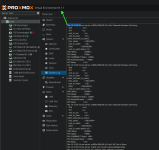
funny thing is,i went to meshcentral(other server),connected(hw desktop) and saw those errors,unloaded e1000e,loaded and still frozen..how the hell is amt working over frozen hw?..luckily i have x710 2-port copper (only inter 10g to nas,no amt there...so not sure if i should switch..need to test amt there)
(error: e1000e 0000:80:1f.6 nic0: Detected Hardware Unit Hang: ...)
i welcome myself to this issue with dell pro max t2 onboard piece of...
i think i was downloading 500mbit tops (500mbit from isp) when this happened
funny thing is,i went to meshcentral(other server),connected(hw desktop) and saw those errors,unloaded e1000e,loaded and still frozen..how the hell is amt working over frozen hw?..luckily i have x710 2-port copper (only inter 10g to nas,no amt there...so not sure if i should switch..need to test amt there)
(error: e1000e 0000:80:1f.6 nic0: Detected Hardware Unit Hang: ...)
Post update:
Upgraded to Proxmox 9 and still NiCS crashes. This time with hardware failure in log. Adding post-up to interface in /etc/network/interfaces -suggested already in this thread- seems to work for me:
Original post:
I have two Intel NiCS on the following Z390M-ITX/ac mainboard:
- Gigabit LAN 10/100/1000 Mb/s
- 1 x Giga PHY Intel® I219V, 1 x GigaLAN Intel® I211AT
Tested confirmed that both crash under load. Crashing occured after upgrading to latest Proxmox 8 kernel. Before this kernel sometimes remote connection problems which I assume now after words already had to do with this issue. Would upgrading to Proxmox 9 help?
Upgraded to Proxmox 9 and still NiCS crashes. This time with hardware failure in log. Adding post-up to interface in /etc/network/interfaces -suggested already in this thread- seems to work for me:
Code:
iface nic0 inet manual
        post-up /sbin/ethtool -K nic0 gso off gro off tso off
Original post:
I have two Intel NiCS on the following Z390M-ITX/ac mainboard:
- Gigabit LAN 10/100/1000 Mb/s
- 1 x Giga PHY Intel® I219V, 1 x GigaLAN Intel® I211AT
Tested confirmed that both crash under load. Crashing occured after upgrading to latest Proxmox 8 kernel. Before this kernel sometimes remote connection problems which I assume now after words already had to do with this issue. Would upgrading to Proxmox 9 help?
Last edited:
I stopped using vms on that proxmox host and never had this issue again. But yea that isn't a real solution..