[SOLVED] Disk import drop-down stays empty?

sjjh

Member
Mar 17, 2023
18
2
8
I want to migrate a bare metal windows PC to a VM. I created a Vhdx image of the running system using Disk2vhd. I pushed this image file on my PVE in path being member of a storage and used following command to convert it to a raw image:
Bash:
# qemu-img convert -f vhdx -O raw PC.VHDX pc.img
# ls -l /var/lib/vz/import/
total 85529477
-rw-r--r-- 1 root root 500107862016 Aug 16 12:14 pc.img
-rw-r--r-- 1 root root  72801583616 Aug 16 12:00 PC.VHDX
On the PVE I have (among other) following storage:
Code:
ID = locale
directory = /var/lib/vz
Content = Disk image, ISO image, Container template, Backup, Snippets, Import
Nodes = All
Enable = [x]
Shared = [ ]
Preallocation = Default
Allow Snapshots as Volume-Chain = [ ]
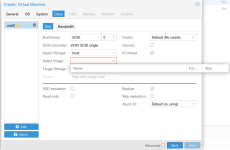
If I now click in the PVE Web UI Create VM and follow the dialogs, under the tab Disks I can click Import and select Import Storage local, but the drop down Select Image stays empty (cf below screenshot). What am I doing wrong? Running PVE 9.2.10 with latest updates. Thx for any support!

1786877296570.png
 
Thanks for your reply and the link. I tried uploading the image via the UI according to the link and noticed, that the file name was rewritten for the upload from pc.img to pc.img.raw. I thus did a mv pc.img pc.img.raw on the command line for the already uploaded file and afterwards I could select the image within the drop down during import.

I'm wondering if it's worth opening a bug report/feature request to either allow the file extension img or enhance the documentation, to state the valid file extensions?

For reference:
Bash:
# cat /etc/pve/storage.cfg
dir: local
    path /var/lib/vz
    content snippets,vztmpl,iso,backup,images,import
    shared 0

zfspool: local-zfs
    pool rpool/data
    content images,rootdir
    sparse 1

zfspool: SSD_STORAGE
    pool SSD_STORAGE
    content images,rootdir
    mountpoint /SSD_STORAGE
    nodes PVE2,PVE1
    sparse 1

pbs: PBS
    datastore PBS_HDD
    server 10.10.10.10
    content backup
    fingerprint 27:04:35:c3:ac:e3:dc:62:ab:14:3c:d9:5f:1a:36:1c:49:90:6c:3b:c7:c5:27:6b:68:66:13:de:37:18:5e:65
    prune-backups keep-all=1
    username user@pbs

# pvesm list local
Volid                                                Format  Type           Size VMID
local:iso/debian-12.10.0-amd64-netinst.iso           iso     iso       663748608
local:iso/debian-13.0.0-amd64-netinst.iso            iso     iso       790626304
local:snippets/debian13-cloud-config.yaml            snippet snippets        533
local:snippets/debian13-docker-cloud-config.yaml     snippet snippets        923
local:vztmpl/debian-12-standard_12.7-1_amd64.tar.zst tzst    vztmpl    126515062
local:vztmpl/debian-13-standard_13.1-1_amd64.tar.zst tzst    vztmpl    127947660

I don't know the valid import formats at the top of my head.
Quoting from your linked PVE tips, OVA/QCOW2/RAW/VMDK/IMG are supported. ;)
 
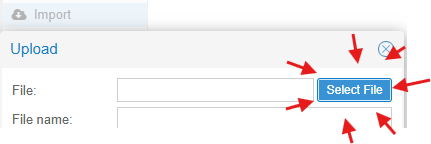
Heh. It's been a minute since I wrote that but I remember that I grabbed that information from the HTML of the upload button here
1786909002487.png

HTML:
<input ... accept=".ova, .qcow2, .raw, .vmdk, .img" ...">

You might find this useful/interesting too
Bash:
# touch /mnt/pve/isos/import/test.{img,img.raw,raw}

# pvesm list isos | grep -Ei "Volid|import"
Volid                                                               Format  Type            Size VMID
isos:import/haos_ova-17.3.ova                                       ova     import     650219520
isos:import/test.img.raw                                            raw     import             0
isos:import/test.raw                                                raw     import             0

# pvesm path isos:import/test.raw
/mnt/pve/isos/import/test.raw

# pvesm path isos:import/test.img
unable to parse directory volume name 'import/test.img'

# ls -l /mnt/pve/isos/import/
total 631240
-rwxr-xr-x 1 root root 650219520 May  6 10:55 haos_ova-17.3.ova
-rwxr-xr-x 1 root root         0 Aug 16 21:49 test.img
-rwxr-xr-x 1 root root         0 Aug 16 21:49 test.img.raw
-rwxr-xr-x 1 root root         0 Aug 16 21:49 test.raw
So a normal .img suffix is ignored even though it lets you upload a file with one. Not sure where the rename logic is. The unable to parse seems to come from here.
 
Last edited:
  • Like
Reactions: sjjh