

different size backup and real ct
- Thread starter simrsta
- Start date
You are using an out of date browser. It may not display this or other websites correctly.
You should upgrade or use an alternative browser.
You should upgrade or use an alternative browser.

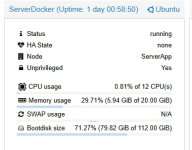


arch: amd64Share the config for that container:pct config 100080 --current
cores: 12
features: nesting=1
hostname: ServerDocker
memory: 20480
net0: name=eth0,bridge=vmbr0,firewall=1,hwaddr=BC:24:11:00
 F:F6,ip=dhcp,ip6=dhcp,type=veth
onboot: 1
ostype: ubuntu
rootfs: local-data:subvol-100080-disk-0,size=112G
swap: 0
unprivileged: 1
config 100080
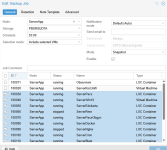
and every i backup serverdocker, It took quite a long time, as if it wasn't incremental,
because it was like backing up from scratch
around 40 minutes
Last edited:
Then you most likely have one or more sparse files which lead to the size increase, see
Regarding the incremental backup: even if the backup of the LXC is incremental, the source contents have to be re-read, you can use change-detection-mode see to metadata to avoid that, see https://pve.proxmox.com/pve-docs/pve-admin-guide.html#_ct_change_detection_mode
Environment:
Replication process (from one pve node to another):
The size is about 1.29G and the time ~20 seconds.
Bash:
$ pveversion
pve-manager/6.4-13/9f411e79 (running kernel: 5.4.143-1-pve)

# proxmox-backup-manager versions
proxmox-backup-server 2.1.2-1 running version: 2.1.2
Replication process (from one pve node to another):
The size is about 1.29G and the time ~20 seconds.
Code:
2022-01-04 11:53:35 shutdown CT 502
2022-01-04 11:53:37 starting migration of CT 502 to node 'app3' (10.110.1.23)
2022-01-04 11:53:38 found local volume 'lxc-disks:subvol-502-disk-0' (in current VM config)
2022-01-04 11:53:39 full send of...- oleg.v
- backup lxc proxmox backup zfs
- Replies: 21
- Forum: Proxmox VE: Installation and configuration
Regarding the incremental backup: even if the backup of the LXC is incremental, the source contents have to be re-read, you can use change-detection-mode see to metadata to avoid that, see https://pve.proxmox.com/pve-docs/pve-admin-guide.html#_ct_change_detection_mode
what kind of storage is local-data? ZFS for example can store a lot of logical data in 112G of physical quota..
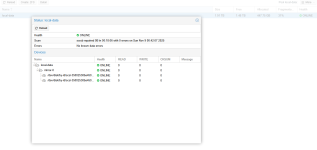
i use zfs
yeah, so then you have a big file that is actually empty, which ZFS can store efficiently without hitting the quota ("size") for the guest volume. for PBS this looks like a big (probably very compressible) backup.
I don't understand what this means. What should I do to make sure the size is correct?The actual size is 112GB, but when backed up, it becomes 500GB+

you have a file that is probably a few hundred GB "big", but filled with zeroes. ZFS can store that and all the other data while taking less than 112GB of space. but PBS will still see the total size of the file and display that. PBS will most likely also take a lot less actual space for storing it, because it does compression and deduplication.
you can either ignore it, or try to make that file smaller. please also check out the thread that chris referenced.
you can either ignore it, or try to make that file smaller. please also check out the thread that chris referenced.