Hi,
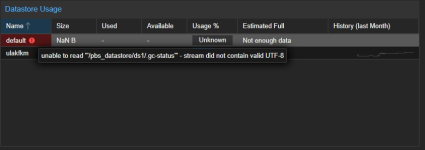
This is happening twice in a month now. We have a PBS server running on Dell 620 server. PBS datastore is backed by PERC 710P Raid 10 array, Write Back cache with BBU. After a power failure data store is corrupted, But the root volume that is a VD on the same Raid controller (raid 1) is OK. First time datastore was formatted with ext4 with default settings. A verification job showed multiple zero size blobs, chunks. Running fsck shows lots os inode errors but could not fully repair. So I started from scratch and recreated raid volume formatted datastore with XFS and sync the backups (~12 TB). Two days ago there was a power failure again. This time datastore is shown in GUI with errors (see the screenshots). sync, verification jobs also giving same error:
"df -h" shows the used space but "du -sh" reports multiple missing files:
So any idea why this is happenning? Raid card show BBU is OK. I am going to start from scratch again but this time should I disable write back cache? Is there any mount/format flag for XFS that it should prevent this kind of corruption?
Regards,
Rahman
This is happening twice in a month now. We have a PBS server running on Dell 620 server. PBS datastore is backed by PERC 710P Raid 10 array, Write Back cache with BBU. After a power failure data store is corrupted, But the root volume that is a VD on the same Raid controller (raid 1) is OK. First time datastore was formatted with ext4 with default settings. A verification job showed multiple zero size blobs, chunks. Running fsck shows lots os inode errors but could not fully repair. So I started from scratch and recreated raid volume formatted datastore with XFS and sync the backups (~12 TB). Two days ago there was a power failure again. This time datastore is shown in GUI with errors (see the screenshots). sync, verification jobs also giving same error:
Code:
unable to read '"/pbs_datastore/ds1/.gc-status"' - stream did not contain valid UTF-8"df -h" shows the used space but "du -sh" reports multiple missing files:
Code:
root@pbs1:~# df -h
Filesystem            Size  Used Avail Use% Mounted on
udev                  158G     0  158G   0% /dev
tmpfs                  32G  1.6M   32G   1% /run
/dev/mapper/pbs-root  209G  108G   90G  55% /
tmpfs                 158G     0  158G   0% /dev/shm
tmpfs                 5.0M     0  5.0M   0% /run/lock
tmpfs                 1.0M     0  1.0M   0% /run/credentials/systemd-journald.service
tmpfs                 158G     0  158G   0% /tmp
tmpfs                 158G  484K  158G   1% /run/proxmox-backup
tmpfs                 1.0M     0  1.0M   0% /run/credentials/getty@tty1.service
tmpfs                  32G  8.0K   32G   1% /run/user/0
/dev/sdb1              22T   11T   12T  48% /pbs_datastore/ds1

root@pbs1:~# du -sh /pbs_datastore/ds1/
du: cannot access '/pbs_datastore/ds1/.chunks/2929/2929e89eb88e3b68b7dcebef9016ae16aede20eb6588e85b02f3fb01db6ced07': No such file or directory
du: cannot access '/pbs_datastore/ds1/.chunks/2929/2929420caaf727ba836aba498592759ea8bb672d2aaa26c71abe03522eabdab6': No such file or directory
du: cannot access '/pbs_datastore/ds1/.chunks/2929/2929b1ec69afb3bf5522cc8af6484ba681855654373fe2d2fafd4308f988b026': No such file or directory
du: cannot access '/pbs_datastore/ds1/.chunks/2929/2929e9bf1cbc348739522e9d604b3cce4d7518e7cc88a3955b7f556a4dd5a82c': No such file or directory
du: cannot access '/pbs_datastore/ds1/.chunks/2929/2929680b0e9f43e66c6b083c5bc2b79b75ae42f7be10756ebd62f77c96967830': No such file or directory
...
...
...
So any idea why this is happenning? Raid card show BBU is OK. I am going to start from scratch again but this time should I disable write back cache? Is there any mount/format flag for XFS that it should prevent this kind of corruption?
Regards,
Rahman