

Copy/Paste to VM

tdukes

New Member
Oct 25, 2026
7
0
1
I setup Proxmox a few hours ago. I can't seem to get copy and paste to a VM working. The spice-vgagent package was already installed in the Debian 13 VM. It could be the settings in Hardware>Display, IDK. I have Display as Default and Clipboard set to VNC. This would be very helpful installing packages I need rather than typing them out.

Also, how can I adjust the font size. It's really har to see what I'm typing in the VM console.

TIA
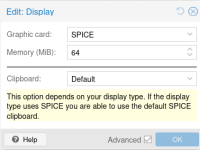
 
Hi tdukes,

For SPICE, if you select your VM, then select Hardware, Display, then Edit, please try these settings [0]:
1792994033663.png

If you are using this VM via CLI, you can also try xterm.js. You can select this by clicking the Shell dropdown, then clicking "xterm.js".

Please let me know if you have any more issues

--

[0]: https://pve.proxmox.com/wiki/SPICE
 
  • Like
Reactions: LnxBil
I probably messed up and uploaded a Debian 13 iso to create the VM. I didn't know Proxmox had one. So its likely the correct drivers for the VM are not installed. I installed the headless version of Debian 13.

This is getting to be too much and I stayed up past 2AM. I'm just going to scrub this and install Debian 13.

Really appreciate everyones help!
 
PVE has a debian 13 template but that is for CTs. Headless is generally what you use for servers. I'm not quite sure what your goal for this VM is though.
 
  • Like
Reactions: Johannes S