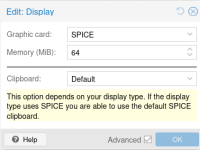
I setup Proxmox a few hours ago. I can't seem to get copy and paste to a VM working. The spice-vgagent package was already installed in the Debian 13 VM. It could be the settings in Hardware>Display, IDK. I have Display as Default and Clipboard set to VNC. This would be very helpful installing packages I need rather than typing them out.
Also, how can I adjust the font size. It's really har to see what I'm typing in the VM console.
TIA
Also, how can I adjust the font size. It's really har to see what I'm typing in the VM console.
TIA