Connect a USB drive plugged into PC to a VM?

craig.stephens

New Member
Oct 1, 2024
8
2
3
Hi,

Is there a way that I can connect a USB drive plugged into my PC to a VM, so that the VM can copy files directly to the USB drive?

I previously used VMWare and it was quite a straightforward task using VMWare workstation.

Thanks,
Craig
 
"The second type of passthrough is SPICE USB passthrough. If you add one or more SPICE USB ports to your VM, you can dynamically pass a local USB device from your SPICE client through to the VM. This can be useful to redirect an input device or hardware dongle temporarily."

Sorry, but SPICE client? What's this?
 
It's an open source remote access solution - see their website and the Wikipedia page for more information. If you want, you can use SPICE as a display for connecting to the VM using Proxmox VE, as an audio device, for folder sharing, or for USB passthrough. You don't have to, though - you can also do USB passthrough without SPICE.
 
  • Like
Reactions: Kingneutron
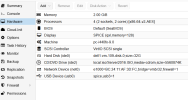
Yes, it does. You don't have to use SPICE. Simply select the USB device or USB port in the Proxmox VE web UI and it should be passed through to Windows.
 
  • Like
Reactions: Kingneutron
That only shows things connected to the Proxmox host. Which is in a data centre. I want to be able to connect a USB disk/device connected to an end user device running Windows to a Windows VM running on Proxmox.
 
  • Like
Reactions: Kingneutron
Ah, now I understand what you're trying to do. The easiest way to achieve Windows -> Windows USB passthrough is by connecting to the Windows VM using Remote Desktop and sharing the USB device, as explained here.

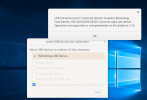
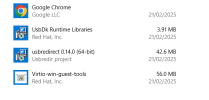
Otherwise you may be able to achieve the same using SPICE, but it's not as well supported under Windows. The SPICE website says that you can install UsbDk to get it working under Windows. I must admit that I never tried it, so feel free to try it and report back.
 
  • Like
Reactions: Kingneutron
Sharing USB serial devices from a Windows PC to a Windows VM over the network (USB/IP)

I use this to flash and debug an ESP32 from a Windows 11 VM on Proxmox. The USB cables stay plugged into my desktop PC, and the VM sees the devices as real local COM ports. Unlike RDP USB redirection, it keeps working without an open RDP session.

Software

  • PC (server): usbipd-win, which runs as the Windows service usbipd.
  • VM (client): usbip-win2, installed in C:\Program Files\USBip (not on the PATH).
On the PC (server)

  1. List the USB devices and note the BUSID of the ones you want to share:
    usbipd list

    The output shows BUSID, VID:PID, device name and state (Not shared / Shared / Attached).
  2. Share a device. This is a one-time step and survives reboots:
    usbipd bind --busid 1-1

    If you get an "Unknown USB filter" warning, add --force. Note that with --force the device is no longer usable on the PC itself. To get it back:

    usbipd unbind --busid 1-1

  3. Allow TCP port 3240 in the firewall, ideally only from the VM's IP:
    New-NetFirewallRule -DisplayName "usbipd (VM)" -Direction Inbound -Protocol TCP -LocalPort 3240 -RemoteAddress <VM-IP> -Action Allow
In the VM (client), PowerShell as administrator

  1. List the devices the PC is sharing:
    & "C:\Program Files\USBip\usbip.exe" list -r <PC-IP>

  2. Attach a device:
    & "C:\Program Files\USBip\usbip.exe" attach -r <PC-IP> -b 1-1

  3. Show what is attached, and on which port:
    & "C:\Program Files\USBip\usbip.exe" port

  4. Detach a device:
    & "C:\Program Files\USBip\usbip.exe" detach -p <port>
The device now shows up in Device Manager as a normal COM port. The VM needs its own driver, for example the Silicon Labs CP210x driver. After installing a driver, detach and attach once, or the device stays in an error state.

Automatic re-attach

Attaching doesn't survive a VM reboot, and it drops when the PC restarts or the network hiccups. I run a small PowerShell script as a scheduled task. It runs as SYSTEM, at startup and every 5 minutes. It checks usbip port and attaches only what is missing. Put the script on a local disk (for example C:\Scripts), because SYSTEM can't see your mapped network drives.

Gotchas I ran into

  • Old USB filter drivers from serial tools, such as HHD/SerialTool, cause the "Unknown USB filter" warning. You can check with usbipd list and in the UpperFilters of the USB and Ports device classes.
  • VPN clients (Proton VPN in my case) can remove the LAN route. Traffic then reaches the VM, but replies go out via the router and never arrive. Enable "allow LAN connections" or restart the network adapter.
  • FTDI adapter: "Access denied" for normal users. In my setup the FTDI (FT232R) COM port in the VM could only be opened by an administrator, while a CP210x adapter worked fine as a normal user. No port filters and no process holding the port. Setting permissions on the Ports device class didn't help either. I never found the root cause. My workaround is to run the tool that uses that port elevated. If you can choose, a CP210x-based adapter avoids the issue.