Cephx Key Migration Procedure and Ceph 19.2 Squid Going EOL Soon

t.lamprecht

Proxmox Staff Member
Staff member
Jul 28, 2015
6,890
5,583
315
South Tyrol/Italy
shop.proxmox.com
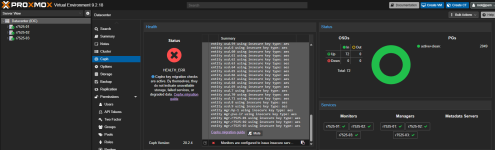
Recent security findings and fixes in Ceph make it necessary to upgrade ceph and migrate authentication keys from the aes to the aes256k cipher. This is to address weaknesses in the old Cephx authentication method, especially if your Ceph service networks are not isolated. Upgrading to Ceph Tentacle 20.2.4 or newer, or Ceph Squid 19.2.6 or newer, will trigger new Cephx health errors and warnings for the old aes type. These do not by themselves indicate data loss, data corruption, or a service failure, but they flag a security issue that needs to be addressed. See the upstream release notes for more details.

In Proxmox VE, we added a migration script to assist you with this one-time migration of existing setups. We also improved Ceph's key-staging mechanism to allow a smoother, more graceful handover: both keys remain valid while you refresh clients, including running guests and CephFS mounts, to use the new key.

The Ceph packages and accompanying pve-manager and pve-docs updates recently became available in the no-subscription repositories after prolonged internal testing. Given that this is not a trivial migration, we still recommend testing the procedure before rolling it out to production, as our testing cannot cover every setup-specific edge case. We plan to roll these changes out to the enterprise repositories in the second half of next week; depending on further QA and feedback here, this may be delayed by a few days.

The overall procedure is documented in the Proxmox VE Reference Documentation included with your installation and linked from the Ceph dashboard, or online at: https://pve.proxmox.com/pve-docs/chapter-pveceph.html#pveceph_cephx_migration

We recommend following the steps closely and using the migration script as much as possible. With hyper-converged setups and no external clients, the procedure is relatively straightforward, but still requires caution. Check client compatibility first; Proxmox VE's kernel RBD and CephFS clients need a running kernel 7.0 or newer. In particular, do not run commands that retire an old key or restrict the allowed ciphers before every affected client is compatible and has been refreshed. Otherwise, incompatible or not-yet-refreshed clients may see I/O failures on reconnecting or when existing service tickets expire, which can be minutes or days after the change.

For external Ceph users not managed by Proxmox VE, you'll need to manage their key rotation yourself. External clients using a managed Ceph user's key also need to be refreshed, including their saved key copies. See our documentation and the upstream documentation linked there.

Reminder: Ceph 19.2 Squid Going EOL Soon
Please also remember that Ceph 19.2 Squid is estimated to reach its upstream end of life (EOL) on 2026-10-31. If you have not already done so, plan to upgrade existing Ceph Squid setups to Ceph Tentacle while Squid is still supported for a smooth handover. This requires an up-to-date Proxmox VE 9.2 or newer; if you're still on Proxmox VE 8, plan that upgrade first. See the upgrade how-to: https://pve.proxmox.com/wiki/Ceph_Squid_to_Tentacle.

We welcome your feedback!
 
Upgraded yesterday to 9.2.18 and 20.2.4, then ran through the process successfully. Relatively simple 3-node cluster. My only gripe is that in some cases it wasn't 100% clear if I should proceed, since the script didn't have the nice green PASS text for many of the early steps. What is a warning, what is informational, etc. I didn't see outright errors, so proceeded past those points.

Another part that gave me pause was: "After Ceph updates its health status, the two error-severity checks clear. The warning about rotating service keys can remain for a few hours and clears automatically."
It wasn't blatantly obvious whether I needed to wait for that to clear or proceed with the process, without digging a bit deeper into what was actually being done (I proceeded without incident and they cleared some hours later).
 
I successfully upgraded a 3-node cluster to ceph version 19.2.6 yesterday as well. I also came across a couple of passages that were unclear to me, so I wasn't sure whether it was safe to proceed , some parts read as somewhat ambiguous. I do have to admit I was caught off guard by having to deal with this in the middle of the cluster upgrade, which probably made the docs harder to follow than they would have been otherwise.
 
Last edited:
Upgraded yesterday to 9.2.18 and 20.2.4, then ran through the process successfully. Relatively simple 3-node cluster. My only gripe is that in some cases it wasn't 100% clear if I should proceed, since the script didn't have the nice green PASS text for many of the early steps. What is a warning, what is informational, etc. I didn't see outright errors, so proceeded past those points.

Another part that gave me pause was: "After Ceph updates its health status, the two error-severity checks clear. The warning about rotating service keys can remain for a few hours and clears automatically."
It wasn't blatantly obvious whether I needed to wait for that to clear or proceed with the process, without digging a bit deeper into what was actually being done (I proceeded without incident and they cleared some hours later).
thanks for the feedback, I tried to improve on that in newer pve-manager (currently on pve-test).
 
I've upgraded and now I'm getting: Not a proper rbd authentication file: /etc/pve/priv/ceph/CEPH00.keyring
Any help is greatly appreciated as I had migrated all of my VMs/LXCs to my CEPH cluster.
CEPH File looks like:
[client.admin]
key = KEY
caps mds = "allow *"
caps mgr = "allow *"
caps mon = "allow *"
caps osd = "allow *"
command: ceph auth get client.admin
[client.admin]
key = KEY
caps mds = "allow *"
caps mgr = "allow *"
caps mon = "allow *"
caps osd = "allow *"
What am I missing here?
 
I had a look at the documention for this rotation inside the Proxmox PVE reference. I would prefer a separate documentation, as the one to upgrade from Squid (19.x) to tentacle (20.x), with detailed and clear steps. With the documentation inside the whole documentation, you don't see clearly the limit between the rotation and the other parts of the documentation.
It is a risky upgrade, so you have to be sure of what you have to do, how to check each step was sucessfull, and where it ends.
And it is a migration only required once, so in my opinion, it should not be part of the general documentation, with day to day tasks...
 
After upgrading to version
Code:
proxmox-ve: 9.2.0 (running kernel: 7.0.14-15-pve)
pve-manager: 9.2.18 (running version: 9.2.18/614bede5d65599c6)
proxmox-kernel-helper: 9.2.0
proxmox-kernel-7.0: 7.0.14-16
proxmox-kernel-7.0.14-16-pve-signed: 7.0.14-16
proxmox-kernel-7.0.14-15-pve-signed: 7.0.14-15
proxmox-kernel-7.0.14-14-pve-signed: 7.0.14-14
proxmox-kernel-7.0.14-12-pve-signed: 7.0.14-12
proxmox-kernel-7.0.14-11-pve-signed: 7.0.14-11
proxmox-kernel-7.0.14-8-pve-signed: 7.0.14-8
proxmox-kernel-6.17: 6.17.13-21
proxmox-kernel-6.17.13-21-pve-signed: 6.17.13-21
amd64-microcode: 3.20251202.1~bpo13+1
ceph: 20.2.4-pve4
ceph-fuse: 20.2.4-pve4
corosync: 3.1.10-pve3
criu: 4.1.1-1
dnsmasq: 2.91-1+deb13u2
frr-pythontools: 10.6.1-1+pve3
ifupdown2: 3.3.0-1+pmx12
ksm-control-daemon: 1.5-1
libjs-extjs: 7.0.0-7
libproxmox-acme-perl: 1.7.2
libproxmox-backup-qemu0: 2.0.2
libproxmox-rs-perl: 0.4.1
libpve-access-control: 9.1.1
libpve-apiclient-perl: 3.4.3
libpve-cluster-api-perl: 9.1.6
libpve-cluster-perl: 9.1.6
libpve-common-perl: 9.2.1
libpve-guest-common-perl: 6.0.5
libpve-http-server-perl: 6.0.5
libpve-network-perl: 1.6.7
libpve-notify-perl: 9.1.6
libpve-rs-perl: 0.15.3
libpve-storage-perl: 9.1.10
libspice-server1: 0.15.2-1+b1
lvm2: 2.03.31-2+pmx1
lxc-pve: 7.0.0-2
lxcfs: 7.0.0-pve1
novnc-pve: 1.7.0-2
proxmox-backup-client: 4.2.5-1
proxmox-backup-file-restore: 4.2.5-1
proxmox-backup-restore-image: 1.0.0
proxmox-enterprise-support-keyring: 1.1
proxmox-firewall: 1.2.3
proxmox-kernel-helper: 9.2.0
proxmox-mail-forward: 1.0.3
proxmox-mini-journalreader: 1.7
proxmox-offline-mirror-helper: 0.7.4
proxmox-widget-toolkit: 5.2.8
pve-cluster: 9.1.6
pve-container: 6.1.14
pve-docs: 9.2.10
pve-edk2-firmware: 4.2026.08-1
pve-esxi-import-tools: 1.0.1
pve-firewall: 6.0.5
pve-firmware: 3.18-6
pve-ha-manager: 5.2.5
pve-i18n: 3.10.0
pve-qemu-kvm: 11.0.3-3
pve-xtermjs: 6.0.0-2
qemu-server: 9.2.7
smartmontools: 7.5-pve2
spiceterm: 3.4.2
swtpm: 0.8.0+pve3
vncterm: 1.9.2
zfsutils-linux: 2.4.4-pve1

dry-run failed
Code:
root@r7525-01:/etc/pve/ceph# /usr/share/pve-manager/migrations/pve-cephx-rotate-service-keys --rotate-cluster-keys --verbose
INFO: This is a dry run. No Ceph key, cipher setting, or daemon will be changed. Session observations can update the migration journal.
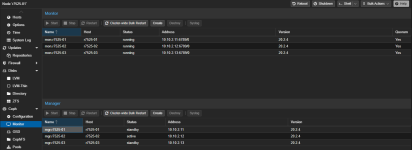
FAIL: Ceph reports insecure keys for mgr.hp-1, mgr.pve-i7, but no running or configured daemon claims them, so there is no keyring to update. Before removing an auth entry, verify that the daemon was removed and no node retains its data directory or keyring.

However, the node hp-1 pve-i7 has been deleted for a long time.
1789369966010.png

Which settings should I check?
 
Hi @egan wu,
do you still have entries for those manager services in your /etc/pve/ceph.conf? Do they show up in the UI in a node's Ceph > Monitor panel?
 
Hi @egan wu,
do you still have entries for those manager services in your /etc/pve/ceph.conf? Do they show up in the UI in a node's Ceph > Monitor panel?
no
Code:
root@r7525-01:~# cat /etc/pve/ceph.conf
[global]
    auth_client_required = cephx
    auth_cluster_required = cephx
    auth_service_required = cephx
    cluster_network = 10.10.2.13/24
    fsid = dc02605a-97c8-4a1f-8654-d4f456c63512
    mon_allow_pool_delete = true
    mon_host = 10.10.2.13 10.10.2.11 10.10.2.12
    ms_bind_ipv4 = true
    ms_bind_ipv6 = false
    osd_pool_default_min_size = 2
    osd_pool_default_size = 3
    public_network = 10.10.2.13/24

[client]
    keyring = /etc/pve/priv/$cluster.$name.keyring
    rbd_read_from_replica_policy = localize

[client.crash]
    keyring = /etc/pve/ceph/$cluster.$name.keyring

[mon.r7525-01]
    public_addr = 10.10.2.11

[mon.r7525-02]
    public_addr = 10.10.2.12

[mon.r7525-03]
    public_addr = 10.10.2.13

1789377128045.png
 
  • Like
Reactions: mijutu
Dear all, I tried to migrate the keys like you described in the documentation. Unfortunately, I'm now stuck with an error, that a VM running on CEPH cannot start after shutdown due to the following error message:

Code:
()
TASK ERROR: Not a proper rbd authentication file: /etc/pve/priv/ceph/ceph.keyring

I had a copy and paste error in one the commands to run and don't know how to fix it.

Here are the steps of my bash history:

Code:
136  /usr/share/pve-manager/migrations/pve-cephx-rotate-service-keys --rotate-cluster-keys
137  /usr/share/pve-manager/migrations/pve-cephx-rotate-service-keys --rotate-cluster-keys --apply
142  /usr/share/pve-manager/migrations/pve-cephx-rotate-service-keys --rotate-cluster-keys --rotate-admin-key
143  /usr/share/pve-manager/migrations/pve-cephx-rotate-service-keys --rotate-cluster-keys --rotate-admin-key --apply
144  /usr/share/pve-manager/migrations/pve-cephx-rotate-service-keys --rotate-all-storage-keys --rotate-admin-key
145  /usr/share/pve-manager/migrations/pve-cephx-rotate-service-keys --rotate-all-storage-keys --rotate-admin-key --apply

Lines 142 and 143 are the wrong copy&paste error I did.

Here is the output of ceph -s:

Code:
root@kcs-proxmox22:~# ceph -s
  cluster:
    id:     XXX
    health: HEALTH_WARN
            1 auth client entities with insecure key types
            Monitors are configured to allow auth using insecure key types
            Monitors are configured to allow creation of insecure key types

  services:
    mon: 3 daemons, quorum kcs-proxmox22,kcs-proxmox23,kcs-proxmox64 (age 2d)
    mgr: kcs-proxmox64(active, since 2d), standbys: kcs-proxmox22, kcs-proxmox23, kcs-proxmox54
    osd: 38 osds: 38 up (since 2d), 38 in (since 8w)

  data:
    pools:   2 pools, 1025 pgs
    objects: 2.53M objects, 9.3 TiB
    usage:   15 TiB used, 52 TiB / 66 TiB avail
    pgs:     1025 active+clean

  io:
    client:   69 KiB/s rd, 30 MiB/s wr, 6 op/s rd, 1.47k op/s wr

Here is the output of the helper script:

Code:
root@kcs-proxmox22:~# /usr/share/pve-manager/migrations/pve-cephx-rotate-service-keys
INFO: This is a dry run. No Ceph key, cipher setting, or daemon will be changed. Session observations can update the migration journal.
PASS: Every service key uses 'aes256k', and so do the service tickets.

Client keys awaiting action:
  'client.admin': 100 session(s) still authenticate with a previous key (kcs-proxmox101: 10,
    kcs-proxmox22: 30, kcs-proxmox23: 29, kcs-proxmox54: 8, kcs-proxmox64: 23). Both keys remain
    valid. Refresh these consumers, then rerun without options.
Possible consumers (host-wide hints, not session attribution):
  kcs-proxmox101: VM 171, VM 176, VM 178, VM 180, VM 181, VM 186, VM 188
  kcs-proxmox22: VM 102, VM 103, VM 104, VM 105, VM 107, VM 110, VM 116, VM 131, 12 more VMs
  kcs-proxmox23: VM 118, VM 129, VM 133, VM 138, VM 141, VM 144, VM 165, VM 182, 14 more VMs
  kcs-proxmox54: VM 109, VM 112, VM 113, VM 115, VM 128, VM 132, VM 137, VM 175
  kcs-proxmox64: VM 106, VM 120, VM 125, VM 127, VM 130, VM 134, VM 135, VM 139, 11 more VMs

But when I power-cycled a VM it cannot start as stated above.

The keyring file looks good to me (I replaced some characters for security reasons):

Code:
root@kcs-proxmox22:~# cat /etc/pve/priv/ceph/ceph.keyring
[client.admin]
        key = XXXXKNqDhlzDyAA5mHIDnYYYYYYkABL/AsDxnQ84xWX5sZZZZZZPJjZekg=
        caps mgr = "allow *"
        caps mon = "allow *"
        caps osd = "allow *"

Please give me some advice how I can proceed to a successful migration.
Thanks in advance!
 
I have a 2-node PVE cluster on pve-manager 9.2.18, Ceph Tentacle 20.2.4-pve on all daemons. 20 OSDs, all LUKS-encrypted via ceph-volume lvm. 4 MDS (2 CephFS volumes), 2 MGR. Third mon (ceph-mon) intentionally lives on a plain Debian VM outside the PVE cluster, for quorum only - not managed by pve-cluster/pvestatd. Its a home lab - I dont need / want 3 copies of all my data - this seemed like a reasonable way to run ceph without storage overkill.

I've manually completed the mon and daemon-key phases of the aes -> aes256k migration: rotated mon. (updated keyrings on all 3 mons - the two PVE nodes via shared /etc/pve/priv/ceph.mon.keyring, the VM via its own standalone /etc/ceph/ceph.mon.keyring - restarted one at a time, confirmed quorum and auth_preferred_cipher: aes256k cluster-wide), then rotated all 26 mds/osd/mgr daemon keys the same way (auth rotate + systemd restart per entity, standbys before actives), then set auth_service_cipher to aes256k. Cluster went from HEALTH_ERR to HEALTH_WARN with no data impact - both error-severity checks (AUTH_INSECURE_SERVICE_KEY_TYPE, AUTH_INSECURE_SERVICE_TICKETS) are clear, all PGs stayed active+clean throughout.

What's left is the client-key-type warning: 28 osd-lockbox entities (4 stale, from past disk swaps), bootstrap-*, client.admin, client.crash. I'd rather use pve-cephx-rotate-service-keys for these, particularly --rotate-lockbox-keys for the encrypted OSDs, than hand-roll the LVM tag update myself.

The dry-run (bare and --rotate-cluster-keys --verbose) fails at the preflight version check:

Code:
FAIL: Could not verify 'aes256k' support for every service daemon:
could not verify the installed Ceph version of mon. on node 'ceph-mon'; check that 'pvestatd' runs there

Its not a "pvestatd stopped" situation - ceph-mon was deliberately built as a plain VM outside the PVE cluster, so pvestatd was never installed there. ceph versions independently confirms it's running 20.2.4-pve, and the mon. key itself is already fully migrated and confirmed working cluster-wide - the tool just has no way to validate that through its normal per-node check for a host that isn't a PVE cluster member.

Is there a supported path for this? - either an alternate way for the tool to verify a non-PVE-managed mon, or a way to tell it that entity's rotation is already confirmed complete so it can proceed with the client/lockbox keys? I dont really want to have to join that VM to the PVE cluster.
 
Thanks for the detailed explanation. The staged key migration sounds like a much safer approach, especially since it allows old and new keys to remain valid while clients are refreshed. I’ll make sure to verify client compatibility and follow the migration script carefully before making any cipher or key changes. The upcoming Squid EOL is also a good reminder to plan the Tentacle upgrade ahead of time rather than waiting until the deadline.
 
Third mon (ceph-mon) intentionally lives on a plain Debian VM outside the PVE cluster, for quorum only - not managed by pve-cluster/pvestatd.
I'm in a similar situation (or at least will be once the change hits the enterprise repo). 4 Node pve cluster plus a server outside that runs a fifth mon.

Having read your post I now plan to temporarily remove the outside mon for the duration of the upgrade. Not sure if you can reasonably do that (quorum) but at least its something to look into.
 
I'm in a similar situation (or at least will be once the change hits the enterprise repo). 4 Node pve cluster plus a server outside that runs a fifth mon.

Having read your post I now plan to temporarily remove the outside mon for the duration of the upgrade. Not sure if you can reasonably do that (quorum) but at least its something to look into.
I could potentially risk it if there is no other option, but for me without that outside mon I get a hard stop if either of the 2 remaining servers goes down. for you with 4+1 youd still presumably have a quorum with 3 if you happened to lose 1 additional server while your outside mon was offline.

since my setup is a homelab its an option, but not a desirable one. it would probably be safer to painfully recreate each OSD 1-by-1. I would rather the migration helper included an override to skip the pre-checks at your own risk though.
 
@tschmidt @kanemari I would remove the custom mon and install PVE on that external host/VM, add it to the cluster and use PVE Ceph integration. If that extra mon is running inside the cluster, get an external host.

@kanemari if I were you I would stop using size=2, min_size=1 asap, as it's a very bad idea if you care about your data [1] [2]


[1] https://forum.proxmox.com/threads/ceph-pool-size-is-2-1-really-a-bad-idea.68939/post-309189
[2] https://docs.ceph.com/en/reef/rados/troubleshooting/troubleshooting-pg/#unfound-objects
 
I'm a bit further than yesterday:

When I put back the OLD aes key into /etc/pve/priv/ceph/ceph.keyring my VMs can start!
With the new aes256k key in this file my VMs cannot start.

How can I proceed?
 
@tschmidt @kanemari I would remove the custom mon and install PVE on that external host/VM, add it to the cluster and use PVE Ceph integration. If that extra mon is running inside the cluster, get an external host.

@kanemari if I were you I would stop using size=2, min_size=1 asap, as it's a very bad idea if you care about your data [1] [2]


[1] https://forum.proxmox.com/threads/ceph-pool-size-is-2-1-really-a-bad-idea.68939/post-309189
[2] https://docs.ceph.com/en/reef/rados/troubleshooting/troubleshooting-pg/#unfound-objects
yes - thanks for the suggestion. I know it has risks.

the reality is its a home lab, not a production environment, it runs in a rack in my garage, and I cant afford to keep another host with the same amount of storage and high speed interconnectivity to the existing 2 hosts live 24x7 to de-risk that "failure during a recovery" edge case. I have a spare server sitting there configured that could do this easily, and its off :) because its another 300W of power, and heat, and noise, and strain on the UPS. the amount of time I have the active 2 nodes in a minimum 1 state is so small (i.e. pve node reboots when updating kernels, etc) and the workloads during the outage are so minimal, my wallet dictates I can afford to lose that amount of data. everything gets backed up on PBS with separate ZFS mirrored disks every 3 days anyway.

anyway - back to the point of the thread - do you mean permanently make the custom mon a full PVE node? that seems like a lot of bloat for all it needs to achieve? for the time that would take I would be better off removing the custom mon entirely and adding it back once the migration is finished?
 
Hi @all,

very strange behaviour here in our 5 node proxmox-cluster (incl. latest updates) after ceph-update from 19.2.5 to 19.2.6 and successful cephx-key-migration (ceph-health status is "OK"):
All new ceph-keys (type aes256k) are valid and present in files on clusternodes - checked with "ceph auth ls" and "cat /var/lib/ceph/osd|mon|mgr/*/keyring. After reboot of any clusternode with osds the old osd-key (type aes) are restored in local keyring-files "/var/lib/ceph/osd/*/", so start of osds fail. All other keys are untouched. After getting correct key for osd.X "ceph auth get osd.X > /var/lib/ceph/osd/ceph-X/keyring" and restarting osds everything works fine.

Anyone an idea how to solve this? Where do the "old keys" come from?
Thanks in advance!
 
I would remove the custom mon and install PVE on that external host/VM, add it to the cluster and use PVE Ceph integration.

It's my PBS host and thus should be seperate from the cluster. It only acts as a fifth vote in ceph / corosync so I can lose 2 PVE nodes. And it hasn't got the RAM to act as a pve node anyway.
 
do you mean permanently make the custom mon a full PVE node? that seems like a lot of bloat for all it needs to achieve? for the time that would take I would be better off removing the custom mon entirely and adding it back once the migration is finished?
Yes. Your choice to keep your "franken-cluster" :) or go for a better manageable / supportable configuration. I would remove Ceph and use ZFS replication, but don't want to lecture anyone or take the thread off topic.


It's my PBS host and thus should be seperate from the cluster. It only acts as a fifth vote in ceph / corosync so I can lose 2 PVE nodes. And it hasn't got the RAM to act as a pve node anyway.
I would add PVE to that PBS host by adding the repo for PVE, create a 2 core 4GB ram VM and run a fifth PVE in it just for quorum and Ceph MON/MGR. No need to run any other VM there. Avoid adding that PBS/PVE node directly to the cluster: backups must be logically isolated from the cluster.