


Recent security findings and fixes in Ceph make it necessary to upgrade ceph and migrate authentication keys from the
In Proxmox VE, we added a migration script to assist you with this one-time migration of existing setups. We also improved Ceph's key-staging mechanism to allow a smoother, more graceful handover: both keys remain valid while you refresh clients, including running guests and CephFS mounts, to use the new key.
The Ceph packages and accompanying pve-manager and pve-docs updates recently became available in the no-subscription repositories after prolonged internal testing. Given that this is not a trivial migration, we still recommend testing the procedure before rolling it out to production, as our testing cannot cover every setup-specific edge case. We plan to roll these changes out to the enterprise repositories in the second half of next week; depending on further QA and feedback here, this may be delayed by a few days.
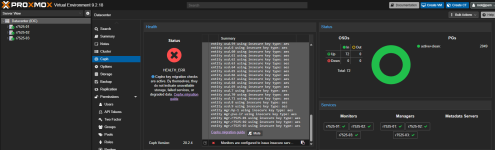
The overall procedure is documented in the Proxmox VE Reference Documentation included with your installation and linked from the Ceph dashboard, or online at: https://pve.proxmox.com/pve-docs/chapter-pveceph.html#pveceph_cephx_migration
We recommend following the steps closely and using the migration script as much as possible. With hyper-converged setups and no external clients, the procedure is relatively straightforward, but still requires caution. Check client compatibility first; Proxmox VE's kernel RBD and CephFS clients need a running kernel 7.0 or newer. In particular, do not run commands that retire an old key or restrict the allowed ciphers before every affected client is compatible and has been refreshed. Otherwise, incompatible or not-yet-refreshed clients may see I/O failures on reconnecting or when existing service tickets expire, which can be minutes or days after the change.
For external Ceph users not managed by Proxmox VE, you'll need to manage their key rotation yourself. External clients using a managed Ceph user's key also need to be refreshed, including their saved key copies. See our documentation and the upstream documentation linked there.
Reminder: Ceph 19.2 Squid Going EOL Soon
Please also remember that Ceph 19.2 Squid is estimated to reach its upstream end of life (EOL) on 2026-10-31. If you have not already done so, plan to upgrade existing Ceph Squid setups to Ceph Tentacle while Squid is still supported for a smooth handover. This requires an up-to-date Proxmox VE 9.2 or newer; if you're still on Proxmox VE 8, plan that upgrade first. See the upgrade how-to: https://pve.proxmox.com/wiki/Ceph_Squid_to_Tentacle.
We welcome your feedback!
aes to the aes256k cipher. This is to address weaknesses in the old Cephx authentication method, especially if your Ceph service networks are not isolated. Upgrading to Ceph Tentacle 20.2.4 or newer, or Ceph Squid 19.2.6 or newer, will trigger new Cephx health errors and warnings for the old aes type. These do not by themselves indicate data loss, data corruption, or a service failure, but they flag a security issue that needs to be addressed. See the upstream release notes for more details.In Proxmox VE, we added a migration script to assist you with this one-time migration of existing setups. We also improved Ceph's key-staging mechanism to allow a smoother, more graceful handover: both keys remain valid while you refresh clients, including running guests and CephFS mounts, to use the new key.
The Ceph packages and accompanying pve-manager and pve-docs updates recently became available in the no-subscription repositories after prolonged internal testing. Given that this is not a trivial migration, we still recommend testing the procedure before rolling it out to production, as our testing cannot cover every setup-specific edge case. We plan to roll these changes out to the enterprise repositories in the second half of next week; depending on further QA and feedback here, this may be delayed by a few days.
The overall procedure is documented in the Proxmox VE Reference Documentation included with your installation and linked from the Ceph dashboard, or online at: https://pve.proxmox.com/pve-docs/chapter-pveceph.html#pveceph_cephx_migration
We recommend following the steps closely and using the migration script as much as possible. With hyper-converged setups and no external clients, the procedure is relatively straightforward, but still requires caution. Check client compatibility first; Proxmox VE's kernel RBD and CephFS clients need a running kernel 7.0 or newer. In particular, do not run commands that retire an old key or restrict the allowed ciphers before every affected client is compatible and has been refreshed. Otherwise, incompatible or not-yet-refreshed clients may see I/O failures on reconnecting or when existing service tickets expire, which can be minutes or days after the change.
For external Ceph users not managed by Proxmox VE, you'll need to manage their key rotation yourself. External clients using a managed Ceph user's key also need to be refreshed, including their saved key copies. See our documentation and the upstream documentation linked there.
Reminder: Ceph 19.2 Squid Going EOL Soon
Please also remember that Ceph 19.2 Squid is estimated to reach its upstream end of life (EOL) on 2026-10-31. If you have not already done so, plan to upgrade existing Ceph Squid setups to Ceph Tentacle while Squid is still supported for a smooth handover. This requires an up-to-date Proxmox VE 9.2 or newer; if you're still on Proxmox VE 8, plan that upgrade first. See the upgrade how-to: https://pve.proxmox.com/wiki/Ceph_Squid_to_Tentacle.
We welcome your feedback!


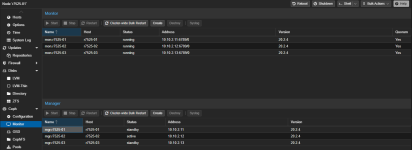

 because its another 300W of power, and heat, and noise, and strain on the UPS. the amount of time I have the active 2 nodes in a minimum 1 state is so small (i.e. pve node reboots when updating kernels, etc) and the workloads during the outage are so minimal, my wallet dictates I can afford to lose that amount of data. everything gets backed up on PBS with separate ZFS mirrored disks every 3 days anyway.