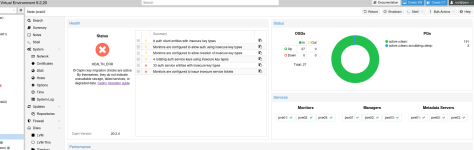
I upgraded my cluster to 9.2.18 and started getting complaints from CEPH about keys. I followed the docs to the letter on CEPH key migration and everything seemed to go well, without errors. Now I can't mount my local CEPH mount.
I've upgraded and now I'm getting: "Not a proper rbd authentication file: /etc/pve/priv/ceph/CEPH00.keyring"
Any help is greatly appreciated as I had migrated all of my VMs/LXCs to my CEPH cluster.
pvesm list CEPH00
Not a proper rbd authentication file: /etc/pve/priv/ceph/CEPH00.keyring
rbd -m 192.168.0.30 -p CEPH00 --keyring /etc/pve/priv/ceph/CEPH00.keyring ls
vm-100-disk-0
vm-101-disk-0
vm-102-disk-0
vm-103-disk-0
vm-104-disk-0
vm-105-disk-0
vm-210-disk-0
vm-210-disk-1
vm-211-disk-0
vm-211-disk-1
vm-300-disk-0
vm-301-disk-0
vm-310-disk-2
vm-400-disk-0
vm-401-disk-0
CEPH File looks like:
[client.admin]
key = KEY
caps mds = "allow *"
caps mgr = "allow *"
caps mon = "allow *"
caps osd = "allow *"
command: ceph auth get client.admin
[client.admin]
key = KEY
caps mds = "allow *"
caps mgr = "allow *"
caps mon = "allow *"
caps osd = "allow *"
What am I missing here?
I've upgraded and now I'm getting: "Not a proper rbd authentication file: /etc/pve/priv/ceph/CEPH00.keyring"
Any help is greatly appreciated as I had migrated all of my VMs/LXCs to my CEPH cluster.
pvesm list CEPH00
Not a proper rbd authentication file: /etc/pve/priv/ceph/CEPH00.keyring
rbd -m 192.168.0.30 -p CEPH00 --keyring /etc/pve/priv/ceph/CEPH00.keyring ls
vm-100-disk-0
vm-101-disk-0
vm-102-disk-0
vm-103-disk-0
vm-104-disk-0
vm-105-disk-0
vm-210-disk-0
vm-210-disk-1
vm-211-disk-0
vm-211-disk-1
vm-300-disk-0
vm-301-disk-0
vm-310-disk-2
vm-400-disk-0
vm-401-disk-0
CEPH File looks like:
[client.admin]
key = KEY
caps mds = "allow *"
caps mgr = "allow *"
caps mon = "allow *"
caps osd = "allow *"
command: ceph auth get client.admin
[client.admin]
key = KEY
caps mds = "allow *"
caps mgr = "allow *"
caps mon = "allow *"
caps osd = "allow *"
What am I missing here?