Good Day,
I'm seeing a somewhat weird issue specifically with 8.3.3.
I am trying to install ceph to convert a cluster running off of local storage to a hyper-converged cluster running on ceph.
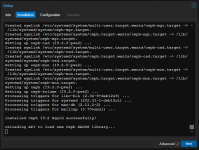
The issue I'm seeing is timeouts when performing the ceph install wizard. On the first page I'm selecting Squid (19.2) + no subscription. It then goes through the install and then I get the following error:
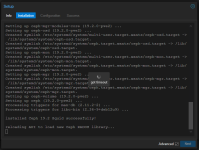
Which from doing a `pveceph install` is the install finishing.
What seems to be resolving the issue is a fresh install from the 8.3.0 ISO as I am now in the middle of trying to get the 4th node in my cluster online (5 node cluster).
The versions on a node that I've done the install manually via CLI but am currently getting timeouts in both the GUI and CLI. My best guess is some update to 8.3.3 is causing this issue.
I'm seeing a somewhat weird issue specifically with 8.3.3.
I am trying to install ceph to convert a cluster running off of local storage to a hyper-converged cluster running on ceph.
The issue I'm seeing is timeouts when performing the ceph install wizard. On the first page I'm selecting Squid (19.2) + no subscription. It then goes through the install and then I get the following error:
Which from doing a `pveceph install` is the install finishing.
What seems to be resolving the issue is a fresh install from the 8.3.0 ISO as I am now in the middle of trying to get the 4th node in my cluster online (5 node cluster).
The versions on a node that I've done the install manually via CLI but am currently getting timeouts in both the GUI and CLI. My best guess is some update to 8.3.3 is causing this issue.
Code:
root@nap-pve001:~# pveversion --verbose
proxmox-ve: 8.3.0 (running kernel: 6.8.12-4-pve)
pve-manager: 8.3.0 (running version: 8.3.0/c1689ccb1065a83b)
proxmox-kernel-helper: 8.1.0
proxmox-kernel-6.8: 6.8.12-4
proxmox-kernel-6.8.12-4-pve-signed: 6.8.12-4
ceph: 19.2.0-pve2
ceph-fuse: 19.2.0-pve2
corosync: 3.1.7-pve3
criu: 3.17.1-2
glusterfs-client: 10.3-5
ifupdown2: 3.2.0-1+pmx11
ksm-control-daemon: 1.5-1
libjs-extjs: 7.0.0-5
libknet1: 1.28-pve1
libproxmox-acme-perl: 1.5.1
libproxmox-backup-qemu0: 1.4.1
libproxmox-rs-perl: 0.3.4
libpve-access-control: 8.2.0
libpve-apiclient-perl: 3.3.2
libpve-cluster-api-perl: 8.0.10
libpve-cluster-perl: 8.0.10
libpve-common-perl: 8.2.9
libpve-guest-common-perl: 5.1.6
libpve-http-server-perl: 5.1.2
libpve-network-perl: 0.10.0
libpve-rs-perl: 0.9.0
libpve-storage-perl: 8.2.9
libspice-server1: 0.15.1-1
lvm2: 2.03.16-2
lxc-pve: 6.0.0-1
lxcfs: 6.0.0-pve2
novnc-pve: 1.5.0-1
proxmox-backup-client: 3.2.9-1
proxmox-backup-file-restore: 3.2.9-1
proxmox-firewall: 0.6.0
proxmox-kernel-helper: 8.1.0
proxmox-mail-forward: 0.3.1
proxmox-mini-journalreader: 1.4.0
proxmox-offline-mirror-helper: 0.6.7
proxmox-widget-toolkit: 4.3.1
pve-cluster: 8.0.10
pve-container: 5.2.2
pve-docs: 8.3.1
pve-edk2-firmware: 4.2023.08-4
pve-esxi-import-tools: 0.7.2
pve-firewall: 5.1.0
pve-firmware: 3.14-1
pve-ha-manager: 4.0.6
pve-i18n: 3.3.1
pve-qemu-kvm: 9.0.2-4
pve-xtermjs: 5.3.0-3
qemu-server: 8.3.0
smartmontools: 7.3-pve1
spiceterm: 3.3.0
swtpm: 0.8.0+pve1
vncterm: 1.8.0
zfsutils-linux: 2.2.6-pve1