Hello,
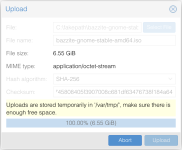
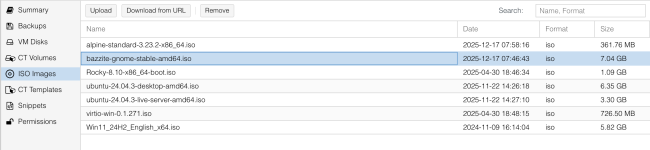
I used to be able to upload isos from the web ui. This is a basic feature, of course it worked, never had a problem with pve 8. Somewhere since PVE9, maybe 9.1, I can no longer upload isos. The system io stall goes up to 90 and the upload stops dead. it is pretty consistent that it gets to maybe 2.4gb then slots down for a couple of seconds, gets to 2.6 or so and stops cold. It behaves the same on the 1gbe and 10gbe connections, just gets to 2.6gb faster before stopping.
I'ved tried a few things, mounting tmp on the nvme, mounting it as tmpfs in ram, adding an optane slog, disabling sync writes on rpool but nothing has helped. I've split the mirrors too, nothing has changed.
Yes, these are cheap consumer grade sata ssds. No, they didn't have a problem before. Other than being the only iso upload source, all they are is boot and a single instance nightly guest backup. (pbs handles more) Configurations haved changed over time, but this problem isn't even isolated to just this one machine. This machine 'tiberius' is an old Ryzen 2600 gaming rig shoved to the gills (pci expansions like 10gbe nic, 8-port HBA, gpu, additional drives carefully laid out to use 100% of the available IO). The other machine 'regulus' is just a Dell Optiplex 3040. Both machines have a zfs mirrored rpool and an m2 nvme for guests. Both are running 9.1.1 or 9.1.2. There is also a third node, an old 4th gen Intel Nuc, it is also on 9.1.1. it isn't powerful enough to pull the full gigabit line speed, but it will take 300-400mbps upload and actually complete, even if it's writing afterwords over nfs back to tiberius.
Since it affects both machines, and since uploading ISO is a pretty basic function, any help is appreciated. I've gone as far as I can with LLMs, here are some details that naturally chatgpt goes AHA, this is the smoking gun! ZFS back pressure from ZFS TXG flush activity metadata etc etc but I'm not a zfs master. All I know is... why did it work and what changed in either ZFS or proxmox 9 that means I can't upload isos anymore, because it used to work even with this crap before I upgraded.
All 3 nodes went through PVE8to9 upgrades but that was weeks/months ago. IN fairness, i haven't tried to upload any isos in a while, just working with lxc templates mostly, so I can't say exactly when it happened.
`watch -n 1 cat /proc/pressure/io`
`watch -n 1 'date; zpool iostat -v'`
I used to be able to upload isos from the web ui. This is a basic feature, of course it worked, never had a problem with pve 8. Somewhere since PVE9, maybe 9.1, I can no longer upload isos. The system io stall goes up to 90 and the upload stops dead. it is pretty consistent that it gets to maybe 2.4gb then slots down for a couple of seconds, gets to 2.6 or so and stops cold. It behaves the same on the 1gbe and 10gbe connections, just gets to 2.6gb faster before stopping.
I'ved tried a few things, mounting tmp on the nvme, mounting it as tmpfs in ram, adding an optane slog, disabling sync writes on rpool but nothing has helped. I've split the mirrors too, nothing has changed.
Yes, these are cheap consumer grade sata ssds. No, they didn't have a problem before. Other than being the only iso upload source, all they are is boot and a single instance nightly guest backup. (pbs handles more) Configurations haved changed over time, but this problem isn't even isolated to just this one machine. This machine 'tiberius' is an old Ryzen 2600 gaming rig shoved to the gills (pci expansions like 10gbe nic, 8-port HBA, gpu, additional drives carefully laid out to use 100% of the available IO). The other machine 'regulus' is just a Dell Optiplex 3040. Both machines have a zfs mirrored rpool and an m2 nvme for guests. Both are running 9.1.1 or 9.1.2. There is also a third node, an old 4th gen Intel Nuc, it is also on 9.1.1. it isn't powerful enough to pull the full gigabit line speed, but it will take 300-400mbps upload and actually complete, even if it's writing afterwords over nfs back to tiberius.
Since it affects both machines, and since uploading ISO is a pretty basic function, any help is appreciated. I've gone as far as I can with LLMs, here are some details that naturally chatgpt goes AHA, this is the smoking gun! ZFS back pressure from ZFS TXG flush activity metadata etc etc but I'm not a zfs master. All I know is... why did it work and what changed in either ZFS or proxmox 9 that means I can't upload isos anymore, because it used to work even with this crap before I upgraded.
All 3 nodes went through PVE8to9 upgrades but that was weeks/months ago. IN fairness, i haven't tried to upload any isos in a while, just working with lxc templates mostly, so I can't say exactly when it happened.
Code:
Total DISK READ:         0.00 B/s | Total DISK WRITE:         0.00 B/s
Current DISK READ:       0.00 B/s | Current DISK WRITE:      38.84 M/s
    PID  PRIO  USER     DISK READ DISK WRITE>    COMMAND
  62348 be/4 www-data      0.00 B      2.64 G pveproxy worker
   4295 be/4 root          0.00 B     23.51 M systemd-journald
   3327 be/4 root        124.00 K      9.77 M kvm -id 108 -name homeassistant-vm,debug-threads=on -n~0=pflash0,pflash1=drive-efidisk0,hpet=off,type=q35+pve0
  23593 be/4 root          0.00 B      9.50 M [kworker/u50:2-kvfree_rcu_reclaim]
     87 be/4 root          0.00 B      7.79 M [kworker/u49:0-events_unbound]
  17630 be/4 root          0.00 B      7.73 M [kworker/u50:1-kvfree_rcu_reclaim]
  39124 be/4 root          0.00 B      5.74 M [kworker/u50:0-kvfree_rcu_reclaim]
  32153 be/4 root          0.00 B      5.38 M [kworker/u50:4-kvfree_rcu_reclaim]
  34590 be/4 root          0.00 B      4.42 M [kworker/u49:3-events_unbound]
   2427 be/4 root        112.00 K      4.03 M rrdcached -g
    400 be/0 root        311.00 K      4.00 M [zvol_tq-1]
  25580 be/4 root          0.00 B      3.09 M [kworker/u49:1-kvfree_rcu_reclaim]
   2959 be/4 root          0.00 B      3.00 M pmxcfs
    401 be/0 root        349.00 K      2.28 M [zvol_tq-2]
   3860 ?dif 100999        6.84 M   1158.00 K pihole-FTL -f
    399 be/0 root         89.00 K   1024.00 K [zvol_tq-0]
  52327 be/4 root          0.00 B    992.00 K [kworker/u49:2-kvfree_rcu_reclaim]
   3628 be/4 100000        0.00 B    504.00 K systemd-journald
   4596 be/4 backup        0.00 B    324.00 K proxmox-backup-proxy
  49834 be/0 root         16.00 K    208.00 K [zvol_tq-1]
   3600 be/4 100000        0.00 B    178.00 K systemd-journald
    637 be/4 root         24.00 K    120.00 K [txg_sync]
   1825 be/4 root          0.00 B    120.00 K [txg_sync]
  61313 be/0 root          0.00 B    114.00 K [zvol_tq-1]
                                       9
   3157 be/4 100000       20.00 K     22.00 K rsbd: cleanupd
   2430 be/4 root          0.00 B     11.00 K smartd -n -q never
  61338 be/0 root          5.00 K      8.00 K [zvol_tq-2]
   3039 be/4 root          0.00 B   1024.00 B nmbd --foreground --no-process-group
   3741 be/4 100000        0.00 B   1024.00 B dhclient -4 -v -i -pf /run/dhclient.eth0.pid -lf /var/~.leases -I -df /var/lib/dhcp/dhclient6.eth0.leases eth0
  63356 be/4 postfix       0.00 B   1024.00 B bounce -z -n defer -t unix -u -c

  keys:  any: refresh  q: quit  i: ionice  o: all  p: threads  a: bandwidth
  sort:  r: asc  left: DISK READ  right: COMMAND  home: PID  end: COMMAND
CONFIG_TASK_DELAY_ACCT and kernel.task_delayacct sysctl not enabled in kernel, cannot determine SWAPIN and IO %
`watch -n 1 cat /proc/pressure/io`
Code:
Every 1.0s: cat /proc/pressure/io                                                                                         tiberius: Tue Dec 16 09:48:32 2025

some avg10=87.72 avg60=56.26 avg300=18.42 total=283301742
full avg10=85.36 avg60=54.29 avg300=17.72 total=275486165
`watch -n 1 'date; zpool iostat -v'`
Code:
Every 1.0s: date; zpool iostat -v                                                                               tiberius: Tue Dec 16 09:48:51 2025

Tue Dec 16 09:48:51 AM EST 2025
                                                               capacity     operations     bandwidth
pool                                                         alloc   free   read  write   read  write
-----------------------------------------------------------  -----  -----  -----  -----  -----  -----
nvme_guests                                                  6.42G   226G     10     18   137K   211K
  nvme-Samsung_SSD_970_EVO_Plus_500GB_S58SNM0T907161H-part1  6.42G   226G     10     18   137K   211K
-----------------------------------------------------------  -----  -----  -----  -----  -----  -----
rpool                                                        23.7G  74.8G      2     50  75.8K  3.70M
  mirror-0                                                   23.7G  74.8G      2     50  75.8K  3.70M
    ata-Netac_SSD_120GB_YS581296399139783932-part3               -      -      1     25  34.8K  1.85M
    ata-Netac_SSD_120GB_YS581296399139784728-part3               -      -      1     25  41.0K  1.85M
-----------------------------------------------------------  -----  -----  -----  -----  -----  -----
vault                                                        18.7G  25.5T      0      0  1.18K  2.34K
  mirror-0                                                   9.24G  12.7T      0      0    220    458
    ata-WDC_WUH721414ALE6L4_81G25VVV                             -      -      0      0    110    229
    ata-WDC_WUH721414ALE604_9JGJ4LST                             -      -      0      0    109    229
  mirror-1                                                   9.18G  12.7T      0      0    219    458
    ata-WDC_WUH721414ALE6L4_Y5JMJSUC                             -      -      0      0    109    229
    ata-WDC_WUH721414ALE6L4_81G7NSRV                             -      -      0      0    109    229
special                                                          -      -      -      -      -      -
  mirror-2                                                    327M   111G      0      0    772  1.44K
    ata-INTEL_SSDSC2BB120G4_PHWL522301B2120LGN                   -      -      0      0    420    738
    ata-INTEL_SSDSC2BB120G4_PHWL522301LH120LGN                   -      -      0      0    352    738
-----------------------------------------------------------  -----  -----  -----  -----  -----  -----
Last edited: