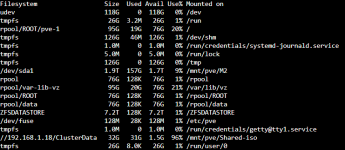
Jul 27 13:53:49 NTL-HOST1 systemd[1]: Stopped user@0.service - User Manager for UID 0.
Jul 27 13:53:49 NTL-HOST1 systemd[1]: Stopping user-runtime-dir@0.service - User Runtime Directory /run/user/0...
Jul 27 13:53:49 NTL-HOST1 systemd[1]: run-user-0.mount: Deactivated successfully.
Jul 27 13:53:49 NTL-HOST1 systemd[1]: user-runtime-dir@0.service: Deactivated successfully.
Jul 27 13:53:49 NTL-HOST1 systemd[1]: Stopped user-runtime-dir@0.service - User Runtime Directory /run/user/0.
Jul 27 13:53:49 NTL-HOST1 systemd[1]: Removed slice user-0.slice - User Slice of UID 0.
Jul 27 13:54:40 NTL-HOST1 kernel: INFO: task txg_sync:868 blocked for more than 122 seconds.
Jul 27 13:55:18 NTL-HOST1 kernel:       Tainted: P           O        7.0.14-6-pve #1
Jul 27 13:55:18 NTL-HOST1 kernel: "echo 0 > /proc/sys/kernel/hung_task_timeout_secs" disables this message.
Jul 27 13:55:18 NTL-HOST1 kernel: task:txg_sync        state:D stack:0     pid:868   tgid:868   ppid:2      task_flags:0x288040 flags:0x00080000
Jul 27 13:55:18 NTL-HOST1 kernel: Call Trace:
Jul 27 13:55:18 NTL-HOST1 kernel:  <TASK>
Jul 27 13:55:18 NTL-HOST1 kernel:  __schedule+0x49a/0x1780
Jul 27 13:55:18 NTL-HOST1 kernel:  ? __mod_timer+0x11c/0x340
Jul 27 13:55:18 NTL-HOST1 kernel:  schedule+0x27/0xb0
Jul 27 13:55:18 NTL-HOST1 kernel:  schedule_timeout+0x89/0x110
Jul 27 13:55:18 NTL-HOST1 kernel:  ? __pfx_process_timeout+0x10/0x10
Jul 27 13:55:18 NTL-HOST1 kernel:  io_schedule_timeout+0x57/0x90
Jul 27 13:55:18 NTL-HOST1 kernel:  __cv_timedwait_common+0x143/0x180 [spl]
Jul 27 13:55:18 NTL-HOST1 kernel:  ? __pfx_autoremove_wake_function+0x10/0x10
Jul 27 13:55:18 NTL-HOST1 kernel:  __cv_timedwait_io+0x19/0x30 [spl]
Jul 27 13:55:18 NTL-HOST1 kernel:  zio_wait+0x146/0x2f0 [zfs]
Jul 27 13:55:18 NTL-HOST1 kernel:  dsl_pool_sync+0xe2/0x510 [zfs]
Jul 27 13:55:18 NTL-HOST1 kernel:  spa_sync+0x42e/0xd80 [zfs]
Jul 27 13:55:18 NTL-HOST1 kernel:  ? spa_txg_history_init_io+0x11c/0x130 [zfs]
Jul 27 13:55:18 NTL-HOST1 kernel:  txg_sync_thread+0x218/0x3c0 [zfs]
Jul 27 13:55:18 NTL-HOST1 kernel:  ? __pfx_txg_sync_thread+0x10/0x10 [zfs]
Jul 27 13:55:18 NTL-HOST1 kernel:  ? __pfx_thread_generic_wrapper+0x10/0x10 [spl]
Jul 27 13:55:18 NTL-HOST1 kernel:  thread_generic_wrapper+0x60/0x80 [spl]
Jul 27 13:55:18 NTL-HOST1 kernel:  kthread+0xf7/0x130
Jul 27 13:55:18 NTL-HOST1 kernel:  ? __pfx_kthread+0x10/0x10
Jul 27 13:55:18 NTL-HOST1 kernel:  ret_from_fork+0x2da/0x3a0
Jul 27 13:55:18 NTL-HOST1 kernel:  ? __pfx_kthread+0x10/0x10
Jul 27 13:55:18 NTL-HOST1 kernel:  ret_from_fork_asm+0x1a/0x30
Jul 27 13:55:18 NTL-HOST1 kernel:  </TASK>
Jul 27 13:55:18 NTL-HOST1 pveproxy[31462]: problem with client ::ffff:me; Connection timed out
Jul 27 13:55:18 NTL-HOST1 pve-firewall[2391]: firewall update time (74.895 seconds)
Jul 27 13:55:18 NTL-HOST1 pvestatd[2394]: status update time (75.288 seconds)
Jul 27 13:55:18 NTL-HOST1 pmxcfs[2216]: [status] notice: RRDC update error /var/lib/rrdcached/db/pve-node-9.0/NTL-HOST1: -1
Jul 27 13:55:18 NTL-HOST1 pmxcfs[2216]: [status] notice: RRDC update error /var/lib/rrdcached/db/pve-vm-9.0/101: -1
Jul 27 13:55:18 NTL-HOST1 pmxcfs[2216]: [status] notice: RRDC update error /var/lib/rrdcached/db/pve-vm-9.0/100: -1
Jul 27 13:55:19 NTL-HOST1 pmxcfs[2216]: [status] notice: RRDC update error /var/lib/rrdcached/db/pve-storage-9.0/NTL-HOST1/local-zfs: -1
Jul 27 13:55:19 NTL-HOST1 pmxcfs[2216]: [status] notice: RRDC update error /var/lib/rrdcached/db/pve-storage-9.0/NTL-HOST1/local: -1
Jul 27 13:55:19 NTL-HOST1 pmxcfs[2216]: [status] notice: RRDC update error /var/lib/rrdcached/db/pve-storage-9.0/NTL-HOST1/
Jul 27 13:55:19 NTL-HOST1 pmxcfs[2216]: [status] notice: RRDC update error /var/lib/rrdcached/db/pve-storage-9.0/NTL-HOST1/ZFSDATASTORE: -1
Jul 27 13:55:19 NTL-HOST1 pmxcfs[2216]: [status] notice: RRDC update error /var/lib/rrdcached/db/pve-storage-9.0/NTL-HOST1/M2: -1
Jul 27 13:55:19 NTL-HOST1 pmxcfs[2216]: [status] notice: RRDC update error /var/lib/rrdcached/db/pve-storage-9.0/NTL-HOST1/Shared-iso: -1
Jul 27 13:55:23 NTL-HOST1 pve-ha-lrm[2454]: loop took too long (85 seconds)
Jul 27 13:55:23 NTL-HOST1 pve-ha-crm[2429]: loop took too long (80 seconds)