

I'm trying to passthrough a gpu to a VM.
Set up:
Motherboard: Asus Z87-K
CPU: Intel Core i5 4670K
GPU: GTX 980/Tesla p100 16GB
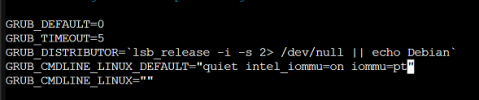
/etc/default/grub:
# The IOMMU looks enabled
root@pve:~# dmesg | grep -e DMAR -e IOMMU
[ 0.054186] DMAR: IOMMU enabled
# but when trying to find the types no output is given
root@pve:~# find /sys/kernel/iommu_groups/ -type l
root@pve:~#
Set up:
Motherboard: Asus Z87-K
CPU: Intel Core i5 4670K
GPU: GTX 980/Tesla p100 16GB
/etc/default/grub:
# The IOMMU looks enabled
root@pve:~# dmesg | grep -e DMAR -e IOMMU
[ 0.054186] DMAR: IOMMU enabled
# but when trying to find the types no output is given
root@pve:~# find /sys/kernel/iommu_groups/ -type l
root@pve:~#

 ff,efif