[SOLVED] Cant connect to web-interface on macbook

raewolf

New Member
Feb 9, 2022
5
1
1
22
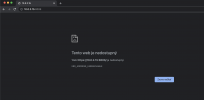
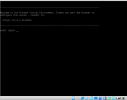
Hello, I am currently running on Macbook in Oracle Vbox 6.32 and i have installed Proxmox VE 7.1. I installed everything as I should and i wanted to connect to the web-interface (https://10.0.2.15:8006) but it didnt worked. Site cannot be reached. I dont know where is the problem. I had the same problem when installing webmin and usermin on debian and i cannot connect to webmin from macbook but in virtual machine i could easily. I dont know if i have something bad in setting but proxmox is installed correctly. I will be so happy if someone could help me because i need it to my school. Thanks.
 

Attachments
  • Screenshot at Feb 09 13-34-54.png
    Screenshot at Feb 09 13-34-54.png
    611.9 KB · Views: 44
  • Screenshot at Feb 09 13-35-16.png
    Screenshot at Feb 09 13-35-16.png
    189.5 KB · Views: 42
  • Screenshot at Feb 09 13-35-48.png
    Screenshot at Feb 09 13-35-48.png
    799.8 KB · Views: 60
Last edited:
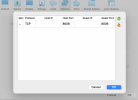
If I interpret your screenshots correctly, you are running PVE in a VM on your MacBook and are forwarding the Port (8006) from your VM to the host? Have you tried opening https://localhost:8006/ on your MacBook?
 
Last edited:
Try adding the IP addresses 127.0.0.1 for the host and 10.0.2.15 for the VM when adding the forwarding configuration. Then try to open https://127.0.0.1:8006.
 
In your third screenshot you have the columns Name, Protocol, Host IP, Host Port, Guest IP, Guest Port. Edit it so that it looks like the following:

NameProtocolHost IPHost PortGuest IPGuest Port
*choose a name*TCP127.0.0.1800610.0.2.158006
 
Last edited:
Hell yeah, thanks mate. U fixed my problem. I am very happy that is it working already. Thanks. Have a great day
 
No problem, please mark this thread as solved :)