Hi,
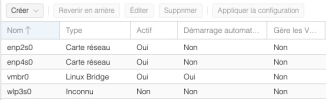
I've just installed Proxmox on a NUC with a wifi chipset Realtek 8852BE. The interface wlp3s0 isn't working at all.
I'm a beginner in linux type OS.
here the lspci commande :
03:00.0 Network controller [0280]: Realtek Semiconductor Co., Ltd. RTL8852BE PCIe 802.11ax Wireless Network Controller [10ec:b852]
Subsystem: Realtek Semiconductor Co., Ltd. RTL8852BE PCIe 802.11ax Wireless Network Controller [10ec:b852]
Kernel driver in use: vfio-pci
Kernel modules: rtw89_8852be
here the dmesg command :
[ 2.992926] rtw89_8852be 0000:03:00.0: loaded firmware rtw89/rtw8852b_fw-1.bin
[ 3.000764] rtw89_8852be 0000:03:00.0: enabling device (0000 -> 0003)
[ 3.004160] rtw89_8852be 0000:03:00.0: Firmware version 0.29.29.5 (da87cccd), cmd version 0, type 5
[ 3.004168] rtw89_8852be 0000:03:00.0: Firmware version 0.29.29.5 (da87cccd), cmd version 0, type 3
[ 3.004176] rtw89_8852be 0000:03:00.0: MAC has already powered on
[ 3.308686] rtw89_8852be 0000:03:00.0: chip rfe_type is 5
[ 3.461226] rtw89_8852be 0000:03:00.0 wlp3s0: renamed from wlan0
The wlp3s0 doesn't appear in ip address command. So the command ip link doesn't work :
Cannot find device "wlp3s0"
What should I do ?
Thank you !
I've just installed Proxmox on a NUC with a wifi chipset Realtek 8852BE. The interface wlp3s0 isn't working at all.
I'm a beginner in linux type OS.
here the lspci commande :
lspci -nnk | grep 0280 -A303:00.0 Network controller [0280]: Realtek Semiconductor Co., Ltd. RTL8852BE PCIe 802.11ax Wireless Network Controller [10ec:b852]
Subsystem: Realtek Semiconductor Co., Ltd. RTL8852BE PCIe 802.11ax Wireless Network Controller [10ec:b852]
Kernel driver in use: vfio-pci
Kernel modules: rtw89_8852be
here the dmesg command :
dmesg | grep -i rtw[ 2.992926] rtw89_8852be 0000:03:00.0: loaded firmware rtw89/rtw8852b_fw-1.bin
[ 3.000764] rtw89_8852be 0000:03:00.0: enabling device (0000 -> 0003)
[ 3.004160] rtw89_8852be 0000:03:00.0: Firmware version 0.29.29.5 (da87cccd), cmd version 0, type 5
[ 3.004168] rtw89_8852be 0000:03:00.0: Firmware version 0.29.29.5 (da87cccd), cmd version 0, type 3
[ 3.004176] rtw89_8852be 0000:03:00.0: MAC has already powered on
[ 3.308686] rtw89_8852be 0000:03:00.0: chip rfe_type is 5
[ 3.461226] rtw89_8852be 0000:03:00.0 wlp3s0: renamed from wlan0
The wlp3s0 doesn't appear in ip address command. So the command ip link doesn't work :
ip link set dev wlp3s0 upCannot find device "wlp3s0"
What should I do ?
Thank you !