

Gooooood Morning...
I am a ESXi user who is considering ProxMox for my new HomeLab. Setup was a breeze and I am having a blast - great work.
I wanted to create my first Microsoft Windows 11 VM and, as there are a lot of tutorials out, there thought it would not be a problem. I just cannot seem to find the TPM box to tick - this is the box I mean:
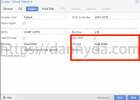
I have selected q35 as the Machine type but, as you can see below:
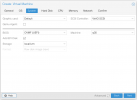
I do not have that option. This is the tutorial I was using:
https://dannyda.com/2021/10/08/how-...2Ek5KEQFJNM-1635232666-0-gqNtZGzNAzujcnBszQg9
but I have tried others.
Any help would be appreciated. Thx.
Cheers
Ursus
PS: responses can be in German, I am just more comfortable with English and think it would help others more in a "neutral" language.
I am a ESXi user who is considering ProxMox for my new HomeLab. Setup was a breeze and I am having a blast - great work.
I wanted to create my first Microsoft Windows 11 VM and, as there are a lot of tutorials out, there thought it would not be a problem. I just cannot seem to find the TPM box to tick - this is the box I mean:
I have selected q35 as the Machine type but, as you can see below:
I do not have that option. This is the tutorial I was using:
https://dannyda.com/2021/10/08/how-...2Ek5KEQFJNM-1635232666-0-gqNtZGzNAzujcnBszQg9
but I have tried others.
Any help would be appreciated. Thx.
Cheers
Ursus
PS: responses can be in German, I am just more comfortable with English and think it would help others more in a "neutral" language.
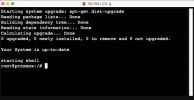
 Thank you for the help. Cheers. ursus