

Hello Forum,
Firstly wanted to say......Proxmox "noob" so be gentle with me !!
Secondly, I have been using VMWare ESXi since V4 in a home office environment and REALLY want to be able to migrate over to Proxmox. In fact, I plan to move everything over to Linux/FreeBSD (I also run FreeNAS for VM storage as well) eventually.
OK, on to the issue I am having. I have successfully installed a Windows 2003 Server and a Linux Mint system on Proxmox, using the standard disk drivers (IDE), however, I would like to utilize the VIRTIO drivers instead. Having read a few posts about these drivers it appears they are much better suited.
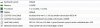
Details of the VM
Where are the drivers for the hard drives ? Have I downloaded the wrong file ? I have tried three different VIRTIO downlaods
and none of them work.
Can anyone shed any light on where I am going wring with this ?
Thanks
Firstly wanted to say......Proxmox "noob" so be gentle with me !!
Secondly, I have been using VMWare ESXi since V4 in a home office environment and REALLY want to be able to migrate over to Proxmox. In fact, I plan to move everything over to Linux/FreeBSD (I also run FreeNAS for VM storage as well) eventually.
OK, on to the issue I am having. I have successfully installed a Windows 2003 Server and a Linux Mint system on Proxmox, using the standard disk drivers (IDE), however, I would like to utilize the VIRTIO drivers instead. Having read a few posts about these drivers it appears they are much better suited.
Details of the VM
- When I boot the VM, the install starts.
- It gets to the point where it wants to know where to install Windows and I click on "Load Driver"
- Browse
- Open up the CDROM where the VirtIO drivers live
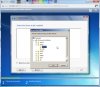
- When I click OK all I get are two INF files availabe, BALLON.INF (which I thought was a memory driver) and VIOSER.INF which is a serial driver.
Where are the drivers for the hard drives ? Have I downloaded the wrong file ? I have tried three different VIRTIO downlaods
- virtio-win-0.1-100.iso
- virtio-win-0.1.103.iso
- virtio-win-0.1.96.iso
and none of them work.
Can anyone shed any light on where I am going wring with this ?
Thanks


 , however, I had to let Windows search the entire ISO for the correct file as I couldn't figure out which folder the VIRTIO drivers were in.

