Can I ask an uid range not to be mapped in an unprivileged container

koalillo

Active Member
Nov 1, 2018
36
0
26
46
Hi,

I'm running FreeIPA and I would like to use unprivileged containers so I can use Docker in containers.

My Proxmox host is joined to IPA, and my containers too. My FreeIPA install uses 1284000000-1284200000 for uids and gids. This breaks with:

$ cat /etc/subuid
root:100000:65536
$ cat /etc/subgid
root:100000:65536

as the FreeIPA uids/gids break that. Is there a way to ask for the FreeIPA uid/gid ranges *NOT* to be mapped? My uids/gids match between my host and my containers, so it's not really a security problem for me.

Thanks,

Álex
 
OK, solved this:

1) In /etc/pve/lxc/209.conf

Code:
lxc.idmap = u 1284000000 1284000000 200000
lxc.idmap = g 1284000000 1284000000 200000
lxc.idmap = u 0 100000 65536
lxc.idmap = g 0 100000 65536

; a noop mapping for my FreeIPA uid/gid range and the "standard one"

2)

Code:
$ cat /etc/subuid 
root:100000:65536
root:1284000000:200000

Code:
$ cat /etc/subgid
root:100000:65536
root:1284000000:200000

allow root to use the FreeIPA range for containers
 
Last edited:
Hi @koalillo I think I'm trying to achieve what you've done. Just a bit confused. Did you configure the <VMID>.conf file and subuid subgid to keep the original ranges too? i.e. 0 100000 65536?

Why not simply remove those and keep your new ranges?
 
OK. I think I'm starting to getting my head around this. Just in case anyone else comes across this in the same state of confusion that I was in, here are the notes I wrote to myself:

I install FreeIPA on an unprivileged container. Unprivileged containers translate the uids and gids on the container to a different range on the host. This is useful for security because the root on the container with uid=0 is mapped to an arbitrarily high uid on the host (typically 100000) which has no special permissions on the host. So even if the container’s root user were able to escape the container, they’d only find themselves in the host with a uid of 100000 and with the permissions of a nobody user.

However, this presents 2 problems for FreeIPA. Firstly, in the default set up, the container is given only uids in the range 0-65536. But FreeIPA tends to assign uids much higher than that.

Secondly, the uids in the container are mapped to a different set of ids in the host, which I think causes logging into the container as a FreeIPA user to fail (maybe because the uid on the host will not match the uid of the FreeIPA server), and also might cause problems when trying to access shared resources such as files.

The default range of uid/gids that are passed to the container are defined on the host in the files: /etc/subuid and /etc/subgid in the format:
root:100000:65536

which means map the first 65536 uids on the container to the uids starting from 100000 on the host. I.e. root uid = 0 on the container is assigned to 100000 on the host and so on sequentially up to container uid 65536 being assigned to 165536 on the host.

It is not sufficient just to widen this range to include the FreeIPA range because a FreeIPA user’s uid on the container will still be translated to that uid+100000 on the host, whereas we want the FreeIPA uids to be assigned to the same number on the host.

So we need to define two ranges: one where the system IDs (e.g. root uid 0) of the container can be mapped to an arbitrary range on the host for security reasons, and another where the FreeIPA uids of the container can be mapped to the same uids on the host. That's why we have two lines in the /etc/subuid and /etc/subgid files:
Code:
root:100000:65536
root:1284000000:200000

In addition we need to map them because we don’t want the uids to be assigned sequentially like they would have been in the default configuration (e.g. container id 10 mapped to host id 100010) because then the FreeIPA ids would still be translated.
So we need to map the lower uids & gids to the arbitrary range on the host and the FreeIPA ones to the same FreeIPA range on the host in /etc/pve/lxc/209.conf

Code:
lxc.idmap = u 1284000000 1284000000 200000 
lxc.idmap = g 1284000000 1284000000 200000 
lxc.idmap = u 0 100000 65536 
lxc.idmap = g 0 100000 65536

Four values are provided on each line. First a character, either 'u', or 'g', to specify whether user or group ids are being mapped. Next is the first userid as seen in the user namespace of the container. Next is the userid as seen on the host. Finally, a range indicating the number of consecutive ids to map.

Note that we’re mapping the low IDs to an offset range in the host, but the high ids are being mapped to the same range on the host.

 
Yeah, sorry, I saw your first message but I was busy and I could not reply- the original post was misformatted and unclear- hope you didn't waste too much time figuring it out.

In the end, I've went back to privileged containers as Docker doesn't work so well for me under LXC, so I'm running it on VMs.
 
I am struggling with a similar problem which I posted HERE Except my range is immediately past 65536 which is used by Synology added user groups (GID). For example:

User UID 1107
Group GID 65607


I am struggling with GID 65607. Any help would be really appreciated.
 
This has been working for me, but I am puzzled why it does.

Why the second line mapping on the host is:

root:100000:65536
root:1284000000:200000

And not:

root:100000:65536
1284000000:1284000000:200000

Similar to the mapping inside the container.
 
This has been working for me, but I am puzzled why it does.

Why the second line mapping on the host is:

root:100000:65536
root:1284000000:200000

And not:

root:100000:65536
1284000000:1284000000:200000

Similar to the mapping inside the container.
This last piece confuses me too. Did you ever figure this out? Wouldn’t it seem you’d want to start the host mapping at 1284000000 too and not root 0?
 
Hey. Been a while since I looked at this, but I think there might be some confusion arising from 'mapping'. IIRC the lines which you're referring to aren't mappings. They are ranges. So, in these cases, the 'root' user is allowed to impersonate a range of uids from 100000 up to 165536, and a second range from 12840000000 to 12840020000 or whatever it is (see https://man7.org/linux/man-pages/man5/subuid.5.html).

The important thing is that these are definitions of two ranges of ids. They are not mappings.

The mappings happen in the second bit lxc.idmap ..... Here you're mapping the system users onto the first range and the freeipa users onto the higher range.

With that, read my Feb 19 post again to see if it starts to make sense. TBH it's been a long time and I've no longer got a solid handle on it, so please let me know if what I've said in this post is misleading and I'll correct or delete it so as not to spread more confusion.
 
This was super helpful! Thanks! I wish free-ipa wouldn't start with such ridiculous uid/gids, but apparently it uses a random number by default. You can change it during install, though (ipa-server-install --idstart=#### -idmax=####), or after its already installed by updating this entry in the directory as follows:

Code:
dn: cn=Posix IDs,cn=Distributed Numeric Assignment Plugin,cn=plugins,cn=config
changetype: modify
replace: dnanextvalue
dnanextvalue: 20000
-
replace: dnamaxvalue
dnamaxvalue: 29999

In case it helps someone decode how to set up the id mapping for other base uids, I configured my free-ipa to use 70000-79999 for all uid/gids, and my files look as follows:

/etc/subuid and /etc/subgid:
Code:
root:100000:65536
root:70000:10000
The first line is the default, and the second line says root can also have subuids starting from 70000, counting 10000 total (i.e. 79999). This means containers running as root can use those subuids.

My lxc conf file (/etc/pve/lxc/102.conf):
Code:
lxc.idmap: u 70000 70000 10000
lxc.idmap: g 70000 70000 10000
lxc.idmap: u 0 100000 65536
lxc.idmap: g 0 100000 65536

The first two lines tell the container to map 10000 uid/gids from 70000 in the container to 10000 uid/gids from 70000 in the host (which lets you log in). The second two lines tells it to map 65536 uid/gids from 0 in the container to 65536 uid/gids starting from 100000 on the host.
 
Last edited:
this is related to FreeIPA, unprivileged LXC containers and ssh breaking but im sure more things break too - all solutions here and on linux containers seemed to range from messing with freeipa ids but that introduces other problems or remapping in containers conf that actually solves it costing only your sanity on keeping track and redeploying on new hosts but freeipa is about making your life easier with less friction, not more.

documentation is scattered around but this is detailed behavior and actually on redhats docs but gets shadowed as an specific AD solution, the click came from this old doc https://www.freeipa.org/page/V4/Migrating_existing_environments_to_Trust

symptoms when trying to login with a ticket on specific hosts where mixed - ranging from staleness to generic 'forbidden messages' or just dropping connection after authenticating'

what gave the clue it was uid was journalctl -u sshd but the real info was hidden in /var/log/sssd/krb5_child.log

(2026-08-07 11:51:40): [krb5_child[1143]] [privileged_krb5_setup] (0x0020): [RID#10] Failed to set real GID: 22

solution is actually a great provision for problems that arrive from how different systems see the same information and its called ID Views

Its readily available on UI and you can map user attributes besides UIDS too. its a middleware - just translates how the guest system sees the information - doesnt touch your data - elegant as freeipa and the source of truth doesnt get scattered around, it lives with all the other info.

one thing though... ive started on cli and when I got to the part we assign a host to 'see' the view I went to check the fqdn on freeipa ui and found the ID Views section - don't know if it appeared after I added the view though, worth checking but im giving both paths.

CLI

first get a ticket first if not doing from freeipa's host
kinit admin

then create a new view
ipa idview-add lxc_unprivileged_view --desc="ID mappings for unprivileged LXC containers"

map your fripas users and group (if needed) to the safe container ID range:
ipa idoverrideuser-add lxc_unprivileged_view lucasnegrao --uid=7532 --gidnumber=7532

if your user has more clashing groups do it for them too
ipa idoverridegroup-add lxc_unprivileged_view developers --gidnumber=5001

that's it. apply the view to the hosts and you're done.
ipa idview-apply lxc_unprivileged_view --hosts=traefik.infra.local

that's it..
(you should also clean cache and restart sssd on container as a general good behavior thing but if it works without.. it works)
sudo sss_cache -E
sudo systemctl restart sssd

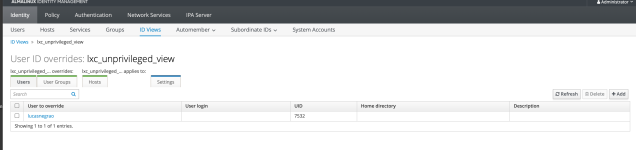
if you have many hosts though the UI path is even less friction -

IDENTITY TAB -> ID VIEWS -> create a new view -> map your fripas users and group to the safe numbers -> choose the hosts.

ui gets selection boxes for everything so its like a 2 minutes thing

Screenshot 2026-08-07 at 15.38.27.png


é nois!

Lucas
 
Last edited:
  • Like
Reactions: kayson