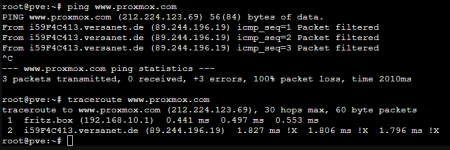
All Network inquiries are filtered from my Provider

Halodri

New Member
Jan 19, 2026
8
0
1
Hi,

Yes, i am new here... and i have only some experience with Linux. I already tried to solve my problem with older forum threads, but i didn't find any solutions in this forum.

I am trying to install proxmox for the first time. After the Installation i cannot update the installation. It looks like, that my provider is filtering my network inquiries from the proxmox server.
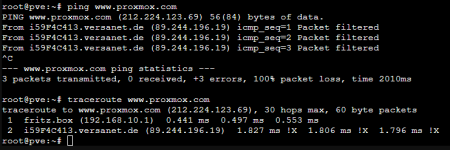
1768783455166.png

Please help me.
 

Attachments

  • 1768783381538.png
    1768783381538.png
    25.3 KB · Views: 3
"ping www.proxmox.com" is not a good choice for a test. It does not answer to my pings too:
Code:
~$ ping -c1 -W 2  www.proxmox.com 
PING www.proxmox.com (212.224.123.69) 56(84) bytes of data.

--- www.proxmox.com ping statistics ---
1 packets transmitted, 0 received, 100% packet loss, time 0ms

I am always unhappy when a public server denies echo-request via ICMP...
Code:
~$ nmap -p 80,443   www.proxmox.com 
Starting Nmap 7.93 ( https://nmap.org ) at 2026-01-19 09:06 CET
Nmap scan report for www.proxmox.com (212.224.123.69)
Host is up (0.019s latency).
Other addresses for www.proxmox.com (not scanned): 2a01:7e0:0:424::12

PORT    STATE SERVICE
80/tcp  open  http
443/tcp open  https

Does any outbound traffic succeed? Tell us more about your local network and give us some background information:
  • pveversion -v
Basic network information:
  • ip address show # currently active IP addresses on this machine
  • ip route show # currently active routing table
  • ip link show # currently active links
  • cat /etc/network/interfaces # configuration of the network
  • cat /etc/resolv.conf # DNS resolver settings
  • ping -c 1 -W 1 9.9.9.9 # a simple "ping" to verify outgoing routing
  • host quad9.net # a simple DNS lookup to verify reachable DNS servers
You may use the “</>“ button at the top of the editor window or you can just place [code]..[/code] around your copy-n-pasted text to create (better) readable text.
 
You are right, but heise.de is answering from the rest of my home network, but not from the proxmox-server:

Code:
root@pve:~# ping www.heise.de
PING www.heise.de (193.99.144.85) 56(84) bytes of data.
From i59F4C413.versanet.de (89.244.196.19) icmp_seq=1 Packet filtered

i tried to show in my first post with traceroute command, that every traffic from the promox-server gets filtered after it leaves my router at home.

For your Information:

pveversion -v:

Code:
Linux pve 6.17.2-1-pve #1 SMP PREEMPT_DYNAMIC PMX 6.17.2-1 (2025-10-21T11:55Z) x86_64

The programs included with the Debian GNU/Linux system are free software;
the exact distribution terms for each program are described in the
individual files in /usr/share/doc/*/copyright.

Debian GNU/Linux comes with ABSOLUTELY NO WARRANTY, to the extent
permitted by applicable law.
root@pve:~# pveversion -v
proxmox-ve: 9.1.0 (running kernel: 6.17.2-1-pve)
pve-manager: 9.1.1 (running version: 9.1.1/42db4a6cf33dac83)
proxmox-kernel-helper: 9.0.4
proxmox-kernel-6.17.2-1-pve-signed: 6.17.2-1
proxmox-kernel-6.17: 6.17.2-1
ceph-fuse: 19.2.3-pve2
corosync: 3.1.9-pve2
criu: 4.1.1-1
frr-pythontools: 10.3.1-1+pve4
ifupdown2: 3.3.0-1+pmx11
intel-microcode: 3.20250812.1~deb13u1
ksm-control-daemon: 1.5-1
libjs-extjs: 7.0.0-5
libproxmox-acme-perl: 1.7.0
libproxmox-backup-qemu0: 2.0.1
libproxmox-rs-perl: 0.4.1
libpve-access-control: 9.0.4
libpve-apiclient-perl: 3.4.2
libpve-cluster-api-perl: 9.0.7
libpve-cluster-perl: 9.0.7
libpve-common-perl: 9.0.15
libpve-guest-common-perl: 6.0.2
libpve-http-server-perl: 6.0.5
libpve-network-perl: 1.2.3
libpve-rs-perl: 0.11.3
libpve-storage-perl: 9.0.18
libspice-server1: 0.15.2-1+b1
lvm2: 2.03.31-2+pmx1
lxc-pve: 6.0.5-3
lxcfs: 6.0.4-pve1
novnc-pve: 1.6.0-3
proxmox-backup-client: 4.0.20-1
proxmox-backup-file-restore: 4.0.20-1
proxmox-backup-restore-image: 1.0.0
proxmox-firewall: 1.2.1
proxmox-kernel-helper: 9.0.4
proxmox-mail-forward: 1.0.2
proxmox-mini-journalreader: 1.6
proxmox-offline-mirror-helper: 0.7.3
proxmox-widget-toolkit: 5.1.2
pve-cluster: 9.0.7
pve-container: 6.0.18
pve-docs: 9.1.0
pve-edk2-firmware: 4.2025.05-2
pve-esxi-import-tools: 1.0.1
pve-firewall: 6.0.4
pve-firmware: 3.17-2
pve-ha-manager: 5.0.8
pve-i18n: 3.6.2
pve-qemu-kvm: 10.1.2-3
pve-xtermjs: 5.5.0-3
qemu-server: 9.0.30
smartmontools: 7.4-pve1
spiceterm: 3.4.1
swtpm: 0.8.0+pve3
vncterm: 1.9.1
zfsutils-linux: 2.3.4-pve1

cat /etc/network/interfaces

Code:
# network interface settings; autogenerated
# Please do NOT modify this file directly, unless you know what
# you're doing.
#
# If you want to manage parts of the network configuration manually,
# please utilize the 'source' or 'source-directory' directives to do
# so.
# PVE will preserve these directives, but will NOT read its network
# configuration from sourced files, so do not attempt to move any of
# the PVE managed interfaces into external files!

auto lo
iface lo inet loopback

iface nic0 inet manual

iface nic1 inet manual

auto vmbr0
iface vmbr0 inet static
        address 192.168.10.120/24
        gateway 192.168.10.1
        bridge-ports nic1
        bridge-stp off
        bridge-fd 0

auto vmbr1
iface vmbr1 inet manual
        bridge-ports nic0
        bridge-stp off
        bridge-fd 0

ip a

Code:
1: lo: <LOOPBACK,UP,LOWER_UP> mtu 65536 qdisc noqueue state UNKNOWN group default qlen 1000
    link/loopback 00:00:00:00:00:00 brd 00:00:00:00:00:00
    inet 127.0.0.1/8 scope host lo
       valid_lft forever preferred_lft forever
    inet6 ::1/128 scope host noprefixroute 
       valid_lft forever preferred_lft forever
2: nic0: <BROADCAST,MULTICAST,UP,LOWER_UP> mtu 1500 qdisc mq master vmbr1 state UP group default qlen 1000
    link/ether 00:10:18:4e:74:98 brd ff:ff:ff:ff:ff:ff
    altname enx0010184e7498
3: nic1: <BROADCAST,MULTICAST,UP,LOWER_UP> mtu 1500 qdisc fq_codel master vmbr0 state UP group default qlen 1000
    link/ether 74:d4:35:f7:a2:e7 brd ff:ff:ff:ff:ff:ff
    altname enp0s25
    altname enx74d435f7a2e7
4: vmbr0: <BROADCAST,MULTICAST,UP,LOWER_UP> mtu 1500 qdisc noqueue state UP group default qlen 1000
    link/ether 74:d4:35:f7:a2:e7 brd ff:ff:ff:ff:ff:ff
    inet 192.168.10.120/24 scope global vmbr0
       valid_lft forever preferred_lft forever
    inet6 fe80::76d4:35ff:fef7:a2e7/64 scope link proto kernel_ll 
       valid_lft forever preferred_lft forever
5: vmbr1: <BROADCAST,MULTICAST,UP,LOWER_UP> mtu 1500 qdisc noqueue state UP group default qlen 1000
    link/ether 00:10:18:4e:74:98 brd ff:ff:ff:ff:ff:ff
    inet6 fe80::210:18ff:fe4e:7498/64 scope link proto kernel_ll 
       valid_lft forever preferred_lft forever

ip r

Code:
default via 192.168.10.1 dev vmbr0 proto kernel onlink 
192.168.10.0/24 dev vmbr0 proto kernel scope link src 192.168.10.120

ip l

Code:
1: lo: <LOOPBACK,UP,LOWER_UP> mtu 65536 qdisc noqueue state UNKNOWN mode DEFAULT group default qlen 1000
    link/loopback 00:00:00:00:00:00 brd 00:00:00:00:00:00
2: nic0: <BROADCAST,MULTICAST,UP,LOWER_UP> mtu 1500 qdisc mq master vmbr1 state UP mode DEFAULT group default qlen 1000
    link/ether 00:10:18:4e:74:98 brd ff:ff:ff:ff:ff:ff
    altname enx0010184e7498
3: nic1: <BROADCAST,MULTICAST,UP,LOWER_UP> mtu 1500 qdisc fq_codel master vmbr0 state UP mode DEFAULT group default qlen 1000
    link/ether 74:d4:35:f7:a2:e7 brd ff:ff:ff:ff:ff:ff
    altname enp0s25
    altname enx74d435f7a2e7
4: vmbr0: <BROADCAST,MULTICAST,UP,LOWER_UP> mtu 1500 qdisc noqueue state UP mode DEFAULT group default qlen 1000
    link/ether 74:d4:35:f7:a2:e7 brd ff:ff:ff:ff:ff:ff
5: vmbr1: <BROADCAST,MULTICAST,UP,LOWER_UP> mtu 1500 qdisc noqueue state UP mode DEFAULT group default qlen 1000
    link/ether 00:10:18:4e:74:98 brd ff:ff:ff:ff:ff:ff

cat /etc/resolv.conf

Code:
nameserver 192.168.10.1

ping -c 1 -W 1 9.9.9.9

Code:
PING 9.9.9.9 (9.9.9.9) 56(84) bytes of data.
From 89.244.196.19 icmp_seq=1 Packet filtered

--- 9.9.9.9 ping statistics ---
1 packets transmitted, 0 received, +1 errors, 100% packet loss, time 0ms

host quad9.net

Code:
quad9.net has address 195.176.255.138
quad9.net has IPv6 address 2001:620:2020:5:9::138
quad9.net mail is handled by 10 mx4.quad9.net.
quad9.net mail is handled by 20 mx2.quad9.net.
quad9.net mail is handled by 5 mx1.quad9.net.

I hope this helps (finding a solution for me. :) )
 
I hope this helps
Thank you for the good reply.

Unfortunately I can see anything wrong here, sorry.

Can you compare the output of a "traceroute 8.8.8.8" from a machine that works with this pve?

Did you enable (and limit) the PVE internal firewall? (I have never used that, but it exists.)
 
I tried to change to the free repository and update the installation from the console. But nothing was updated.

Then i found, that all my network traffic from the promox server could'nt reach any internet server, because my provider seem to filter/block all traffic from it. If i use any other computer/device from my home network, i can reach any internet server.
 
Thank you for the good reply.

Unfortunately I can see anything wrong here, sorry.

Can you compare the output of a "traceroute 8.8.8.8" from a machine that works with this pve?

Did you enable (and limit) the PVE internal firewall? (I have never used that, but it exists.)
From the installation on of the proxmox server i did not change anything concerning the firewall.

Code:
traceroute to 8.8.8.8 (8.8.8.8), 30 hops max, 60 byte packets
 1  fritz.box (192.168.10.1)  0.688 ms  0.732 ms  0.866 ms
 2  i59F4C413.versanet.de (89.244.196.19)  2.391 ms !X  2.381 ms !X  2.366 ms !X

For me, that output of traceroute tells me, that this network query leaves my router (192.168.10.1), but does not get any answer from the following network-node. Probably that is a bit wrong, because traceroute shows me a delay time (or whatever it is called) from the next node out of my house.

Now the routing from my other computer (now in german :) )

Code:
Routenverfolgung zu dns.google [8.8.8.8]
über maximal 30 Hops:

  1    <1 ms    <1 ms    <1 ms  fritz.box [192.168.10.1]
  2     9 ms     7 ms     8 ms  han0001aihk001.versatel.de [94.134.198.242]
  3     8 ms     7 ms     8 ms  han1022aihd001.versatel.de [62.214.42.25]
  4    11 ms    10 ms    10 ms  72.14.222.29
  5    11 ms    10 ms    10 ms  72.14.222.28
  6    12 ms    10 ms    10 ms  108.170.255.161
  7    11 ms    10 ms    10 ms  142.251.244.105
  8    12 ms    10 ms    10 ms  dns.google [8.8.8.8]

Ablaufverfolgung beendet.
 
I tried to change to the free repository and update the installation from the console. But nothing was updated.

Then i found, that all my network traffic from the promox server could'nt reach any internet server, because my provider seem to filter/block all traffic from it. If i use any other computer/device from my home network, i can reach any internet server.

Nochmal: Welchen Update Befehl hast Du ausgeführt und was war das Ergebnis?
 
Nochmal: Welchen Update Befehl hast Du ausgeführt und was war das Ergebnis?

Ich glaube der erste Fehlerbericht bei apt update war anders, aber jetzt kommt:

Code:
root@pve:~# apt update
Ign:1 http://download.proxmox.com/debian/pve trixie InRelease
Err:2 http://download.proxmox.com/debian/pve trixie Release
  404  Not Found [IP: 192.168.10.1 8182]
Error: The repository 'http://download.proxmox.com/debian/pve trixie Release' does not have a Release file.
Notice: Updating from such a repository can't be done securely, and is therefore disabled by default.
Notice: See apt-secure(8) manpage for repository creation and user configuration details.
 
Ich glaube der erste Fehlerbericht bei apt update war anders, aber jetzt kommt:

Code:
root@pve:~# apt update
Ign:1 http://download.proxmox.com/debian/pve trixie InRelease
Err:2 http://download.proxmox.com/debian/pve trixie Release
  404  Not Found [IP: 192.168.10.1 8182]
Error: The repository 'http://download.proxmox.com/debian/pve trixie Release' does not have a Release file.
Notice: Updating from such a repository can't be done securely, and is therefore disabled by default.
Notice: See apt-secure(8) manpage for repository creation and user configuration details.

Danke. Und jetzt bitte noch den Inhalt von /etc/apt/sources.list.d/proxmox.list

Dann sehen wir vermutlich den eigentlichen Grund, denn wenn ich apt update ausführe, wird zwar „InRelease“ abgefragt, aber nicht „Release“.

Daher gehe ich davon aus, dass dein Repository-Setup fehlerhaft ist.
 
Okay, hier ist aber

/etc/apt/sources.list.d/proxmox.sources

eine Datei /etc/apt/sources.list.d/proxmox.list existiert nicht

Code:
root@pve:~# cat /etc/apt/sources.list.d/proxmox.sources
Types: deb
URIs: http://download.proxmox.com/debian/pve
Suites: trixie
Components: pve-no-subscription
Signed-By: /usr/share/keyrings/proxmox-archive-keyring.gpg

die Dateien in dem Ordner:
Code:
root@pve:/etc/apt/sources.list.d# ls -l
total 20
-rw-r--r-- 1 root root 168 Jan 18 22:41 ceph.sources
-rw-r--r-- 1 root root 395 Jan 19 15:25 debian.sources
-rw-r--r-- 1 root root 162 Jan 19 15:25 proxmox.sources
-rw-r--r-- 1 root root 165 Jan 18 22:40 pve-enterprise.sources
-rw-r--r-- 1 root root  72 Jan 18 22:41 pve-no-subscription.list~

Kann ich davon ausgehen, dass es hier um die richtige Datei geht, aber nur, dass sie evtl. im neusten Release von Proxmox anders heisst?
 
Last edited:
Okay, hier ist aber

/etc/apt/sources.list.d/proxmox.sources

eine Datei /etc/apt/sources.list.d/proxmox.list existiert nicht

Code:
root@pve:~# cat /etc/apt/sources.list.d/proxmox.sources
Types: deb
URIs: http://download.proxmox.com/debian/pve
Suites: trixie
Components: pve-no-subscription
Signed-By: /usr/share/keyrings/proxmox-archive-keyring.gpg

die Dateien in dem Ordner:
Code:
root@pve:/etc/apt/sources.list.d# ls -l
total 20
-rw-r--r-- 1 root root 168 Jan 18 22:41 ceph.sources
-rw-r--r-- 1 root root 395 Jan 19 15:25 debian.sources
-rw-r--r-- 1 root root 162 Jan 19 15:25 proxmox.sources
-rw-r--r-- 1 root root 165 Jan 18 22:40 pve-enterprise.sources
-rw-r--r-- 1 root root  72 Jan 18 22:41 pve-no-subscription.list~

Kann ich davon ausgehen, dass es hier um die richtige Datei geht, aber nur, dass sie evtl. im neusten Release von Proxmox anders heisst?

My bad, the filename is proxmox.sources and the content on my end is identical to yours.

Yet, I still think that you cannot update due to a repository setup misconfiguration. It‘s more likely than a German ISP filtering content.

However - I am out of ideas, where the issue is in detail, maybe some stale *.sources or *.list files in sources.list.d?
 
I dont see why a repository misconfiguration should affect my Internet connection outside of my house.

There must be something in the IP-packets from the proxmox server, which result in a filtering at my ISP, but i dont know what it is.
 
Solved!

Sorry for taking your time and also thank you for that.

I thought all the time it was "outside" of my network, but somehow it seemed to be a misconfiguration of my router. After i changed the internal IP of the server and change the internet access rights for that IP in router, it worked. But i really dont know, what i did wrong in the first place!?

Thank you, again.