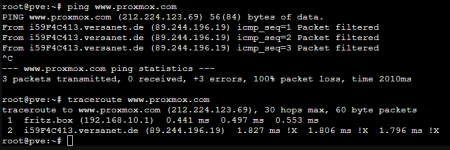
All Network inquiries are filtered from my Provider

Halodri

New Member
Jan 19, 2026
1
0
1
Hi,

Yes, i am new here... and i have only some experience with Linux. I already tried to solve my problem with older forum threads, but i didn't find any solutions in this forum.

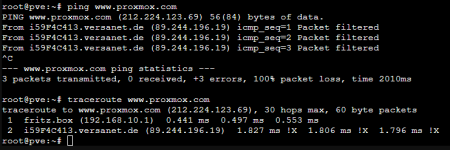
I am trying to install proxmox for the first time. After the Installation i cannot update the installation. It looks like, that my provider is filtering my network inquiries from the proxmox server.
1768783455166.png

Please help me.
 

Attachments

  • 1768783381538.png
    1768783381538.png
    25.3 KB · Views: 2
"ping www.proxmox.com" is not a good choice for a test. It does not answer to my pings too:
Code:
~$ ping -c1 -W 2  www.proxmox.com 
PING www.proxmox.com (212.224.123.69) 56(84) bytes of data.

--- www.proxmox.com ping statistics ---
1 packets transmitted, 0 received, 100% packet loss, time 0ms

I am always unhappy when a public server denies echo-request via ICMP...
Code:
~$ nmap -p 80,443   www.proxmox.com 
Starting Nmap 7.93 ( https://nmap.org ) at 2026-01-19 09:06 CET
Nmap scan report for www.proxmox.com (212.224.123.69)
Host is up (0.019s latency).
Other addresses for www.proxmox.com (not scanned): 2a01:7e0:0:424::12

PORT    STATE SERVICE
80/tcp  open  http
443/tcp open  https

Does any outbound traffic succeed? Tell us more about your local network and give us some background information:
  • pveversion -v
Basic network information:
  • ip address show # currently active IP addresses on this machine
  • ip route show # currently active routing table
  • ip link show # currently active links
  • cat /etc/network/interfaces # configuration of the network
  • cat /etc/resolv.conf # DNS resolver settings
  • ping -c 1 -W 1 9.9.9.9 # a simple "ping" to verify outgoing routing
  • host quad9.net # a simple DNS lookup to verify reachable DNS servers
You may use the “</>“ button at the top of the editor window or you can just place [code]..[/code] around your copy-n-pasted text to create (better) readable text.