

After reboot no webgui and pve-cluster.service fail

stangspwn

New Member
Jan 3, 2025
10
0
1
hello all,

I am really hoping someone can help me figure this out. I've tried reviewing the forums for pve-cluster.service failing and no webgui but nothing would work so I'm posting.

I'll try and post as much relevant info in this first post.

When the server reboots...before I get to the login I get this string of failed to starts.
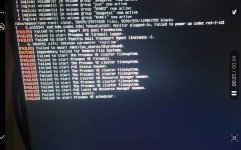
Screenshot_20250210_214706_Gallery.jpg

I can then login to the server but not to the webgui. I can then SSH in from my other computer and pull the below info.
output for ip a

Code:
root@proxmox:~# ip a
1: lo: <LOOPBACK,UP,LOWER_UP> mtu 65536 qdisc noqueue state UNKNOWN group default qlen 1000
    link/loopback 00:00:00:00:00:00 brd 00:00:00:00:00:00
    inet 127.0.0.1/8 scope host lo
       valid_lft forever preferred_lft forever
    inet6 ::1/128 scope host
       valid_lft forever preferred_lft forever
2: enp6s0: <BROADCAST,MULTICAST,UP,LOWER_UP> mtu 1500 qdisc mq master vmbr0 state UP group default qlen 1000
    link/ether 58:11:22:4d:27:20 brd ff:ff:ff:ff:ff:ff
3: vmbr0: <BROADCAST,MULTICAST,UP,LOWER_UP> mtu 1500 qdisc noqueue state UP group default qlen 1000
    link/ether 58:11:22:4d:27:20 brd ff:ff:ff:ff:ff:ff
    inet 10.0.0.253/24 scope global vmbr0
       valid_lft forever preferred_lft forever
    inet6 fe80::5a11:22ff:fe4d:2720/64 scope link
       valid_lft forever preferred_lft forever

output for hostname

Code:
root@proxmox:~# hostname
proxmox

My /etc/hosts shows the below

Code:
127.0.0.1 localhost.localdomain localhost
10.0.0.253 proxmox.hdpharm.local proxmox

# The following lines are desirable for IPv6 capable hosts

::1     ip6-localhost ip6-loopback
fe00::0 ip6-localnet
ff00::0 ip6-mcastprefix
ff02::1 ip6-allnodes
ff02::2 ip6-allrouters
ff02::3 ip6-allhosts

output for systemctl status pve-cluster.service

Code:
root@proxmox:~# root@proxmox:~# systemctl status pve-cluster.service
● pve-cluster.service - The Proxmox VE cluster filesystem
     Loaded: loaded (/lib/systemd/system/pve-cluster.service; enabled; vendor preset: enabled)
     Active: failed (Result: exit-code) since Mon 2025-02-10 21:43:14 CST; 56min ago
    Process: 1870 ExecStart=/usr/bin/pmxcfs (code=exited, status=255/EXCEPTION)
        CPU: 3ms

Feb 10 21:43:14 proxmox systemd[1]: pve-cluster.service: Scheduled restart job, restart counter is at 5.
Feb 10 21:43:14 proxmox systemd[1]: Stopped The Proxmox VE cluster filesystem.
Feb 10 21:43:14 proxmox systemd[1]: pve-cluster.service: Start request repeated too quickly.
Feb 10 21:43:14 proxmox systemd[1]: pve-cluster.service: Failed with result 'exit-code'.
Feb 10 21:43:14 proxmox systemd[1]: Failed to start The Proxmox VE cluster filesystem.

output for journal ctl -b0 -u pve-cluster.service
Code:
root@proxmox:~# journalctl -b0 -u pve-cluster.service
-- Journal begins at Wed 2024-05-01 00:31:11 CDT, ends at Mon 2025-02-10 22:41:13 CST. --
Feb 10 21:43:13 proxmox systemd[1]: Starting The Proxmox VE cluster filesystem...
Feb 10 21:43:13 proxmox pmxcfs[1852]: [main] crit: unable to create lock '/var/lib/pve-cluster/.pmxcfs.lockfile': Read-only file system
Feb 10 21:43:13 proxmox pmxcfs[1852]: [main] notice: exit proxmox configuration filesystem (-1)
Feb 10 21:43:13 proxmox pmxcfs[1852]: [main] crit: unable to create lock '/var/lib/pve-cluster/.pmxcfs.lockfile': Read-only file system
Feb 10 21:43:13 proxmox pmxcfs[1852]: [main] notice: exit proxmox configuration filesystem (-1)
Feb 10 21:43:13 proxmox systemd[1]: pve-cluster.service: Control process exited, code=exited, status=255/EXCEPTION
Feb 10 21:43:13 proxmox systemd[1]: pve-cluster.service: Failed with result 'exit-code'.
Feb 10 21:43:13 proxmox systemd[1]: Failed to start The Proxmox VE cluster filesystem.
Feb 10 21:43:13 proxmox systemd[1]: pve-cluster.service: Scheduled restart job, restart counter is at 1.
Feb 10 21:43:13 proxmox systemd[1]: Stopped The Proxmox VE cluster filesystem.
Feb 10 21:43:13 proxmox systemd[1]: Starting The Proxmox VE cluster filesystem...
Feb 10 21:43:13 proxmox pmxcfs[1860]: [main] crit: unable to create lock '/var/lib/pve-cluster/.pmxcfs.lockfile': Read-only file system
Feb 10 21:43:13 proxmox pmxcfs[1860]: [main] notice: exit proxmox configuration filesystem (-1)
Feb 10 21:43:13 proxmox systemd[1]: pve-cluster.service: Control process exited, code=exited, status=255/EXCEPTION
Feb 10 21:43:13 proxmox systemd[1]: pve-cluster.service: Failed with result 'exit-code'.
Feb 10 21:43:13 proxmox systemd[1]: Failed to start The Proxmox VE cluster filesystem.
Feb 10 21:43:14 proxmox systemd[1]: pve-cluster.service: Scheduled restart job, restart counter is at 2.
Feb 10 21:43:14 proxmox systemd[1]: Stopped The Proxmox VE cluster filesystem.
Feb 10 21:43:14 proxmox systemd[1]: Starting The Proxmox VE cluster filesystem...
Feb 10 21:43:14 proxmox pmxcfs[1865]: [main] crit: unable to create lock '/var/lib/pve-cluster/.pmxcfs.lockfile': Read-only file system
Feb 10 21:43:14 proxmox pmxcfs[1865]: [main] notice: exit proxmox configuration filesystem (-1)
Feb 10 21:43:14 proxmox systemd[1]: pve-cluster.service: Control process exited, code=exited, status=255/EXCEPTION
Feb 10 21:43:14 proxmox systemd[1]: pve-cluster.service: Failed with result 'exit-code'.
Feb 10 21:43:14 proxmox systemd[1]: Failed to start The Proxmox VE cluster filesystem.


output during pveversion -v

Code:
root@proxmox:~# pveversion -v
proxmox-ve: 7.4-1 (running kernel: 5.15.158-2-pve)
pve-manager: 7.4-19 (running version: 7.4-19/f98bf8d4)
pve-kernel-5.15: 7.4-15
pve-kernel-5.15.158-2-pve: 5.15.158-2
pve-kernel-5.15.74-1-pve: 5.15.74-1
ceph-fuse: 15.2.17-pve1
corosync: 3.1.7-pve1
criu: 3.15-1+pve-1
glusterfs-client: 9.2-1
ifupdown2: 3.1.0-1+pmx4
ksm-control-daemon: 1.4-1
libjs-extjs: 7.0.0-1
libknet1: 1.24-pve2
libproxmox-acme-perl: 1.4.4
libproxmox-backup-qemu0: 1.3.1-1
libproxmox-rs-perl: 0.2.1
libpve-access-control: 7.4.3
libpve-apiclient-perl: 3.2-2
libpve-common-perl: 7.4-2
libpve-guest-common-perl: 4.2-4
libpve-http-server-perl: 4.3.0
libpve-rs-perl: 0.7.7
libpve-storage-perl: 7.4-4
libspice-server1: 0.14.3-2.1
lvm2: 2.03.11-2.1
lxc-pve: 5.0.2-2
lxcfs: 5.0.3-pve1
novnc-pve: 1.4.0-1
proxmox-backup-client: 2.4.7-1
proxmox-backup-file-restore: 2.4.7-1
proxmox-kernel-helper: 7.4-1
proxmox-mail-forward: 0.1.1-1
proxmox-mini-journalreader: 1.3-1
proxmox-widget-toolkit: 3.7.4
pve-cluster: 7.3-3
pve-container: 4.4-7
pve-docs: 7.4-2
pve-edk2-firmware: 3.20230228-4~bpo11+3
pve-firewall: 4.3-5
pve-firmware: 3.6-6
pve-ha-manager: 3.6.1
pve-i18n: 2.12-1
pve-qemu-kvm: 7.2.10-1
pve-xtermjs: 4.16.0-2
qemu-server: 7.4-6
smartmontools: 7.2-pve3
spiceterm: 3.2-2
swtpm: 0.8.0~bpo11+3
vncterm: 1.7-1
zfsutils-linux: 2.1.15-pve1
root@proxmox:~#


output qm list

Code:
root@proxmox:~# qm list
ipcc_send_rec[1] failed: Connection refused
ipcc_send_rec[2] failed: Connection refused
ipcc_send_rec[3] failed: Connection refused
Unable to load access control list: Connection refused
root@proxmox:~#
 
output from apt dist-upgrade

Code:
root@proxmox:~# apt dist-upgrade
Reading package lists... Done
Building dependency tree... Done
Reading state information... Done
Calculating upgrade... Done
The following packages will be upgraded:
  busybox rsync ucf
3 upgraded, 0 newly installed, 0 to remove and 0 not upgraded.
Need to get 906 kB of archives.
After this operation, 0 B of additional disk space will be used.
W: Not using locking for read only lock file /var/lib/dpkg/lock-frontend
W: Not using locking for read only lock file /var/lib/dpkg/lock
W: chown to _apt:root of directory /var/cache/apt/archives/partial failed - SetupAPTPartialDirectory (30: Read-only file system)
W: chmod 0700 of directory /var/cache/apt/archives/partial failed - SetupAPTPartialDirectory (30: Read-only file system)
W: chown to _apt:root of directory /var/lib/apt/lists/auxfiles failed - SetupAPTPartialDirectory (30: Read-only file system)
W: chmod 0755 of directory /var/lib/apt/lists/auxfiles failed - SetupAPTPartialDirectory (30: Read-only file system)
W: Not using locking for read only lock file /var/cache/apt/archives/lock
Do you want to continue? [Y/n] y
Err:1 http://security.debian.org bullseye-security/main amd64 rsync amd64 3.2.3-4+deb11u3
  Could not open file /var/cache/apt/archives/partial/rsync_3.2.3-4+deb11u3_amd64.deb - open (30: Read-only file system) [IP: 151.101.66.132 80]
Err:2 http://security.debian.org bullseye-security/main amd64 ucf all 3.0043+deb11u2
  Could not open file /var/cache/apt/archives/partial/ucf_3.0043+deb11u2_all.deb - open (30: Read-only file system) [IP: 151.101.130.132 80]
Err:3 http://security.debian.org bullseye-security/main amd64 busybox amd64 1:1.30.1-6+deb11u1
  Could not open file /var/cache/apt/archives/partial/busybox_1%3a1.30.1-6+deb11u1_amd64.deb - open (30: Read-only file system) [IP: 151.101.194.132 80]
W: Problem unlinking the file /var/cache/apt/archives/partial/.apt-acquire-privs-test.RcbVdK - IsAccessibleBySandboxUser (30: Read-only file system)
W: Problem unlinking the file /var/cache/apt/archives/partial/.apt-acquire-privs-test.01kKpL - IsAccessibleBySandboxUser (30: Read-only file system)
W: Problem unlinking the file /var/cache/apt/archives/partial/.apt-acquire-privs-test.Hpf86J - IsAccessibleBySandboxUser (30: Read-only file system)
W: Problem unlinking the file /var/cache/apt/archives/partial/rsync_3.2.3-4+deb11u3_amd64.deb - PrepareFiles (30: Read-only file system)
W: Problem unlinking the file /var/cache/apt/archives/partial/ucf_3.0043+deb11u2_all.deb - PrepareFiles (30: Read-only file system)
W: Problem unlinking the file /var/cache/apt/archives/partial/busybox_1%3a1.30.1-6+deb11u1_amd64.deb - PrepareFiles (30: Read-only file system)
E: Failed to fetch http://security.debian.org/pool/updates/main/r/rsync/rsync_3.2.3-4%2bdeb11u3_amd64.deb  Could not open file /var/cache/apt/archives/partial/rsync_3.2.3-4+deb11u3_amd64.deb - open (30: Read-only file system) [IP: 151.101.66.132 80]
E: Failed to fetch http://security.debian.org/pool/updates/main/u/ucf/ucf_3.0043%2bdeb11u2_all.deb  Could not open file /var/cache/apt/archives/partial/ucf_3.0043+deb11u2_all.deb - open (30: Read-only file system) [IP: 151.101.130.132 80]
E: Failed to fetch http://security.debian.org/pool/updates/main/b/busybox/busybox_1.30.1-6%2bdeb11u1_amd64.deb  Could not open file /var/cache/apt/archives/partial/busybox_1%3a1.30.1-6+deb11u1_amd64.deb - open (30: Read-only file system) [IP: 151.101.194.132 80]
E: Unable to fetch some archives, maybe run apt-get update or try with --fix-missing?
root@proxmox:~#

output from apt-get update

Code:
root@proxmox:~# apt-get update
Ign:1 http://security.debian.org bullseye-security InRelease
Hit:2 http://ftp.us.debian.org/debian bullseye InRelease
Err:2 http://ftp.us.debian.org/debian bullseye InRelease
  Couldn't create temporary file /tmp/apt.conf.spOfW6 for passing config to apt-key
Ign:3 http://ftp.us.debian.org/debian bullseye-updates InRelease
Err:4 http://security.debian.org bullseye-security Release
  Could not open file /var/lib/apt/lists/partial/security.debian.org_dists_bullseye-security_Release - open (30: Read-only file system) [IP: 151.101.2.132 80]
Err:5 http://ftp.us.debian.org/debian bullseye-updates Release
  Could not open file /var/lib/apt/lists/partial/ftp.us.debian.org_debian_dists_bullseye-updates_Release - open (30: Read-only file system) [IP: 64.50.233.100 80]
Hit:6 http://download.proxmox.com/debian/pve bullseye InRelease
Err:6 http://download.proxmox.com/debian/pve bullseye InRelease
  Couldn't create temporary file /tmp/apt.conf.g7Vy6d for passing config to apt-key
Reading package lists... Done
W: chown to _apt:root of directory /var/lib/apt/lists/partial failed - SetupAPTPartialDirectory (30: Read-only file system)
W: chmod 0700 of directory /var/lib/apt/lists/partial failed - SetupAPTPartialDirectory (30: Read-only file system)
W: chown to _apt:root of directory /var/lib/apt/lists/auxfiles failed - SetupAPTPartialDirectory (30: Read-only file system)
W: chmod 0755 of directory /var/lib/apt/lists/auxfiles failed - SetupAPTPartialDirectory (30: Read-only file system)
W: Not using locking for read only lock file /var/lib/apt/lists/lock
W: Problem unlinking the file /var/lib/apt/lists/partial/.apt-acquire-privs-test.Al5Ebx - IsAccessibleBySandboxUser (30: Read-only file system)
W: Problem unlinking the file /var/lib/apt/lists/partial/.apt-acquire-privs-test.7uGwpv - IsAccessibleBySandboxUser (30: Read-only file system)
W: Problem unlinking the file /var/lib/apt/lists/partial/.apt-acquire-privs-test.9EOhEv - IsAccessibleBySandboxUser (30: Read-only file system)
W: Problem unlinking the file /var/lib/apt/lists/partial/.apt-acquire-privs-test.ypG1wu - IsAccessibleBySandboxUser (30: Read-only file system)
W: Problem unlinking the file /var/lib/apt/lists/partial/security.debian.org_dists_bullseye-security_InRelease - PrepareFiles (30: Read-only file system)
W: Problem unlinking the file /var/lib/apt/lists/partial/ftp.us.debian.org_debian_dists_bullseye_InRelease - PrepareFiles (30: Read-only file system)
W: chown to _apt:root of file /var/lib/apt/lists/ftp.us.debian.org_debian_dists_bullseye_InRelease failed - Item::QueueURI (30: Read-only file system)
W: chmod 0600 of file /var/lib/apt/lists/ftp.us.debian.org_debian_dists_bullseye_InRelease failed - Item::QueueURI (30: Read-only file system)
W: chown to root:root of file /var/lib/apt/lists/ftp.us.debian.org_debian_dists_bullseye_InRelease failed - 400::URIFailure (30: Read-only file system)
W: chmod 0644 of file /var/lib/apt/lists/ftp.us.debian.org_debian_dists_bullseye_InRelease failed - 400::URIFailure (30: Read-only file system)
W: An error occurred during the signature verification. The repository is not updated and the previous index files will be used. GPG error: http://ftp.us.debian.org/debian bullseye InRelease: Couldn't create temporary file /tmp/apt.conf.spOfW6 for passing config to apt-key
W: Problem unlinking the file /var/lib/apt/lists/partial/ftp.us.debian.org_debian_dists_bullseye-updates_InRelease - PrepareFiles (30: Read-only file system)
W: Problem unlinking the file /var/lib/apt/lists/partial/security.debian.org_dists_bullseye-security_Release - PrepareFiles (30: Read-only file system)
E: The repository 'http://security.debian.org bullseye-security Release' no longer has a Release file.
N: Updating from such a repository can't be done securely, and is therefore disabled by default.
N: See apt-secure(8) manpage for repository creation and user configuration details.
W: Problem unlinking the file /var/lib/apt/lists/partial/ftp.us.debian.org_debian_dists_bullseye-updates_Release - PrepareFiles (30: Read-only file system)
E: The repository 'http://ftp.us.debian.org/debian bullseye-updates Release' no longer has a Release file.
N: Updating from such a repository can't be done securely, and is therefore disabled by default.
N: See apt-secure(8) manpage for repository creation and user configuration details.
W: Problem unlinking the file /var/lib/apt/lists/partial/download.proxmox.com_debian_pve_dists_bullseye_InRelease - PrepareFiles (30: Read-only file system)
W: chown to _apt:root of file /var/lib/apt/lists/download.proxmox.com_debian_pve_dists_bullseye_InRelease failed - Item::QueueURI (30: Read-only file system)
W: chmod 0600 of file /var/lib/apt/lists/download.proxmox.com_debian_pve_dists_bullseye_InRelease failed - Item::QueueURI (30: Read-only file system)
W: chown to root:root of file /var/lib/apt/lists/download.proxmox.com_debian_pve_dists_bullseye_InRelease failed - 400::URIFailure (30: Read-only file system)
W: chmod 0644 of file /var/lib/apt/lists/download.proxmox.com_debian_pve_dists_bullseye_InRelease failed - 400::URIFailure (30: Read-only file system)
W: An error occurred during the signature verification. The repository is not updated and the previous index files will be used. GPG error: http://download.proxmox.com/debian/pve bullseye InRelease: Couldn't create temporary file /tmp/apt.conf.g7Vy6d for passing config to apt-key
W: Problem unlinking the file /var/cache/apt/pkgcache.bin - RemoveCaches (30: Read-only file system)
W: Problem unlinking the file /var/cache/apt/srcpkgcache.bin - RemoveCaches (30: Read-only file system)
root@proxmox:~#


Hopefully this is enough info to direct someone on how to direct me. I'd appreciate it and my wife would really appreciate it if the plex server was running again o_O

Thank you in advance!
 
  • Like
Reactions: stangspwn
It doesn't look full to me. It's at 70% so fuller but not full.

Code:
root@proxmox:~# df -h
Filesystem            Size  Used Avail Use% Mounted on
udev                   63G     0   63G   0% /dev
tmpfs                  13G  9.9M   13G   1% /run
/dev/mapper/pve-root  450G  306G  125G  71% /
tmpfs                  63G     0   63G   0% /dev/shm
tmpfs                 5.0M     0  5.0M   0% /run/lock
tmpfs                  13G     0   13G   0% /run/user/0
root@proxmox:~#


When I run fsck i get the below

Code:
root@proxmox:~# fsck
fsck from util-linux 2.36.1
fsck: /etc/fstab: parse error at line 1 -- ignored

When I run cat /etc/fstab i get the below

Code:
root@proxmox:~# cat /etc/fstab
[...]

# Mount CIFS share from server

# Mount CIFS share on demand with rwx permissions for use in LXCs (manually added)
//10.0.0.65/ShareNewHD /mnt/lxc_shares/ShareNewHD cifs rw,realtime,ver=3.1.1,credentials=/etc/samba/servershare.conf,uid=0 0 0
 
You can specify a device to check, i.e. : fsck /dev/mapper/pve-root

I would start with examining journalctl, i.e. : journalctl -b 0


Blockbridge : Ultra low latency all-NVME shared storage for Proxmox - https://www.blockbridge.com/proxmox

response for fsck /dev/mapper/pve-root

Code:
root@proxmox:~# fsck /dev/mapper/pve-root
fsck from util-linux 2.36.1
fsck: /etc/fstab: parse error at line 1 -- ignored
e2fsck 1.46.5 (30-Dec-2021)
/dev/mapper/pve-root is mounted.
e2fsck: Cannot continue, aborting.

result for journalctl -b 0 is looong. Can you direct me on what I should look for or I can post it as text attachment.

thank you for the help
 
Last edited:
thanks I'll take a look at those links. Below is the output for mount


Code:
root@proxmox:~# mount
sysfs on /sys type sysfs (rw,nosuid,nodev,noexec,relatime)
proc on /proc type proc (rw,nosuid,nodev,noexec,relatime)
udev on /dev type devtmpfs (rw,nosuid,relatime,size=65784320k,nr_inodes=16446080,mode=755,inode64)
devpts on /dev/pts type devpts (rw,nosuid,noexec,relatime,gid=5,mode=620,ptmxmode=000)
tmpfs on /run type tmpfs (rw,nosuid,nodev,noexec,relatime,size=13163824k,mode=755,inode64)
/dev/mapper/pve-root on / type ext4 (rw,relatime)
securityfs on /sys/kernel/security type securityfs (rw,nosuid,nodev,noexec,relatime)
tmpfs on /dev/shm type tmpfs (rw,nosuid,nodev,inode64)
tmpfs on /run/lock type tmpfs (rw,nosuid,nodev,noexec,relatime,size=5120k,inode64)
cgroup2 on /sys/fs/cgroup type cgroup2 (rw,nosuid,nodev,noexec,relatime)
pstore on /sys/fs/pstore type pstore (rw,nosuid,nodev,noexec,relatime)
efivarfs on /sys/firmware/efi/efivars type efivarfs (rw,nosuid,nodev,noexec,relatime)
bpf on /sys/fs/bpf type bpf (rw,nosuid,nodev,noexec,relatime,mode=700)
systemd-1 on /proc/sys/fs/binfmt_misc type autofs (rw,relatime,fd=30,pgrp=1,timeout=0,minproto=5,maxproto=5,direct,pipe_ino=36963)
mqueue on /dev/mqueue type mqueue (rw,nosuid,nodev,noexec,relatime)
debugfs on /sys/kernel/debug type debugfs (rw,nosuid,nodev,noexec,relatime)
hugetlbfs on /dev/hugepages type hugetlbfs (rw,relatime,pagesize=2M)
tracefs on /sys/kernel/tracing type tracefs (rw,nosuid,nodev,noexec,relatime)
fusectl on /sys/fs/fuse/connections type fusectl (rw,nosuid,nodev,noexec,relatime)
configfs on /sys/kernel/config type configfs (rw,nosuid,nodev,noexec,relatime)
sunrpc on /run/rpc_pipefs type rpc_pipefs (rw,relatime)
lxcfs on /var/lib/lxcfs type fuse.lxcfs (rw,nosuid,nodev,relatime,user_id=0,group_id=0,allow_other)
tmpfs on /run/user/0 type tmpfs (rw,nosuid,nodev,relatime,size=13163820k,nr_inodes=3290955,mode=700,inode64)
binfmt_misc on /proc/sys/fs/binfmt_misc type binfmt_misc (rw,nosuid,nodev,noexec,relatime)
tracefs on /sys/kernel/debug/tracing type tracefs (rw,nosuid,nodev,noexec,relatime)
/dev/fuse on /etc/pve type fuse (rw,nosuid,nodev,relatime,user_id=0,group_id=0,default_permissions,allow_other)
root@proxmox:~#
 
output of lsblk -f

Code:
root@proxmox:~# lsblk -f
NAME                         FSTYPE      FSVER    LABEL UUID                                   FSAVAIL FSUSE% MOUNTPOINT
sda                          LVM2_member LVM2 001       JGsP5P-yv1c-ZfOu-8NBa-y3Lp-4bht-KBJdAU
└─Seagate1-vm--101--disk--0
sdb                          LVM2_member LVM2 001       oE3Vlm-MuhL-4eBM-6qLh-3r5W-k3QX-BNQacm
└─Seagate2-vm--101--disk--0
sdc                          LVM2_member LVM2 001       m26pqP-95Ha-ON6n-3vN6-RqGZ-sDyO-8TCCAc
sdd                          LVM2_member LVM2 001       XLx7a7-1rRs-zLF2-uHg0-vNJW-mdaV-RFSFUk
sde                          LVM2_member LVM2 001       EUyuUe-v8jP-hbo6-yI2E-06v7-LESJ-jmXRjz
└─NewHD1-vm--101--disk--0
sdf                          LVM2_member LVM2 001       nPnjKK-2YQD-9ebU-SMTz-8WCr-H1xW-pgqbR5
└─Unraid1-vm--101--disk--0
sdg                          LVM2_member LVM2 001       tE8SPV-89az-JeOl-yk6z-05xQ-bDef-5scI8r
└─Unraid2-vm--101--disk--0
nvme0n1                      LVM2_member LVM2 001       d3DTTA-9ync-jKch-BA3R-8Lck-sGbV-SmMFWK
├─NVME1-NVME1_tmeta
│ └─NVME1-NVME1-tpool
│   ├─NVME1-NVME1
│   ├─NVME1-vm--103--disk--0 ext4        1.0            1ba228a7-9fb0-4b9f-a38b-44d6f570f01d
│   ├─NVME1-vm--101--disk--0
│   └─NVME1-vm--101--disk--2
└─NVME1-NVME1_tdata
  └─NVME1-NVME1-tpool
    ├─NVME1-NVME1
    ├─NVME1-vm--103--disk--0 ext4        1.0            1ba228a7-9fb0-4b9f-a38b-44d6f570f01d
    ├─NVME1-vm--101--disk--0
    └─NVME1-vm--101--disk--2
nvme2n1                      LVM2_member LVM2 001       DUR78S-s7zv-0SUM-ZMa1-ZZ4l-kGLA-gGaPZ4
nvme1n1
├─nvme1n1p1
├─nvme1n1p2                  vfat        FAT32          411E-0AD0
└─nvme1n1p3                  LVM2_member LVM2 001       BRNQc2-ey0K-EG9T-gnig-IbQb-y3zv-XCI7xA
  ├─pve-swap                 swap        1              69cf5ce6-0382-44f4-ac6e-1aae0decd04f
  └─pve-root                 ext4        1.0            bff54f52-2541-44a5-83b3-518e8f733a5e    124.9G    68% /
root@proxmox:~#
 
Some relevant search results that may be helpful in understanding of what you are seeing:

https://forum.manjaro.org/t/parse-error-fstab-solved/46086

https://askubuntu.com/questions/536955/e2fsck-cannot-continue-aborting

As for the log, you probably want to go line by line and search for anything related to ReadOnly.

What is the output of : mount

Blockbridge : Ultra low latency all-NVME shared storage for Proxmox - https://www.blockbridge.com/proxmox
looking through the journalctl -b 0 output i see the below over and over and over again

Feb 11 15:56:45 proxmox spiceproxy[2120]: unable to open log file '/var/log/pveproxy/access.log' - Read-only file system
 
The issue happened before these messages started.

You can try something like described here:
https://superuser.com/questions/401217/how-to-check-root-partition-with-fsck


Blockbridge : Ultra low latency all-NVME shared storage for Proxmox - https://www.blockbridge.com/proxmox
after running tune2fs commands i get this

Code:
root@proxmox:~# tune2fs -c 60 /dev/mapper/pve-root
tune2fs 1.46.5 (30-Dec-2021)
Setting maximal mount count to 60
root@proxmox:~# fsck /dev/mapper/pve-root
fsck from util-linux 2.36.1
fsck: /etc/fstab: parse error at line 1 -- ignored
e2fsck 1.46.5 (30-Dec-2021)
/dev/mapper/pve-root: clean, 58494/29974528 files, 82061714/119867392 blocks
root@proxmox:~#
 
running journalctl -b 0 again i get some of the following.

Code:
root@proxmox:~# journalctl -b 0
-- Journal begins at Wed 2024-05-01 00:31:11 CDT, ends at Tue 2025-02-11 21:10:51 CST. --
Feb 11 21:06:48 proxmox kernel: Linux version 5.15.158-2-pve (build@proxmox) (gcc (Debian 10.2.1-6) 10.2.1 20210110, GNU ld (GNU Binutils for Debian) 2.35.2) #1 SMP PVE 5.15.158-2 (2024-07-26T13:11Z) ()
Feb 11 21:06:48 proxmox kernel: Command line: BOOT_IMAGE=/boot/vmlinuz-5.15.158-2-pve root=/dev/mapper/pve-root ro quiet intel_iommu=on iommu=pt


shouldn't /dev/mapper/pve-root be rw instead of ro?


Code:
 snd_hda_codec_realtek hdaudioC0D0:      Line=0x1a
Feb 11 21:06:48 proxmox kernel: snd_hda_codec_hdmi hdaudioC0D2: Monitor plugged-in, Failed to power up codec ret=[-13]
Feb 11 21:06:48 proxmox systemd-modules-load[659]: Failed to insert module 'kvmgt': No such device
Feb 11 21:06:48 proxmox systemd-modules-load[659]: Failed to find module 'exngt'
Feb 11 21:06:48 proxmox systemd-modules-load[659]: Failed to find module 'vfio-mdev'


Code:
 Finished Wait for udev To Complete Device Initialization.
Feb 11 21:06:49 proxmox systemd[1]: Condition check resulted in Import ZFS pools by cache file being skipped.
Feb 11 21:06:49 proxmox systemd[1]: Starting Import ZFS pools by device scanning...
Feb 11 21:06:49 proxmox systemd[1]: Starting Import ZFS pool PlexMovies...
Feb 11 21:06:49 proxmox zpool[1449]: cannot import 'PlexMovies': no such pool available
Feb 11 21:06:49 proxmox zpool[1448]: no pools available to import
Feb 11 21:06:49 proxmox systemd[1]: zfs-import@PlexMovies.service: Main process exited, code=exited, status=1/FAILURE
Feb 11 21:06:49 proxmox systemd[1]: zfs-import@PlexMovies.service: Failed with result 'exit-code'.
Feb 11 21:06:49 proxmox systemd[1]: Failed to start Import ZFS pool PlexMovies.
Feb 11 21:06:49 proxmox systemd[1]: Finished Import ZFS pools by device scanning.
Feb 11 21:06:49 proxmox systemd[1]: Reached target ZFS pool import target.
Feb 11 21:06:49 proxmox systemd[1]: Starting Mount ZFS filesystems...
Feb 11 21:06:49 proxmox systemd[1]: Starting Wait for ZFS Volume (zvol) links in /dev...
Feb 11 21:06:49 proxmox systemd[1]: Finished Mount ZFS filesystems.


Code:
 Finished LVM event activation on device 8:80.
Feb 11 21:06:49 proxmox networking[1578]: networking: Configuring network interfaces
Feb 11 21:06:49 proxmox systemd-tmpfiles[1586]: rm_rf(/tmp/systemd-private-d90ea89399ea400182a27ab9a89137dd-systemd-logind.service-B3N15e): Read-only file system
Feb 11 21:06:49 proxmox systemd-tmpfiles[1586]: rm_rf(/tmp/systemd-private-d90ea89399ea400182a27ab9a89137dd-chrony.service-kLdtXf): Read-only file system
Feb 11 21:06:49 proxmox systemd-tmpfiles[1586]: rm_rf(/tmp): Read-only file system
Feb 11 21:06:49 proxmox systemd-tmpfiles[1586]: rm_rf(/var/tmp/systemd-private-d90ea89399ea400182a27ab9a89137dd-systemd-logind.service-YgLMkf): Read-only file system
Feb 11 21:06:49 proxmox pvefw-logger[1582]: unable to open file '/var/log/pve-firewall.log': Read-only file system
Feb 11 21:06:49 proxmox systemd[1]: pvefw-logger.service: Control process exited, code=exited, status=255/EXCEPTION
Feb 11 21:06:49 proxmox systemd[1]: pvefw-logger.service: Failed with result 'exit-code'.
Feb 11 21:06:49 proxmox systemd-tmpfiles[1586]: rm_rf(/var/tmp/systemd-private-d90ea89399ea400182a27ab9a89137dd-chrony.service-oxWmTg): Read-only file system
Feb 11 21:06:49 proxmox systemd[1]: Failed to start Proxmox VE firewall logger.
Feb 11 21:06:49 proxmox systemd-tmpfiles[1586]: Setting access ACL "u::rwx,g::r-x,g:adm:r-x,m::r-x,o::r-x" on /var/log/journal failed: Read-only file system
Feb 11 21:06:49 proxmox systemd-tmpfiles[1586]: Cannot set file attribute for '/var/log/journal', value=0x00800000, mask=0x00800000, ignoring: Read-only file system
Feb 11 21:06:49 proxmox systemd-tmpfiles[1586]: Setting access ACL "u::rwx,g::r-x,g:adm:r-x,m::r-x,o::r-x" on /var/log/journal/8c5332a4b46b40b5a7e6674de6424186 failed: Read-only file system
Feb 11 21:06:49 proxmox systemd-tmpfiles[1586]: Cannot set file attribute for '/var/log/journal/8c5332a4b46b40b5a7e6674de6424186', value=0x00800000, mask=0x00800000, ignoring: Read-only file system
Feb 11 21:06:49 proxmox systemd-tmpfiles[1586]: Setting access ACL "u::rw-,g::r-x,g:adm:r--,m::r--,o::---" on /var/log/journal/8c5332a4b46b40b5a7e6674de6424186/system.journal failed: Read-only file system
Feb 11 21:06:49 proxmox systemd[1]: Finished Create Volatile Files and Directories.


Code:
[1609]: [system] AppArmor D-Bus mediation is enabled
Feb 11 21:06:49 proxmox rsyslogd[1615]: imuxsock: Acquired UNIX socket '/run/systemd/journal/syslog' (fd 3) from systemd.  [v8.2102.0]
Feb 11 21:06:49 proxmox rsyslogd[1615]: cannot create '/var/spool/postfix/dev/log': Address already in use [v8.2102.0 try https://www.rsyslog.com/e/2176 ]
Feb 11 21:06:49 proxmox systemd[1]: Started System Logging Service.
Feb 11 21:06:49 proxmox rsyslogd[1615]: [origin software="rsyslogd" swVersion="8.2102.0" x-pid="1615" x-info="https://www.rsyslog.com"] start
Feb 11 21:06:49 proxmox rsyslogd[1615]: file '/var/log/syslog': open error: Read-only file system [v8.2102.0 try https://www.rsyslog.com/e/2433 ]

Code:
Feb 11 21:06:49 proxmox rsyslogd[1615]: file '/var/log/daemon.log': open error: Read-only file system [v8.2102.0 try https://www.rsyslog.com/e/2433 ]

pretty much anything in /var/log came back Read-only


Code:
ure-instance.sh[1755]: chmod: changing permissions of 'etc/localtime': Read-only file system
Feb 11 21:06:49 proxmox systemd[1]: postfix@-.service: Control process exited, code=exited, status=1/FAILURE
Feb 11 21:06:49 proxmox systemd[1]: postfix@-.service: Failed with result 'exit-code'.
Feb 11 21:06:49 proxmox systemd[1]: Failed to start Postfix Mail Transport Agent (instance -).
Feb 11 21:06:49 proxmox systemd[1]: Starting Postfix Mail Transport Agent...
Code:
: Starting Rotate log files...
Feb 11 21:06:49 proxmox systemd[1763]: logrotate.service: Failed to set up mount namespacing: /run/systemd/unit-root/dev: Read-only file system
Feb 11 21:06:49 proxmox systemd[1763]: logrotate.service: Failed at step NAMESPACE spawning /usr/sbin/logrotate: Read-only file system
Feb 11 21:06:49 proxmox systemd[1]: Starting Daily man-db regeneration...
Feb 11 21:06:49 proxmox systemd[1]: logrotate.service: Main process exited, code=exited, status=226/NAMESPACE
Feb 11 21:06:49 proxmox systemd[1]: logrotate.service: Failed with result 'exit-code'.
Feb 11 21:06:49 proxmox systemd[1]: Failed to start Rotate log files.

Code:
]: Started LSB: start or stop rrdcached.
Feb 11 21:06:49 proxmox systemd[1]: Starting The Proxmox VE cluster filesystem...
Feb 11 21:06:49 proxmox pmxcfs[1794]: [main] crit: unable to create lock '/var/lib/pve-cluster/.pmxcfs.lockfile': Read-only file system
Feb 11 21:06:49 proxmox pmxcfs[1794]: [main] notice: exit proxmox configuration filesystem (-1)
Feb 11 21:06:49 proxmox pmxcfs[1794]: [main] crit: unable to create lock '/var/lib/pve-cluster/.pmxcfs.lockfile': Read-only file system
Feb 11 21:06:49 proxmox pmxcfs[1794]: [main] notice: exit proxmox configuration filesystem (-1)
Feb 11 21:06:49 proxmox systemd[1]: pve-cluster.service: Control process exited, code=exited, status=255/EXCEPTION
Feb 11 21:06:49 proxmox systemd[1]: pve-cluster.service: Failed with result 'exit-code'.
Feb 11 21:06:49 proxmox systemd[1]: Failed to start The Proxmox VE cluster filesystem.
Feb 11 21:06:49 proxmox systemd[1]: Condition check resulted in Corosync Cluster Engine being skipped.
 
Old Thread but I'll add my 0.02$ just in case you are still looking for a Solution.

In my Case, this can happen (mostly on a Backup Server) if I sent there a ZFS Snapshot WITHOUT specifying a -o mountpoint=/zdata/BACKUP/<HOST> Parameter when receiving it.

If you forget to receive with the mountpoint Parameter, then it will by default inherit the mountpoint Parameter of the Pool you are trying to backup (in most cases, for me, that is /, since I backup the / Pool rpool most of the Time).

As such, this can result in 2 different Issues:
  1. Boot is broken (GRUB cannot find Kernel / Initrd) so you are stuck with an unbootable System
  2. The read-only Dataset that has been backed up to e.g. a zdata Pool is erroneously mounted as /

You can find is out via root@BACKUP:/# mount -l | grep "on / type zfs":
Code:
zdata/ZFSBACKUP/HOST/ROOT/debian on / type zfs (ro,noatime,xattr,noacl,casesensitive)

The Solution is:
Code:
zfs umount zdata/ZFSBACKUP/<HOST>/ROOT/debian
zfs set mountpoint=/zdata/ZFSBACKUP/<HOST>/ROOT/debian zdata/ZFSBACKUP/<HOST>/ROOT/debian
zfs set mountpoint=/zdata/ZFSBACKUP/<HOST>/ROOT/debian zdata/ZFSBACKUP/<HOST>

If you want to avoid Issues in the Future, send the new Snapshots like:
Code:
zfs send -Rv rpool@<SNAPSHOT_NAME> | ssh root@<BACKUP_HOST>.<DOMAIN> zfs receive -o readonly=on -o mountpoint=/zdata/BACKUP/<HOST> -s -Fduv zdata/BACKUP/<HOST>

Note that many People caution about receiving with the -F Option, so use that at your Risk / Discretion.

I couldn't get it to work without the -F Option that's why I use it like that, but you might want to research more about it :) .