

This is my nfs directory permission (NFS server in a privileged container):
And nfs exports like this:
I added nfs in PVE like this:
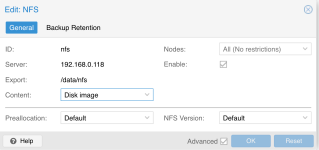
However, I found that PVE created a new directory call `images` and its permission is `nobody:nogroup` .
How can I fix that issue? I want to write it with proper permission, like writers group.
Bash:
root@homelab-nas:/data# namei -l /data/nfs/
f: /data/nfs/
drwxr-xr-x root root    /
drwxrwxr-x root writers data
drwxrwxr-x root writers nfs
And nfs exports like this:
Bash:
root@homelab-nas:/data# exportfs -v
/data/nfs       <world>(rw,wdelay,root_squash,no_subtree_check,sec=sys,rw,secure,root_squash,no_all_squash)
I added nfs in PVE like this:
However, I found that PVE created a new directory call `images` and its permission is `nobody:nogroup` .
How can I fix that issue? I want to write it with proper permission, like writers group.