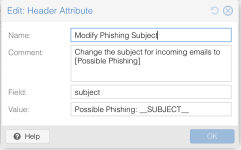
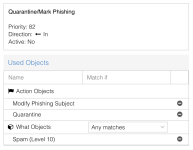
Hi
If in Mail Filter > What Object I set:
Spam (Level 10)
Spam (Level 5)
Can I set a prefix for a specific level?
if lvl 5: [probable SPAM]
if 10: [probable phishing!]
Now I have set it in Action Objects, but it seems to work globally
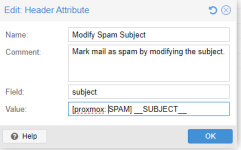
Or is it possible to enter some content at the beginning of the email body with appropriate formatting (e.g., in red)
By the way, one more question - can I mention the spam score value in the subject?
If in Mail Filter > What Object I set:
Spam (Level 10)
Spam (Level 5)
Can I set a prefix for a specific level?
if lvl 5: [probable SPAM]
if 10: [probable phishing!]
Now I have set it in Action Objects, but it seems to work globally
Or is it possible to enter some content at the beginning of the email body with appropriate formatting (e.g., in red)
By the way, one more question - can I mention the spam score value in the subject?
Last edited: