8700G iGPU 780m passthrough

vinnfts

Member
Aug 8, 2024
37
3
8
Hi guys, I'm trying to passthrough the iGPU to Windows VM
I followed many steps but there was still error 43 in Windows, please help
My promox hardware:
8700G
64GB G.Skill X5 Flare
Mainboard B650 Gigabyte Aorus Elite AX ver 1.3
1 HDD 16TB + 2 SSD 1TB
My /etc/default/grub
Code:
GRUB_DEFAULT=0
GRUB_TIMEOUT=5
GRUB_DISTRIBUTOR=`lsb_release -i -s 2> /dev/null || echo Debian`
GRUB_CMDLINE_LINUX_DEFAULT="quiet iommu=pt"
GRUB_CMDLINE_LINUX=""

dmesg | grep -e DMAR -e IOMMU
Code:
[    0.464252] pci 0000:00:00.2: AMD-Vi: IOMMU performance counters supported
[    0.611337] perf/amd_iommu: Detected AMD IOMMU #0 (2 banks, 4 counters/bank).

I checked
lspci -nn | grep -e 'AMD/ATI'
Code:
11:00.0 VGA compatible controller [0300]: Advanced Micro Devices, Inc. [AMD/ATI] Phoenix1 [1002:15bf] (rev 06)
11:00.1 Audio device [0403]: Advanced Micro Devices, Inc. [AMD/ATI] Rembrandt Radeon High Definition Audio Controller [1002:1640]

My /etc/modules
Code:
vfio
vfio_iommu_type1
vfio_pci

Next, I bind the iGPU’s PCI ID to vfio-pci
/etc/modprobe.d/vfio.conf
Code:
options vfio-pci ids=1002:15bf,1002:1640,1022:15c7,1022:15b9,1022:15ba,1022:15e2,1022:15e3
softdep amdgpu pre: vfio-pci
softdep radeon pre: vfio-pci
softdep snd_hda_intel pre: vfio-pci

Check lspci -nnk
Code:
11:00.0 VGA compatible controller [0300]: Advanced Micro Devices, Inc. [AMD/ATI] Phoenix1 [1002:15bf] (rev 06)
        Subsystem: Gigabyte Technology Co., Ltd Phoenix1 [1458:d000]
        Kernel driver in use: vfio-pci
        Kernel modules: amdgpu
11:00.1 Audio device [0403]: Advanced Micro Devices, Inc. [AMD/ATI] Rembrandt Radeon High Definition Audio Controller [1002:1640]
        Subsystem: Advanced Micro Devices, Inc. [AMD/ATI] Rembrandt Radeon High Definition Audio Controller [1002:1640]
        Kernel driver in use: vfio-pci
        Kernel modules: snd_hda_intel
11:00.2 Encryption controller [1080]: Advanced Micro Devices, Inc. [AMD] Family 19h (Model 74h) CCP/PSP 3.0 Device [1022:15c7]
        Subsystem: Advanced Micro Devices, Inc. [AMD] Family 19h (Model 74h) CCP/PSP 3.0 Device [1022:15c7]
        Kernel driver in use: vfio-pci
        Kernel modules: ccp
11:00.3 USB controller [0c03]: Advanced Micro Devices, Inc. [AMD] Device [1022:15b9]
        Subsystem: Gigabyte Technology Co., Ltd Device [1458:5007]
        Kernel driver in use: xhci_hcd
        Kernel modules: xhci_pci
11:00.4 USB controller [0c03]: Advanced Micro Devices, Inc. [AMD] Device [1022:15ba]
        Subsystem: Gigabyte Technology Co., Ltd Device [1458:5007]
        Kernel driver in use: xhci_hcd
        Kernel modules: xhci_pci
11:00.6 Audio device [0403]: Advanced Micro Devices, Inc. [AMD] Family 17h/19h HD Audio Controller [1022:15e3]
        DeviceName: Realtek ALC1220
        Subsystem: Gigabyte Technology Co., Ltd Family 17h/19h HD Audio Controller [1458:a194]
        Kernel driver in use: vfio-pci
        Kernel modules: snd_hda_intel

I also extracted and configured vbios
My /etc/pve/qemu-server/101.conf
Code:
agent: 1
args: -cpu 'host,-hypervisor,kvm=off'
bios: ovmf
boot: order=scsi0;ide0;ide2;net0
cores: 8
cpu: host
efidisk0: local-lvm:vm-101-disk-0,efitype=4m,pre-enrolled-keys=1,size=4M
hostpci0: 0000:11:00.0,romfile=vbios_15BF.dat,x-vga=1
hostpci1: 0000:11:00.1,romfile=AMDGopDriver.rom
ide0: local:iso/virtio-win-0.1.266.iso,media=cdrom,size=707456K
ide2: local:iso/Win11_24H2_English_x64.iso,media=cdrom,size=5683090K
machine: pc-q35-6.2
memory: 8192
meta: creation-qemu=9.0.2,ctime=1743238806
name: Windows
net0: virtio=BC:24:11:8A:07:C8,bridge=vmbr0,firewall=1
numa: 0
ostype: win11
scsi0: local-lvm:vm-101-disk-1,iothread=1,size=500G
scsihw: virtio-scsi-single
smbios1: uuid=35745faf-0266-4b24-9515-07d7f9917ba7
sockets: 1
tpmstate0: local-lvm:vm-101-disk-2,size=4M,version=v2.0
vga: none
vmgenid: 05a40414-b16d-4b21-97b5-0f01617abe4c

I also disabled Above 4G decoding & Re-size Bar Support in BIOS
 
Last edited:
To make sure, I also blacklisted drivers at /etc/modprobe.d/blacklist.conf
Code:
blacklist nouveau
blacklist nvidia*
blacklist radeon
blacklist amdgpu
blacklist snd_hda_intel
#!/bin/bash
shopt -s nullglob
for g in $(find /sys/kernel/iommu_groups/* -maxdepth 0 -type d | sort -V);>
echo "IOMMU Group ${g##*/}:"
for d in $g/devices/*; do
echo -e "\t$(lspci -D -nns ${d##*/}"
done;
done;
 
Last edited:
Hi,

How did you access the vBIOS, could you provide yours. I'm using a GMKTec K6 with a Phoenix1 and can't find the vBIOS from the BIOS.

Thanks !
 
I've reached about the same point as you have there on the Aoostar WTR Max (8845hs Pro) with 780M). I have managed to get the VM guest rebooting now without having to reboot the host. but I've tried every guide which I can find without solving the error 43.
 
I've reached about the same point as you have there on the Aoostar WTR Max (8845hs Pro) with 780M). I have managed to get the VM guest rebooting now without having to reboot the host. but I've tried every guide which I can find without solving the error 43.
DerekG,
Do you mean you got the passthrough to work with the Aoostar WTR Max (8845hs Pro) with 780M?
Can you share what you did to get it working as I'm really stuck and would like to have passthrough to windows of the 780M Aoostar WTR Max
 
DerekG,
Do you mean you got the passthrough to work with the Aoostar WTR Max (8845hs Pro) with 780M?
Can you share what you did to get it working as I'm really stuck and would like to have passthrough to windows of the 780M Aoostar WTR Max
Hi mrmrv,

I have managed to get the passthrough working in Windows 11 by following a combination of 3 different guides:

Note: I have not tested with a physical monitor connected as I only access via RDP. And I do have a dummy monitor dongle plugged in but I don't know if it's required or not.

It's the most complexed passthrough I've done thus far as you need to do the following:
1) Configure a the passthrough with the rom files (in my case I used both the the video and the audio rom files)
2) Configure a fix for the AMD reset bug within the guest VM (I used the DevCon.exe to reset the 780m on VM shutdown)
3) Configure for the AMD reset bug on the Proxmox host (I used the hook script method).

These are the guides I used:

For the basic passthrough, including the rom files.
https://github.com/isc30/ryzen-gpu-passthrough-proxmox

This one explains the AMD reset bug, with 2 methods to overcome the problem.
https://github.com/xiongyw/docs/blo...rum-um880pro/pve-8.4-1_minisforum-um880pro.md

This is specifically for the AMD reset bug on the Proxmox host side.
https://github.com/isc30/ryzen-gpu-passthrough-proxmox/issues/131

I hope that helps, it's too late now, but I can post my config later if needed.

Good luck.
 
Last edited:
If you can post your config that would be really appreciated.

Did you do any changes in the bios settings? Or they are the ' factory default settings'

As far as I see I did all the steps in the 3 posts, including creating a rom dump and trying the rom dump from https://github.com/isc30/ryzen-gpu-passthrough-proxmox

For me it keeps failing with

Code:
error writing '1' to '/sys/bus/pci/devices/0000:01:00.0/reset': Inappropriate ioctl for device
failed to reset PCI device '0000:01:00.0', but trying to continue as not all devices need a reset
swtpm_setup: Not overwriting existing state file.
kvm: -device vfio-pci,host=0000:01:00.0,id=hostpci0,bus=ich9-pcie-port-1,addr=0x0,romfile=/usr/share/kvm/vbios_1002_1900.bin: vfio 0000:01:00.0: failed to setup container for group 25: Failed to set group container: Invalid argument
stopping swtpm instance (pid 3499) due to QEMU startup error
start failed: QEMU exited with code 1

in proxmox dmesg I see:
432.577260] vfio-pci 0000:01:00.0: Firmware has requested this device have a 1:1 IOMMU mapping, rejecting configuring the device without a 1:1 mapping. Contact your platform vendor.
 
What stage are you up to there.?

The passthrough should work regardless of the AMD reset bug, which shows the issue when you restart or shutdown the guest either from the host side or the guest side. If the system gets into that 'igpu stuck on reset' you can ONLY recover by a complete host reboot.

Have you got the passthough working at all?
 
PCI passthrough of the SATA controller (to another vm) goes without any issues.

GPU passthrough not at all. I keep getting the failed to setup container for group 25: Failed to set group container: Invalid argument

Without passthrough the windows vm works fine, but with passthrough it errors.
This is after reboot, so no chance yet even to get into windows. At this point I would be happy if it works once, I could live with always needing a reboot


01:00.0 VGA compatible controller: Advanced Micro Devices, Inc. [AMD/ATI] Phoenix3 (rev d5)
Subsystem: Advanced Micro Devices, Inc. [AMD/ATI] Device 0124
Kernel driver in use: vfio-pci
Kernel modules: amdgpu
01:00.1 Audio device: Advanced Micro Devices, Inc. [AMD/ATI] Radeon High Definition Audio Controller [Rembrandt/Strix]
Subsystem: Advanced Micro Devices, Inc. [AMD/ATI] Radeon High Definition Audio Controller [Rembrandt/Strix]
Kernel driver in use: vfio-pci
Kernel modules: snd_hda_intel
0
 
I'm looking at those errors and it seems like you have a typo in one of your commands somewhere.
Verify that you do not have memory ballooning set on the VM.
Or maybe the vga rom file is not correct. The correct files can be downloaded from the guide you have been following.
I'm using the Aoostar Gem12 roms - AMDGopDriver_8845hs.rom (for audio) & vbios_8845hs.dat (for the igpu)

If you post all the configs as per the 1st two posts in this thread I can compare and let you know if there is anything different, but the posts above also look correct apart from the fact that all references to the igpu will be different, above is 11:00 whereas yours is 01:00

I hope @vinnfts doesn't mind, it looks like we've hijacted his thread.
 
Last edited:
  • Like
Reactions: uzumo
Hi,
Million tries further, but still no luck.
I remain getting the
Code:
error writing '1' to '/sys/bus/pci/devices/0000:01:00.0/reset': Inappropriate ioctl for device
failed to reset PCI device '0000:01:00.0', but trying to continue as not all devices need a reset
kvm: -device vfio-pci,host=0000:01:00.0,id=hostpci0,bus=ich9-pcie-port-1,addr=0x0,x-vga=on,romfile=/usr/share/kvm/vbios_8845hs.dat: vfio 0000:01:00.0: failed to setup container for group 25: Failed to set group container: Invalid argument
TASK ERROR: start failed: QEMU exited with code 1

also in dmesg
[ 21.315157] vfio-pci 0000:01:00.0: Firmware has requested this device have a 1:1 IOMMU mapping, rejecting configuring the device without a 1:1 mapping. Contact your platform vendor.


I also tried with a linux guest, but the error is the same.
Maybe you can spot an issue

my config files:

/etc/default/grub tried many combinations.. now is:
GRUB_CMDLINE_LINUX_DEFAULT="quiet amd_iommu=on iommu=pt vfio_iommu_type1.allow_unsafe_interrupts=1 nofb nomodeset video=vesafb:off,efifb:off"

/etc modules
Code:
vfio
vfio_iommu_type1
vfio_pci
vfio_virqfd

/etc/modprobe.d/vfio.conf
Code:
options vfio-pci ids=1002:1900,1002:1640,1022:15e2,1022:15e3  disable_vga=1
options vfio_iommu_type1 allow_unsafe_interrupts=1
softdep radeon pre: vfio-pci
softdep amdgpu pre: vfio-pci
softdep snd_hda_intel pre: vfio-pci

/etc/modprobe.d/blacklist.conf

Code:
# don't load driver for iGPU and sound devices
blacklist amdgpu
blacklist radeon
blacklist snd_sof_amd_acp63
blacklist snd_sof_amd_vangogh
blacklist snd_sof_amd_rembrandt
blacklist snd_sof_amd_renoir
blacklist snd_sof_amd_acp
blacklist snd_sof_pci
blacklist snd_sof_xtensa_dsp
blacklist snd_sof
blacklist snd_sof_utils
blacklist snd_soc_core
blacklist snd_hda_intel
blacklist snd_compress
blacklist snd_intel_dspcfg
blacklist snd_pcm_dmaengine
blacklist snd_intel_sdw_acpi
blacklist snd_pci_ps
blacklist snd_rpl_pci_acp6x
blacklist snd_hda_codec
blacklist snd_acp_pci
blacklist snd_acp_legacy_common
blacklist snd_hda_core
blacklist snd_pci_acp6x
blacklist snd_hwdep
blacklist snd_pci_acp5x
blacklist snd_pcm
blacklist snd_rn_pci_acp3x
blacklist snd_timer
blacklist snd_acp_config
blacklist snd_soc_acpi
blacklist snd_pci_acp3x

Code:
agent: 1
args: -cpu host,hv_passthrough,level=35,-hypervisor,kvm=off,+svm
balloon: 0
bios: ovmf
boot: order=scsi0;ide2;ide0;net0
cores: 14
cpu: host
efidisk0: pvedata:vm-105-disk-0,efitype=4m,pre-enrolled-keys=1,size=1M
hookscript: local:snippets/ryzen_igpu_reset.sh
hostpci0: 0000:01:00.0,pcie=1,romfile=vbios_8845hs.bin,x-vga=1
hostpci1: 0000:01:00.1,pcie=1,romfile=AMDGopDriver.rom
hostpci2: 0000:01:00.5,pcie=1
hostpci3: 0000:01:00.6,pcie=1
machine: pc-q35-10.0+pve1,viommu=virtio
memory: 16814
meta: creation-qemu=10.0.2,ctime=1757878448
name: win11
net0: virtio=BC:24:11:C7:8A:A5,bridge=vmbr0,firewall=1
numa: 0
ostype: win11
scsi0: local-lvm:vm-105-disk-0,discard=on,size=256G,ssd=1
scsihw: virtio-scsi-pci
smbios1: uuid=ed9f54a5-d753-41d3-9fc1-f26e2afdc9c2
sockets: 1
tpmstate0: pvedata:vm-105-disk-1,size=4M,version=v2.0
vmgenid: a10a72e7-af77-4447-b720-b40b5b8bc824
 
note
1) I I just past the gpu, the error is the same
2) I have pci passthrough working fine for sata
3) My best guess it is related to the bios settings
 
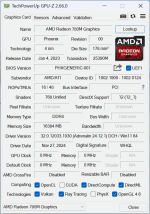
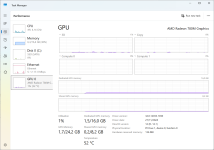
I have the 780m iGPU passed through to a Windows VM and fully functional.

I followed the guides I posted earlier and the passthrough works so long as the correct rom files are used.

But since then I upgraded from Proxmox 8.4 to 9.0 and I noticed that the upgrade kept the Linux kernel on 'Linux 6.8.12-14-pve' instead of 'Linux 6.14.11-2-pve' which the other nodes in my cluster have been upgraded to.

I have not attempted the kernel upgrade, because it borked one of my Intel iGPU nodes, something which has been working for years suddenly I get Error 43 in Windows and even reverting the kernel version does not solve the problem. The strange thing is that I have another intel iGPU and for that unit the passthrough is still fine after upgrade.

It's worth looking into the kernel because there is a known PCI reset issue with the latest kernel version - read the last 3 posts:
 
Finally success here as well..
I messed up and needed to do a full reset of the bios.
With the recovery of the standard values and once more entering the few options it started working.

Don't know what bios setting blocked the working, but it solved the

[ 21.315157] vfio-pci 0000:01:00.0: Firmware has requested this device have a 1:1 IOMMU mapping, rejecting configuring the device without a 1:1 mapping. Contact your platform vendor.
 
Hold on a second. Could you at least give me the settings?
I'm struggling at 780m...

Please give me the results of the following command:

Code:
cat /etc/kernel/cmdline
cat /etc/default/grub
cat /etc/modules
cat /etc/modprobe.d/*
cat /var/lib/vz/snippets/*
cat /etc/pve/qemu-server/VMID.conf
uname -a

I managed to configure all the other integrated GPUs, but the 8700G just won't work no matter what I try, and I'm utterly devastated.
 
Last edited:
Yes, sure here we go.
NB, followed the exact instructions from https://github.com/isc30/ryzen-gpu-passthrough-proxmox
But, only after the bios reset my Aoostar WRT MAX started to work. Before I could not get it to work, the VM's crash on startup.

I'll make some screenshots of the bios settings I changed from default.
Note, I don't think my issue was very kernel related. It works both on proxmox 8.4 as well as proxmox 9.1 with most recent kernel
The only change was the bios. I can't tell my previous setting... was trying everything to get it going. I know what changes |I made from the 'load optimal settings' default.

cat /etc/default/grub

cat: /etc/kernel/cmdline: No such file or directory
# If you change this file or any /etc/default/grub.d/*.cfg file,
# run 'update-grub' afterwards to update /boot/grub/grub.cfg.
# For full documentation of the options in these files, see:
# info -f grub -n 'Simple configuration'

GRUB_DEFAULT=0
GRUB_TIMEOUT=5
GRUB_DISTRIBUTOR=`( . /etc/os-release && echo ${NAME} )`
#GRUB_CMDLINE_LINUX_DEFAULT="quiet"
#GRUB_CMDLINE_LINUX_DEFAULT="quiet amd_iommu=on iommu=pt vfio_iommu_type1.allow_unsafe_interrupts=1 nofb nomodeset video=vesafb:off,efifb:off"
#GRUB_CMDLINE_LINUX_DEFAULT="quiet amd_iommu=on iommu=pt pcie_acs_override=downstream,multifunction"
#GRUB_CMDLINE_LINUX_DEFAULT="quiet iommu=1 pcie_acs_override=downstream,multifunction"
GRUB_CMDLINE_LINUX_DEFAULT="quiet iommu=pt"

GRUB_CMDLINE_LINUX=""

# If your computer has multiple operating systems installed, then you
# probably want to run os-prober. However, if your computer is a host
# for guest OSes installed via LVM or raw disk devices, running
# os-prober can cause damage to those guest OSes as it mounts
# filesystems to look for things.
#GRUB_DISABLE_OS_PROBER=false

# Uncomment to enable BadRAM filtering, modify to suit your needs
# This works with Linux (no patch required) and with any kernel that obtains
# the memory map information from GRUB (GNU Mach, kernel of FreeBSD ...)
#GRUB_BADRAM="0x01234567,0xfefefefe,0x89abcdef,0xefefefef"

# Uncomment to disable graphical terminal
#GRUB_TERMINAL=console

# The resolution used on graphical terminal
# note that you can use only modes which your graphic card supports via VBE/GOP/UGA
# you can see them in real GRUB with the command `videoinfo'
#GRUB_GFXMODE=640x480

# Uncomment if you don't want GRUB to pass "root=UUID=xxx" parameter to Linux
#GRUB_DISABLE_LINUX_UUID=true

# Uncomment to disable generation of recovery mode menu entries
#GRUB_DISABLE_RECOVERY="true"

# Uncomment to get a beep at grub start
#GRUB_INIT_TUNE="480 440 1"


cat /etc/modules


# /etc/modules is obsolete and has been replaced by /etc/modules-load.d/.
# Please see modules-load.d(5) and modprobe.d(5) for details.
#
# Updating this file still works, but it is undocumented and unsupported.
#vfio
#vfio_iommu_type1
#vfio_pci
#vfio_virqfd
vfio
vfio_iommu_type1
vfio_pci
vfio_virqfd

cat /etc/modprobe.d/*

options vfio-pci ids=1002:1900,1002:1640
softdep radeon pre: vfio-pci
softdep amdgpu pre: vfio-pci
softdep snd_hda_intel pre: vfio-pci
options zfs zfs_arc_max=6511656960


cat /var/lib/vz/snippets/*


#!/bin/bash
phase="$2"
echo "Phase is $phase"
if [ "$phase" == "pre-start" ]; then
# Unbind gpu from amdgpu

echo "0000:01:00.0" > /sys/bus/pci/drivers/amdgpu/unbind 2>/dev/null
echo "0000:01:00.1" > /sys/bus/pci/drivers/snd_hda_intel/unbind 2>/dev/null
sleep 5
elif [ "$phase" == "post-stop" ]; then
# Unbind gpu from vfio-pci
sleep 5
echo "0000:01:00.0" > /sys/bus/pci/drivers/vfio-pci/unbind 2>/dev/null
sleep 2
echo "0000:01:00.1" > /sys/bus/pci/drivers/vfio-pci/unbind 2>/dev/null
sleep 5
# Bind amdgpu
echo "0000:01:00.0" > /sys/bus/pci/drivers/amdgpu/bind 2>/dev/null
# Bind snd_hda_intel
echo "0000:01:00.1" > /sys/bus/pci/drivers/snd_hda_intel/bind 2>/dev/null
sleep 2
fi

Linux pve 6.17.2-2-pve #1 SMP PREEMPT_DYNAMIC PMX 6.17.2-2 (2025-11-26T12:33Z) x86_64 GNU/Linux


cat /etc/pve/qemu-server/VMID.conf --> note: this is the final one, with primary display set to the video card

#hostpci0%3A 0000%3A01%3A00.0,pcie=1,x-vga=1
#hostpci1%3A 0000%3A01%3A00.1,pcie=1,romfile=AMDGopDriver.rom
#hostpci2%3A 0000%3A01%3A00.5,pcie=1
#hostpci3%3A 0000%3A01%3A00.6,pcie=1
#args%3A -cpu host,hv_passthrough,level=35,-hypervisor,kvm=off,+svm
#hostpci1%3A 0000%3A01%3A00.1,pcie=1,romfile=AMDGopDriver_8845hs.rom
#hostpci1%3A 0000%3A01%3A00.1,pcie=1,rombar=0
#hostpci0%3A 0000%3A01%3A00.0,pcie=1
agent: 1
args: -cpu 'host,hv_passthrough,-hypervisor,kvm=off'
balloon: 0
bios: ovmf
boot: order=sata1;net0
cores: 14
cpu: host
efidisk0: pvedata:vm-105-disk-0,efitype=4m,ms-cert=2023,pre-enrolled-keys=1,size=1M
hookscript: local:snippets/ryzen_igpu_reset.sh
hostpci0: 0000:01:00.0,pcie=1,romfile=vbios_8845hs.bin,x-vga=1
hostpci1: 0000:01:00.1
hostpci2: 0000:01:00.6
hostpci3: 0000:01:00.5
machine: pc-q35-10.0+pve1,viommu=virtio
memory: 16814
meta: creation-qemu=10.0.2,ctime=1757878448
name: win11
net0: virtio=BC:24:11:C7:8A:A5,bridge=vmbr0,firewall=1
numa: 0
ostype: win11
sata1: pvedata:vm-105-disk-2,discard=on,size=256G,ssd=1
scsihw: virtio-scsi-pci
smbios1: uuid=ed9f54a5-d753-41d3-9fc1-f26e2afdc9c2
sockets: 1
tpmstate0: pvedata:vm-105-disk-1,size=4M,version=v2.0
usb0: host=046d:c534,usb3=1
usb1: host=046d:c52b,usb3=1
vga: none
vmgenid: a10a72e7-af77-4447-b720-b40b5b8bc824
 
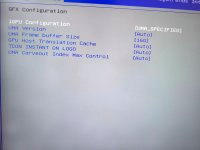
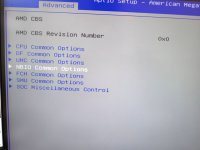
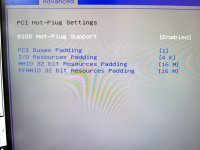
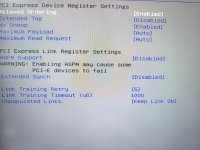
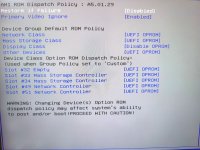
The critical ones I changed disable: above4G decoding, resize BAR support & SR-IOV
i did not load the soundcard bios, it PVE crashes with that enabled
I had difficulties loading the grapical windows drivers, they complained about the chipset not being correct. I ended up with loading the older version of the drivers (from dec 2024)


IMG_20251212_124312.jpg


Note:
To get Ollama working properly I needed to change the video memory to 8 or 16G
IMG_20251212_124133.jpgIMG_20251212_124150.jpgIMG_20251212_124411.jpg
 

Attachments

  • IMG_20251212_124405.jpg
    IMG_20251212_124405.jpg
    228.9 KB · Views: 7
  • IMG_20251212_124544.jpg
    IMG_20251212_124544.jpg
    236.2 KB · Views: 7
  • Like
Reactions: uzumo
Thank you.

It's working except that it won't restart, but I was having trouble because it kept turning into a green screen when I tried to restart it.

I'll try implementing your settings.
 
For me windows restart is working fine. (assuming it goes via the proxmox restart, had mixed results with rebooting via windows inside the vm)

In some instances rebooting proxmox is hanging though. It is not consistent, mostly when I used the gpu in both Linux and windows.

It consistently hangs when using it in (in Linux) with Ollama and try to load too much in memory.
The AMD ROCm driver is not officially supporting this gpu, maybe that causes that problem.