So this works mostly*
Tested so far is: lemonade-sdk, vkcube, vaapi video encoding.
This works better on the "unstable" distros. Currently using debian forky with this and it's the best out of the ubuntu/debian combinations I tried. Still has compatibility issues here and there, but seems to be more an issue of everything else catching up.
17-03-2026:
Updated the patchfile: brought over the mem-fixed patches which should improve performance significantly. For the lemonade-sdk I'm getting around 50% utilization(and tps) which considering all the sync calls is actually pretty decent.
30-03-2026: (Patch for 10.2.1-1)
Updated the patch file and instructions for compiling pve-qemu.
Also cleaned up the instructions, and added some missing steps.
Virglrenderer:
This needs to be built as well. I recommend doing it first as it does impact the pve-qemu build later.
I had weird issues with proxmox favoring the apt version so here are my steps
sudo apt build-dep virglrenderersudo apt-get source virglrenderer- cd into the folder it extracted
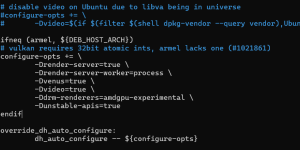
- open debian/rules and add
-Ddrm-renderers=amdgpu-experimental, -Dunstable-apis=true , -Dvideo=true , and -Dvenus=true to the configure-opts variable. (not sure if you need the last 3 tbh but it works so I'm not touching it)
- go back to the root folder and run
dpkg-buildpackage -us -uc -b
- Now run
sudo dpkg -i *.deb
 PVE-QEMU:
Steps to get it working:
git clone https://github.com/proxmox/pve-qemu- Place patch file in
pve-qemu/debian/patches/extra and remove .txt
- add
extra/extra/0031-VDRM_10.2.1.patch to the end of pve-qemu/debian/patches/series
- Comment out
extra/0009-virtio-gpu-virgl-Add-virtio-gpu-virgl-hostmem-region.patch
- Comment out
extra/0010-virtio-gpu-Ensure-BHs-are-invoked-only-from-main-loo.patch
- These last two patches are included in the "master" patch and will conflict with it.
- Pull Qemu dependencies
cd qemu; meson subprojects download; cd ..
- Go back to the root of pve-qemu and build with
make deb
- Just install the new pve-qemu with
sudo dpkg -i ./*.deb
Mesa (guest):
Mesa also isn't configured to support this so we will manually build off the apt source similar to virglrenderer.
sudo apt build-dep mesasudo apt-get source mesa- cd into the folder
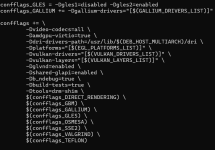
- Open debian/rules and near the end you have a giant block of "confflags". Add
-Dvideo-codecs=all and -Damdgpu-virtio=true to it, I'll include a picture below of how it should look roughly.
- go back to the root of mesa and run
dpkg-buildpackage -us -uc -b
- Now run
sudo dpkg -i *.deb on the folder with the deb packages
- If it complains about missing packages just run
apt --fix-broken install it should grab any it missed originally.
If
dpkg -i ./*.debisn't working I used
apt reinstall ./*.deb instead to ensure it was replacing the packages correctly but I don't think it's necessary.
QEMU Config:
You can somewhat just follow the normal instructions
here.
I use this though
args: -device virtio-gpu-gl,blob=on,drm_native_context=on,hostmem=8G -display egl-headless,rendernode=/dev/dri/renderD128 -object memory-backend-memfd,id=mem1,size=16G -machine memory-backend=mem1
Make sure that the size=x command matches the ram of the VM. The hostmem is just the "bar"/"aperture" size between the host/guest. Keep it between 256MB and 8GB I think it can have issues outside of that.
Misc Notes:
You will also need to be running kernel 6.14+ on the guest.
Also apt will attempt to update these packages at some point, so keep that in mind. Running something like
apt mark hold "packagenamehere" is a temporary solution without breaking the whole proxmox dependency chain.
Good luck lol



