

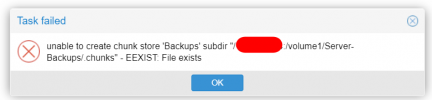
[SOLVED] New install, can't add datastore get "EPERM: Operation not permitted"

Red Squirrel

Renowned Member
May 31, 2014
67
12
73
I am trying to add a local datastore, pointing to a folder that is mounted to a NFS share. I have verified that I can read and write to the folder from the console, I have squash setup on the NFS server so it shouldn't matter what user on the PBS server that tries to write to it. It's also empty.

I cant find any logs that show more details of why it's failing. Anyone get any idea of where I can check? The server I installed it on does have 6 drive bays so eventually I want to setup local storage but hard drives are crazy expensive now so going to use the NAS for the time being.
 
Hi, @Red Squirrel
From what I read at the Forum, various NAS-es can make various difficulties and differences with setting a PBS datastore.

UIDs (backup:backup), mapping, squoshes...

Don't know which NAS you use, so I don't know if these links are of any relevance for you, but maybe you'll find some hint there:


https://www.derekseaman.com/2025/08...for-proxmox-backup-server-datastore-2025.html
 
I just use Linux as my NAS and have the share exported. Permissions with NFS have always been a pain so I just use squash option so it forces everything to be one user/group and it doesn't matter of the client user/group. This is how the export is set:

Code:
/volumes/raid2/pve_pbs          backup.i.anyf.ca(rw,async,all_squash,anonuid=1046,anongid=1046) backuppve.i.anyf.ca(rw,async,all_squash,anonuid=1046,anongid=1046)

On the backup server itself I can mount it fine, I can make and delete files and folders from command line. Although I'm testing that as root, does PBS use a specific built in user?
 
I assume you haven't checked the links I posted :) .

PBS requires the specific user, yes.

Specifically:

Code:
# id backup

uid=34(backup) gid=34(backup) groups=34(backup),26(tape)


# cat /etc/proxmox-backup/datastore.cfg

datastore: store1
        gc-schedule sun 23:00
        notify prune=always
        path /pool1/store1


# ls -ld /pool1/store1

drwxr-xr-x 5 backup backup 7 Feb  8 23:14 /pool1/store1/
 
Last edited:
  • Like
Reactions: Brethsteallar
Was not sure if backup was just an example user that they used for the tutorial or something actually built in. So ended up having to create that user on the NAS and make sure the uid matches and now it works. I figured all_squash would prevent needing to do that. It now let me create the datastore.