

Create Cluster - No network interface available ?

Jiheffe

New Member
Jul 23, 2025
1
0
1
[Update] Found a workaround with
Bash:
pvecm create cluster-name --link0 192.168.2.20
but still wondering why it didn't come up in the UI :confused:

New to Proxmox VE ;)

Background info: Proxmox VE 9.0.5. Couple of days ago, I did a reboot of this node which didn't go well. For some reason the network didn't came up and I had to connect a display and cable. Was a complete disaster as the node was hosting my network DHCP server (Pi-Hole) ! systemctl showed pve-cluster.service was not running , /etc/hosts was bad, ... Long story short, I managed with the help of Claude and ChatGPT to get the Pi-Hole LXC back, and then further restore all VMs and LXCs.

But I guess all this fiddling left some leftovers... I now want to create a cluster but the dropdown list to select a network is empty. What is wrong here ?
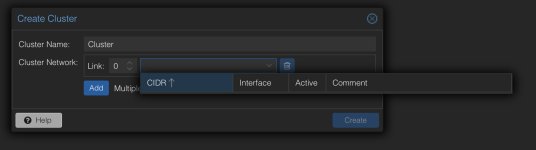

Screenshot 2025-08-15 at 01.46.34.jpg

TIA
 
Last edited:
but still wondering why it didn't come up in the UI :confused:
it uses the api call /node/localhost/network api call and shows everything with a cidr

so if you post the output of
Code:
pvesh get /nodes/localhost/network --output-format json-pretty

i can check what might be the problem
 
Hi, I’m new to Proxmox and running into a similar issue. When I try to create a cluster via the GUI, the drop down for selecting a cluster network shows nothing.

Following the suggestion from dcsapak, I ran the CLI command:
Code:
pvesh get /nodes/localhost/network --output-format json-pretty

The output I get is:
JSON:
[
   {
      "families" : [
         "inet"
      ],
      "iface" : "nic1",
      "method" : "manual",
      "method6" : "manual",
      "priority" : 5,
      "type" : "eth"
   },
   {
      "active" : 1,
      "exists" : 1,
      "families" : [
         "inet"
      ],
      "iface" : "nic0",
      "method" : "manual",
      "method6" : "manual",
      "priority" : 3,
      "type" : "eth"
   },
   {
      "active" : 1,
      "autostart" : 1,
      "bridge_fd" : 0,
      "bridge_ports" : "nic0",
      "bridge_stp" : "off",
      "comments" : "\taddress 192.168.1.203/24\n\tgateway 192.168.1.1\n\tbridge-stp off\n\tbridge-fd 0\n",
      "families" : [
         "inet"
      ],
      "iface" : "vmbr0",
      "method" : "dhcp",
      "method6" : "manual",
      "priority" : 4,
      "type" : "bridge"
   },
   {
      "altnames" : [
         "wlp0s20f3",
         "wlxf42679e3bf43"
      ],
      "exists" : 1,
      "families" : [
         "inet"
      ],
      "iface" : "wlo1",
      "method" : "manual",
      "method6" : "manual",
      "type" : "eth"
   }
]

From this, my assumption is that the GUI doesn’t list the interface because it’s a bridge using DHCP rather than a static IPv4 address. Is this correct, or am I missing something?
 
Hi, I’m new to Proxmox and running into a similar issue. When I try to create a cluster via the GUI, the drop down for selecting a cluster network shows nothing.

Following the suggestion from dcsapak, I ran the CLI command:
Code:
pvesh get /nodes/localhost/network --output-format json-pretty

The output I get is:
JSON:
[
   {
      "families" : [
         "inet"
      ],
      "iface" : "nic1",
      "method" : "manual",
      "method6" : "manual",
      "priority" : 5,
      "type" : "eth"
   },
   {
      "active" : 1,
      "exists" : 1,
      "families" : [
         "inet"
      ],
      "iface" : "nic0",
      "method" : "manual",
      "method6" : "manual",
      "priority" : 3,
      "type" : "eth"
   },
   {
      "active" : 1,
      "autostart" : 1,
      "bridge_fd" : 0,
      "bridge_ports" : "nic0",
      "bridge_stp" : "off",
      "comments" : "\taddress 192.168.1.203/24\n\tgateway 192.168.1.1\n\tbridge-stp off\n\tbridge-fd 0\n",
      "families" : [
         "inet"
      ],
      "iface" : "vmbr0",
      "method" : "dhcp",
      "method6" : "manual",
      "priority" : 4,
      "type" : "bridge"
   },
   {
      "altnames" : [
         "wlp0s20f3",
         "wlxf42679e3bf43"
      ],
      "exists" : 1,
      "families" : [
         "inet"
      ],
      "iface" : "wlo1",
      "method" : "manual",
      "method6" : "manual",
      "type" : "eth"
   }
]

From this, my assumption is that the GUI doesn’t list the interface because it’s a bridge using DHCP rather than a static IPv4 address. Is this correct, or am I missing something?
I think you should always use static IP.
Besides that, check the /etc/hosts to match the IP and the server name, like this:

Code:
192.168.100.10 pve01.network.local pve01
 
Besides that, check the /etc/hosts to match the IP and the server name, like this:

I checked my /etc/hosts file, and it currently looks like this:
Code:
root@pve:~# cat  /etc/hosts
127.0.0.1 localhost.localdomain localhost
192.168.1.203 pve.jiajunli-homelab.net pve

# The following lines are desirable for IPv6 capable hosts

::1     ip6-localhost ip6-loopback
fe00::0 ip6-localnet
ff00::0 ip6-mcastprefix
ff02::1 ip6-allnodes
ff02::2 ip6-allrouters
ff02::3 ip6-allhosts

From what I can tell, this should be correct. The IP matches the server’s hostname.
 
Last edited:
I checked my /etc/hosts file, and it currently looks like this:
Code:
root@pve:~# cat  /etc/hosts
127.0.0.1 localhost.localdomain localhost
192.168.1.203 pve.jiajunli-homelab.net pve

# The following lines are desirable for IPv6 capable hosts

::1     ip6-localhost ip6-loopback
fe00::0 ip6-localnet
ff00::0 ip6-mcastprefix
ff02::1 ip6-allnodes
ff02::2 ip6-allrouters
ff02::3 ip6-allhosts

From what I can tell, this should be correct. The IP matches the server’s hostname.
I will tell you what I do before try to create a cluster.
If I want to create a cluster using a different IP from that one in the vmbr0 bridge, I put this IP in the /etc/hosts.
Then I use
pvecm create cluster-name --link0 IP_I_WANT_TO_USE_TO_CLUSTER_COMMUNICATION_BUT_NOT_IN_VMBR0

I am not entirely sure this is necessary, but that is what I do and works all the time.

Hope you find a way to fix your issue.
 
  • Like
Reactions: thelazyautomator