Opt-in Linux 6.17 Kernel for Proxmox VE 9 available on test & no-subscription

RIP: 0010:megasas_build_and_issue_cmd_fusion+0xeaa/0x1870 [megaraid_sas][ 28.571290] Code: 20 48 89 d1 48 83 e1 fc 83 e2 01 48 0f 45 d9 4c 8b 73 10 44 8b 6b 18 4c 89 f9 4c 8d 79 08 45 85 fa 0f 84 fd 03 00 00 45 29 cc <4c>
similar trace as in https://forum.proxmox.com/threads/ceph-osd-crashes-with-kernel-6-17-2-1-pve-on-dell-system.176725/
(different system vendor, but also a newer machine)
-> I'll update the thread there as it seems a good fit (more targetet than the general thread for the kernel)
 
I can confirm this: BOSS-S1 controllers with Intel SSDs do not work with the 6.17 kernel. In contrast, BOSS-S1/2 controllers with Micron SSDs work without any issues. Same behavior as described.
Is there any idea what the problem could be? Is there a bug report or something similar about this? I haven’t found anything about it yet. We have entire clusters with this combination, so I hope the workaround won’t end up being to swap out the SSDs
 
Is there any idea what the problem could be? Is there a bug report or something similar about this? I haven’t found anything about it yet. We have entire clusters with this combination, so I hope the workaround won’t end up being to swap out the SSDs

I had to actually pin the 6.17.2-1 kernel on a R530 BOSS-S1 PBS instance. It locks up with the 6.17.2-2 kernel. Something obviously changed with 6.17.2-2.
 
I had to actually pin the 6.17.2-1 kernel on a R530 BOSS-S1 PBS instance. It locks up with the 6.17.2-2 kernel. Something obviously changed with 6.17.2-2.

6.17.4-1-pve is out now. It is based on the updated Ubuntu kernel of Ubuntu-6.17.0-9.9 kernel. So there should be new hardware updates.
 
I'm running 6.17.2-2-pve and I noticed it broke PBS, so I have rolled back to 6.14.11-4-pve as all backups were stalling. it appears the TCP receive window too small.

I'm still running 6.17.2-2-pve on one cluster of PVE9's and wondering if I need to pull the kernels back on them too, as I noticed live migration between hosts is slower than it used to be, again I suspect window size issues with the kernel?
 
I'm running 6.17.2-2-pve and I noticed it broke PBS, so I have rolled back to 6.14.11-4-pve as all backups were stalling. it appears the TCP receive window too small.

I'm still running 6.17.2-2-pve on one cluster of PVE9's and wondering if I need to pull the kernels back on them too, as I noticed live migration between hosts is slower than it used to be, again I suspect window size issues with the kernel?
Crosspost reply here. I also noticed problems with 6.17.2-2 which are not an issue on 6.17.2-1: https://forum.proxmox.com/threads/s...o-pve-9-1-1-and-pbs-4-0-20.176444/post-822997

On top of that, in that treat it does not look like 6.17.4-1 solves it completely.
 
Actually had to pin 6.14.11-4 kernel on PBS instances. 6.17.2-1 was giving intermittent issues on BOSS-S1.
 
  • Like
Reactions: carles89
Hi

Just a small comment.

After I updated the Proxmox kernel to 6.17.2-1 , my Plex container stopped working with hw transcoding . Intel_gpu_top show Plex transcoding with hw , but video enhance and render is “dead” . Seems that the server is doing software transcoding, instead of using the GPU.

Cpu is Intel Core Ultra 9 285T

Pinned kernel 6.14.11-4 everything works again before I updated.

Since im a total noob at this kernel thingy, I had to Google gemini my way back to the “old” kernel. Didnt know that I could do that, but I pinned and rebooted and its running perfectly :)

Dont know if its the right place to post , but I want to give it a go :)

Thank you

I tried to use kernel 6.17.2-2-pve on a lxc ubuntu 24.04.03 container. HW transcoding works again :)
 
  • Like
Reactions: SInisterPisces
We recently uploaded the 6.17 kernel to our repositories. The current default kernel for the Proxmox VE 9 series is still 6.14, but 6.17 is now an option.

We plan to use the 6.17 kernel as the new default for the Proxmox VE 9.1 release later in Q4.
This follows our tradition of upgrading the Proxmox VE kernel to match the current Ubuntu version until we reach an Ubuntu LTS release, at which point we will only provide newer kernels as an opt-in option. The 6.17 kernel is based on the Ubuntu 25.10 Questing release.

We have run this kernel on some of our test setups over the last few days without encountering any significant issues. However, for production setups, we strongly recommend either using the 6.14-based kernel or testing on similar hardware/setups before upgrading any production nodes to 6.17.


Guys there is a kernel memory leak in the in kernel CephFS driver for all kernels after 6.15. That means 6.17 WILL leak kernel memory over time if you use cephFS

https://tracker.ceph.com/issues/74156

It's a slow leak but you cannot get the memory to free once it has leaked. You probably want to look into that before moving to anything like production with this kernel.
 
Guys there is a kernel memory leak in the in kernel CephFS driver for all kernels after 6.15. That means 6.17 WILL leak kernel memory over time if you use cephFS

https://tracker.ceph.com/issues/74156

It's a slow leak but you cannot get the memory to free once it has leaked. You probably want to look into that before moving to anything like production with this kernel.
Developers don't always see posts like this on the forums. Submit this on https://bugzilla.proxmox.com/ for it to get the best attention.
 
There may be a bug with the cpu-scheduler:
  • 6.14.8-2-pve works
  • booting 6.17.1 or 6.17.2 only one cpu-core (0 out of 31) is used
  • CPU is AMD Opteron(tm) Processor 6262 HE
  • mpstat -P ALL 1
    shows that only CPU 0 is used, other CPUs sometimes shows 1% or to 2% usage, seems to be because of interrupts.
 
I am also experiencing significant issues with the 6.17 kernel. I immediately noticed that the kernel module for ZFS is not loading.

# modprobe zfs
Failed to insert module ‘zfs’: Key was rejected by service

Secure boot is, of course, disabled and can be ruled out as a source of error.

During troubleshooting, the file system of the LVM system disk also crashed reproducibly and then automatically went into read-only mode. So there are other issues too, not just the ZFS module.
Just to be sure, I did a fresh installation on a new disk on the platform and updated the kernel there as well. This had the same effect.

Pinning the kernel 6.14.11-4-pve resolved the issue.

Hardware:
i7-4790 @ H97 chipset

Solution:
With the new kernel, some errors such as DMAR: [DMA Write NO_PASID] Request device [00:1f.2] fault addr 0xd9000000 [fault reason 0x0c] non-zero reserved fields in PTE appeared in the log for the first time. This indicates that there are now remapping problems that interfere with the chipset SATA controller on this platform.
After adding the kernel parameters intel_iommu=on iommu=pt everything works perfectly again.
I had the same DMA issue passing through NIC cards.

Here is how I fixed it.

The boot log from kernel 6.17.4-1-pve shows recurring DMAR faults (e.g., [DMA Read NO_PASID] Request device [02:00.0] fault addr 0x5464000 [fault reason 0x0c] non-zero reserved fields in PTE) associated with my Intel Ethernet controllers at PCIe addresses 01:00.0 and 02:00.0.

This fault (reason code 0x0C / 12) indicates that the IOMMU page table entries (PTEs) contain non-zero values in reserved fields, which violates the Intel VT-d specification for my Haswell-era hardware (Core i3-4030U). In newer kernels (post-6.11), the IOMMU driver may default to using huge pages for performance optimizations in VFIO passthrough scenarios. However, on older hardware like mine, this can inadvertently set reserved bits in the PTEs, triggering protection faults during DMA operations.


Recommended Fix​


  1. Disable huge pages for VFIO IOMMU:
    • Create or edit /etc/modprobe.d/vfio.conf (or a similar file in /etc/modprobe.d/):
      text

      options vfio_iommu_type1 disable_hugepages=1


    • Update initramfs: update-initramfs -u -k all
    • Reboot and test passthrough on kernel 6.17.4.
    This forces 4K pages in IOMMU mappings, avoiding the reserved bit issue. It's a common workaround for similar faults on pre-Skylake Intel hardware.
 
I was running PVE on kernel 6.8 for the longest time with no issues. I updated to PVE9.0 back in August and immediately had issues with the VM that does PCI passthrough. I posted about it here and fiona responded here saying kernel changes might be needed. At that time that was kernel 6.14. I pinned back the 6.8 kernel and have been running fine since then.

I wanted to try this new kernel 6.17 in the hopes that it would fix my issue, but unfortunately it did not. The behavior has changed slightly, where the VM will think it's running (100% RAM, 100% of a single core, so 25% CPU if I allocate 4 cores, 50% CPU if I allocate one core, 100% CPU if I allocate one core) but it won't actually boot. I also can't attach the console, it will always fail with VM 102 qmp command 'set_password' failed - unable to connect to VM 102 qmp socket - timeout after 50 retries. The issue goes away when I hard-stop the VM, remove the PCI passthrough device, and boot the VM. The issue goes away if I use the 6.8 kernel with proxmox-boot-tool kernel pin 6.8.12-13-pve and then reboot

I am currently attempting to use 6.17.4-1-pve using the latest version of PVE

I've attached the same logs as last time: VM configuration, GDB output, PVE package versions, ps faxl output, the last hour of PVE server log.

This is an Odroid H4+ with a 12th Gen Intel N97 CPU, if that helps.


I'm looking to figure out if this is still an issue with the kernel, or if maybe there's a setting I can apply that will make this work.

edit: There's also a post on the bug tracker https://bugzilla.proxmox.com/show_bug.cgi?id=7176

 

Attachments

Last edited:
I was running PVE on kernel 6.8 for the longest time with no issues. I updated to PVE9.0 back in August and immediately had issues with the VM that does PCI passthrough. I posted about it here and fiona responded here saying kernel changes might be needed. At that time that was kernel 6.14. I pinned back the 6.8 kernel and have been running fine since then.

I wanted to try this new kernel 6.17 in the hopes that it would fix my issue, but unfortunately it did not. The behavior has changed slightly, where the VM will think it's running (100% RAM, 100% of a single core, so 25% CPU if I allocate 4 cores, 50% CPU if I allocate one core, 100% CPU if I allocate one core) but it won't actually boot. I also can't attach the console, it will always fail with VM 102 qmp command 'set_password' failed - unable to connect to VM 102 qmp socket - timeout after 50 retries. The issue goes away when I hard-stop the VM, remove the PCI passthrough device, and boot the VM. The issue goes away if I use the 6.8 kernel with proxmox-boot-tool kernel pin 6.8.12-13-pve and then reboot

I am currently attempting to use 6.17.4-1-pve using the latest version of PVE

I've attached the same logs as last time: VM configuration, GDB output, PVE package versions, ps faxl output, the last hour of PVE server log.

This is an Odroid H4+ with a 12th Gen Intel N97 CPU, if that helps.


I'm looking to figure out if this is still an issue with the kernel, or if maybe there's a setting I can apply that will make this work.

edit: There's also a post on the bug tracker https://bugzilla.proxmox.com/show_bug.cgi?id=7176

The issue you're encountering appears to be a kernel regression or hardware-specific incompatibility in the VFIO PCI passthrough handling, specifically during the loading of the PCI device's expansion ROM (visible in the GDB backtrace where Thread 10 is stuck in vfio_pci_load_rom during a pread64 syscall). This occurs with the SATA controller (PCI device 0000:03:00.0) being passed through via hostpci0: mapping=SATA in your VM config.
The symptoms—VM appearing "running" but hung at 100% RAM usage and partial CPU utilization (scaling with allocated cores), inability to attach VNC console (timing out on QMP socket connection), and no actual boot progress—align with this ROM load failure blocking QEMU's initialization.

This worked on kernel 6.8.12-13-pve because older kernels handled VFIO ROM access differently for certain devices (potentially less strict or without the hang on unmapped/invalid ROM regions). Newer kernels (6.14+, including your current 6.17.4-1-pve) introduce changes in VFIO, PCI reset, or IOMMU handling that expose this on your Intel N97 hardware. The multiple device resets seen in the kernel logs (vfio-pci 0000:03:00.0: resetting) during VM start are normal for VFIO prep, but the subsequent ROM read hang is not.

Recommended Workaround
Add rombar=0 to your VM's hostpci0 line in /etc/pve/qemu-server/102.conf to disable loading the expansion ROM BAR entirely. This often resolves hangs for devices where ROM access is unnecessary or problematic (e.g., storage controllers like SATA, which typically don't require a ROM for passthrough operation).
Updated line:
Code:
hostpci0: mapping=SATA,rombar=0
This should bypass the ROM load step without affecting functionality, as SATA passthrough generally doesn't rely on the ROM.

Another thing to note. On some systems, the IOMMU groups change on Kernel 6.17. Although I think this is mainly on AMD systems.
 
  • Like
Reactions: empirical6355
IOMMU groups change on Kernel 6.17
I checked this using https://pve.proxmox.com/wiki/PCI_Passthrough#Verify_IOMMU_isolation pvesh get /nodes/odroid/hardware/pci --pci-class-blacklist "" and everything lookks good, separate iommugroup for each device
disable loading the expansion ROM BAR entirely. This often resolves hangs
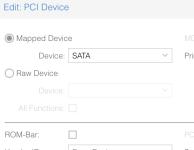
This worked for me, thank you! Rather than editing the line manually in the config, there's a GUI checkbox option to enable or disable ROM-Bar. It was enabled by default, so I disabled it and then the VM was able to boot.

1766386058968.png
 
I'm running 6.17.2-2-pve and I noticed it broke PBS, so I have rolled back to 6.14.11-4-pve as all backups were stalling. it appears the TCP receive window too small.

I'm still running 6.17.2-2-pve on one cluster of PVE9's and wondering if I need to pull the kernels back on them too, as I noticed live migration between hosts is slower than it used to be, again I suspect window size issues with the kernel?

we've so far had one instance that might indicate that PVE could potentially also trigger a TCP connection stall, but haven't had any further reports or confirmation. if you see behaviour that indicates you can trigger the problematic behaviour, please open a new thread and include relevant information:
- versions of both ends of the connection
- ss -tim from both sides for the affected connection while it is hanging

and please tag me and @Chris
 
I run PVE 9 from the no-subscription repos on an old desktop PC (HP EliteDesk 800 G1, 2018) and see occasional SATA errors when using the 6.17.2-1-pve kernel. These didn't show up previously under PVE 8, and disappeared after downgrading to the 6.14.11-4-pve kernel.

SATA controller is a
Code:
00:1f.2 SATA controller: Intel Corporation 8 Series/C220 Series Chipset Family 6-port SATA Controller 1 [AHCI mode] (rev 04)

Errors look like this:
Code:
Dec 17 08:15:47 pve kernel: ata3.00: failed command: WRITE FPDMA QUEUED
Dec 17 08:15:47 pve kernel: ata3.00: cmd 61/08:b8:50:92:3a/00:00:96:00:00/40 tag 23 ncq dma 4096 out
                                     res 40/00:01:09:4f:c2/00:00:00:00:00/00 Emask 0x4 (timeout)
Dec 17 08:15:47 pve kernel: ata3.00: status: { DRDY }
Dec 17 08:15:47 pve kernel: ata3.00: failed command: WRITE FPDMA QUEUED
Dec 17 08:15:47 pve kernel: ata3.00: cmd 61/08:f8:a8:7c:45/00:00:96:00:00/40 tag 31 ncq dma 4096 out
                                     res 40/00:01:00:4f:c2/00:00:00:00:00/00 Emask 0x4 (timeout)
Dec 17 08:15:47 pve kernel: ata3.00: status: { DRDY }
Dec 17 08:15:47 pve kernel: ata3: hard resetting link
Dec 17 08:15:47 pve kernel: ata3: SATA link up 6.0 Gbps (SStatus 133 SControl 300)
Dec 17 08:15:47 pve kernel: ata3.00: supports DRM functions and may not be fully accessible
Dec 17 08:15:47 pve kernel: ata3.00: configured for UDMA/133
Dec 17 08:15:47 pve kernel: ata3: EH complete
Dec 19 04:59:31 pve kernel: ata3.00: exception Emask 0x0 SAct 0xfe0 SErr 0x50000 action 0x6 frozen
Dec 19 04:59:31 pve kernel: ata3: SError: { PHYRdyChg CommWake }
Dec 19 04:59:31 pve kernel: ata3.00: failed command: WRITE FPDMA QUEUED
Dec 19 04:59:31 pve kernel: ata3.00: cmd 61/08:28:48:5d:b9/00:00:76:00:00/40 tag 5 ncq dma 4096 out
                                     res 40/00:01:01:4f:c2/00:00:00:00:00/00 Emask 0x4 (timeout)
Dec 19 04:59:31 pve kernel: ata3.00: status: { DRDY }

This looks typical for bad cabling or a failing disk, but see above - I've now been on 6.14.11-4-pve for two days without any similar messages.
 
Last edited:
I run PVE 9 from the no-subscription repos on an old desktop PC (HP EliteDesk 800 G1, 2018) and see occasional SATA errors when using the 6.17.2-1-pve kernel. These didn't show up previously under PVE 8, and disappeared after downgrading to the 6.14.11-4-pve kernel.

SATA controller is a
Code:
00:1f.2 SATA controller: Intel Corporation 8 Series/C220 Series Chipset Family 6-port SATA Controller 1 [AHCI mode] (rev 04)

Errors look like this:
Code:
Dec 17 08:15:47 pve kernel: ata3.00: failed command: WRITE FPDMA QUEUED
Dec 17 08:15:47 pve kernel: ata3.00: cmd 61/08:b8:50:92:3a/00:00:96:00:00/40 tag 23 ncq dma 4096 out
                                     res 40/00:01:09:4f:c2/00:00:00:00:00/00 Emask 0x4 (timeout)
Dec 17 08:15:47 pve kernel: ata3.00: status: { DRDY }
Dec 17 08:15:47 pve kernel: ata3.00: failed command: WRITE FPDMA QUEUED
Dec 17 08:15:47 pve kernel: ata3.00: cmd 61/08:f8:a8:7c:45/00:00:96:00:00/40 tag 31 ncq dma 4096 out
                                     res 40/00:01:00:4f:c2/00:00:00:00:00/00 Emask 0x4 (timeout)
Dec 17 08:15:47 pve kernel: ata3.00: status: { DRDY }
Dec 17 08:15:47 pve kernel: ata3: hard resetting link
Dec 17 08:15:47 pve kernel: ata3: SATA link up 6.0 Gbps (SStatus 133 SControl 300)
Dec 17 08:15:47 pve kernel: ata3.00: supports DRM functions and may not be fully accessible
Dec 17 08:15:47 pve kernel: ata3.00: configured for UDMA/133
Dec 17 08:15:47 pve kernel: ata3: EH complete
Dec 19 04:59:31 pve kernel: ata3.00: exception Emask 0x0 SAct 0xfe0 SErr 0x50000 action 0x6 frozen
Dec 19 04:59:31 pve kernel: ata3: SError: { PHYRdyChg CommWake }
Dec 19 04:59:31 pve kernel: ata3.00: failed command: WRITE FPDMA QUEUED
Dec 19 04:59:31 pve kernel: ata3.00: cmd 61/08:28:48:5d:b9/00:00:76:00:00/40 tag 5 ncq dma 4096 out
                                     res 40/00:01:01:4f:c2/00:00:00:00:00/00 Emask 0x4 (timeout)
Dec 19 04:59:31 pve kernel: ata3.00: status: { DRDY }

This looks typical for bad cabling or a failing disk, but see above - I've now been on 6.14.11-4-pve for two days without any similar messages.
Make sure you are running the latest firmware version available. There have been similar reports (although for kernel version 6.17.4-1) with issues caused by outdated firmware, see https://forum.proxmox.com/threads/issues-after-upgrading-to-6-17-4-1-pve.178221/