[SOLVED] Proxmox Cluster 3 nodes, Monitors refuse to start

Danny-10-10

New Member
Sep 24, 2024
23
2
3
I posted this in the wrong section before so i am posting this here hoping is the right place.

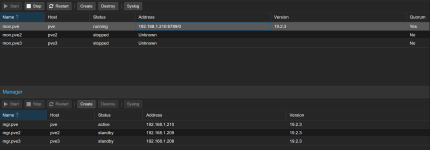
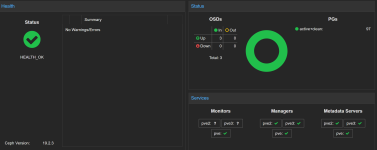
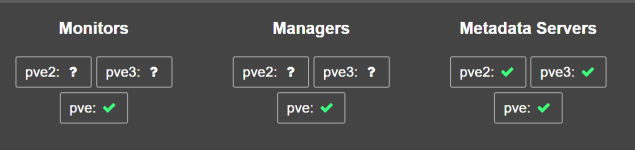
Hi all, i am facing a strange issue, after using having a proxmox pc for my self hosted app I decided to play around and create a cluter to dive deeper into the HA topics, i dowloaded the latest ISO and build up a cluster from scratch. My Cluster works, i can see every node, my ceph storage says everythng is ok. Managers works on all 3 node, metadata is ok on all 3 nodes but Monitor started only on the first node. When i try to make it start on the others node, nothing happen.
This is the syslog of the second node

Oct 28 00:13:47 pve2 ceph-mon[1041]: 2025-10-28T00:13:47.531+0100 7265f2d4c6c0 -1 received signal: Hangup from killall -q -1 ceph-mon ceph-mgr ceph-mds ceph-osd ceph-fuse radosgw rbd-mirror cephfs-mirror (PID: 2949170) UID: 0
Oct 28 00:13:47 pve2 ceph-mon[1041]: 2025-10-28T00:13:47.531+0100 7265f2d4c6c0 -1 mon.pve2@0(leader) e1 *** Got Signal Hangup ***
Oct 28 00:13:47 pve2 ceph-mon[1041]: 2025-10-28T00:13:47.554+0100 7265f2d4c6c0 -1 received signal: Hangup from (PID: 2949171) UID: 0
Oct 28 00:13:47 pve2 ceph-mon[1041]: 2025-10-28T00:13:47.554+0100 7265f2d4c6c0 -1 mon.pve2@0(leader) e1 *** Got Signal Hangup ***

this is from the third node

ct 28 00:48:10 pve3 ceph-mon[1030]: 2025-10-28T00:48:10.850+0100 7f59362b76c0 -1 received signal: Hangup from killall -q -1 ceph-mon ceph-mgr ceph-mds ceph-osd ceph-fuse radosgw rbd-mirror cephfs-mirror (PID: 740342) UID: 0
Oct 28 00:48:10 pve3 ceph-mon[1030]: 2025-10-28T00:48:10.852+0100 7f59362b76c0 -1 mon.pve3@0(leader) e1 *** Got Signal Hangup ***
Oct 28 00:48:10 pve3 ceph-mon[1030]: 2025-10-28T00:48:10.871+0100 7f59362b76c0 -1 received signal: Hangup from (PID: 740343) UID: 0
Oct 28 00:48:10 pve3 ceph-mon[1030]: 2025-10-28T00:48:10.871+0100 7f59362b76c0 -1 mon.pve3@0(leader) e1 *** Got Signal Hangup ***

I am kinda stuck
 

Attachments

  • Screenshot 2025-10-21 103158.png
    Screenshot 2025-10-21 103158.png
    21 KB · Views: 10
  • Screenshot 2025-10-28 112840.png
    Screenshot 2025-10-28 112840.png
    127 KB · Views: 10
  • Screenshot 2025-10-28 112900.png
    Screenshot 2025-10-28 112900.png
    101.7 KB · Views: 10
Whats the output of
  • ceph -s
  • cat /etc/pve/ceph.conf
Please paste the output within [code][/code] tags or use the formatting buttons of the editor </>.
 
Thank you for your reply


ceph -s output

Code:
cluster:
    id:     b1e9e7bc-2ec5-4838-9702-7a66f1749bc3
    health: HEALTH_WARN
            2 OSD(s) experiencing slow operations in BlueStore
 
  services:
    mon: 1 daemons, quorum pve (age 13h)
    mgr: pve(active, since 13h), standbys: pve2, pve3
    mds: 1/1 daemons up, 2 standby
    osd: 3 osds: 3 up (since 13h), 3 in (since 7w)
 
  data:
    volumes: 1/1 healthy
    pools:   4 pools, 97 pgs
    objects: 23.00k objects, 88 GiB
    usage:   263 GiB used, 1.1 TiB / 1.4 TiB avail
    pgs:     97 active+clean
 
  io:
    client:   49 KiB/s wr, 0 op/s rd, 9 op/s wr

cat /etc/pve/ceph.conf output
Code:
[global]
        auth_client_required = cephx
        auth_cluster_required = cephx
        auth_service_required = cephx
        cluster_network = 192.168.1.210/24
        fsid = b1e9e7bc-2ec5-4838-9702-7a66f1749bc3
        mon_allow_pool_delete = true
        mon_host = 192.168.1.210
        ms_bind_ipv4 = true
        ms_bind_ipv6 = false
        osd_pool_default_min_size = 2
        osd_pool_default_size = 3
        public_network = 192.168.1.210/24

[client]
        keyring = /etc/pve/priv/$cluster.$name.keyring

[client.crash]
        keyring = /etc/pve/ceph/$cluster.$name.keyring

[mds]
        keyring = /var/lib/ceph/mds/ceph-$id/keyring

[mds.pve]
        host = pve
        mds_standby_for_name = pve

[mds.pve2]
        host = pve2
        mds_standby_for_name = pve

[mds.pve3]
        host = pve3
        mds_standby_for_name = pve

[mon.pve]
        public_addr = 192.168.1.210


PVE has monitor working (192.168.1.210)
PVE2 (192.168.1.209)
PVE3 (192.168.1.208)
 
I don't know if this poses a problem, but the network is not 100% correct. Instead of 192.168.1.210/24, it should be 192.168.1.0/24
 
I modified the file according your suggestion when I try to start the monitor the situation stated above in my first post dosn't change
 
I don't know if this poses a problem, but the network is not 100% correct. Instead of 192.168.1.210/24, it should be 192.168.1.0/24
You mean in the ceph.conf file? that is no problem, as the /24 defines the subnet, so the last octet does not matter.

What is interesting is that, according to the ceph -s and the config file, only one MON is known to the running Ceph cluster.

The other MONs might be shown in the Proxmox VE UI because there are still parts of them around. Try to clean them up on the other two hosts and create them again.

The question is why they didn't show up for the Ceph cluster itself. Do you still have the task logs of the MON creation? You can navigate to NODE → Tasks and set the Task Type filter to cephcreatemon.

Is the network working as expected? Do you have configured a large MTU that might not work as expected?


If the destroy via the web UI doesn't work, try the following on PVE2 and PVE3:
Code:
systemctl disable ceph-mon@$(hostname)

mv /var/lib/ceph/mon-ceph-$(hostname) /root/mon.bkp

You can then later remove the backed up MON dir with rm -rf /root/mon.bkp
 
Thank you for your reply
PVE3 log create mon
Code:
creating new monitor keyring
creating /etc/pve/priv/ceph.mon.keyring
importing contents of /etc/pve/priv/ceph.client.admin.keyring into /etc/pve/priv/ceph.mon.keyring
monmaptool: monmap file /tmp/monmap
monmaptool: generated fsid f5cbbdaf-68c3-40eb-990c-d55139456581
setting min_mon_release = quincy
epoch 0
fsid f5cbbdaf-68c3-40eb-990c-d55139456581
last_changed 2025-10-10T19:50:11.198618+0200
created 2025-10-10T19:50:11.198618+0200
min_mon_release 17 (quincy)
election_strategy: 1
0: [v2:192.168.1.209:3300/0,v1:192.168.1.209:6789/0] mon.pve2
monmaptool: writing epoch 0 to /tmp/monmap (1 monitors)
created the first monitor, assume it's safe to disable insecure global ID reclaim for new setup
Configuring keyring for ceph-crash.service
Created symlink '/etc/systemd/system/ceph-mon.target.wants/ceph-mon@pve2.service' -> '/usr/lib/systemd/system/ceph-mon@.service'.
TASK OK

PVE3 log Create Mon

Code:
()
creating new monitor keyring
creating /etc/pve/priv/ceph.mon.keyring
importing contents of /etc/pve/priv/ceph.client.admin.keyring into /etc/pve/priv/ceph.mon.keyring
monmaptool: monmap file /tmp/monmap
monmaptool: generated fsid c126ca7c-c0c1-4930-ac92-e407c80ef8a1
setting min_mon_release = quincy
epoch 0
fsid c126ca7c-c0c1-4930-ac92-e407c80ef8a1
last_changed 2025-10-11T10:48:05.301376+0200
created 2025-10-11T10:48:05.301376+0200
min_mon_release 17 (quincy)
election_strategy: 1
0: [v2:192.168.1.208:3300/0,v1:192.168.1.208:6789/0] mon.pve3
monmaptool: writing epoch 0 to /tmp/monmap (1 monitors)
created the first monitor, assume it's safe to disable insecure global ID reclaim for new setup
Configuring keyring for ceph-crash.service
Created symlink '/etc/systemd/system/ceph-mon.target.wants/ceph-mon@pve3.service' -> '/usr/lib/systemd/system/ceph-mon@.service'.
TASK OK

Trying to destroy the monitor of PVE3 via Web UI give me this error

can't remove last monitor (500)

I will try to remove it by Console later and i will keep you update.

Just a clarification if my only monitor goes down my HA will not work?
 
Hmm, the create logs look okay.

Just a clarification if my only monitor goes down my HA will not work?
Yep. You need a quorum of available MONs for the Ceph cluster to work. So usually 2 of 3.
 
Well this did the trick, thank you

Code:
systemctl disable ceph-mon@$(hostname)

mv /var/lib/ceph/mon/ceph-$(hostname) /root/mon.bkp

now i have this

Code:
  cluster:
    id:     b1e9e7bc-2ec5-4838-9702-7a66f1749bc3
    health: HEALTH_WARN
            3 OSD(s) experiencing slow operations in BlueStore
            2 daemons have recently crashed
 
  services:
    mon: 3 daemons, quorum pve,pve3,pve2 (age 65s)
    mgr: pve(active, since 43h), standbys: pve2, pve3
    mds: 1/1 daemons up, 2 standby
    osd: 3 osds: 3 up (since 43h), 3 in (since 7w)
 
  data:
    volumes: 1/1 healthy
    pools:   4 pools, 97 pgs
    objects: 23.51k objects, 90 GiB
    usage:   269 GiB used, 1.1 TiB / 1.4 TiB avail
    pgs:     97 active+clean
 
  io:
    client:   79 KiB/s wr, 0 op/s rd, 7 op/s wr


the daemons crashed are the monitors.
The slow operation usually get fixed after i reboot the node, is strange cpu average is below 1%, i will look further into it.
I still can't wrap my mind around the error, no error during the creation of the cluster yet a stubborn monitor wasn't starting
Thank you for your time
 
Last edited: