Proxmox, 3 Node Ceph Setup with Full Mesh

niman

New Member
Nov 23, 2026
2
0
1
Hi, guys!
we would like to build a new Proxmox infrastructure with 3 Proxmox nodes and Ceph in a full mesh setup.
Each server has 3 NICs with multiple ports. Our plan is to use them as follows:

NIC1: 2 x 25 Gbit ports → Both ports for the full mesh network
NIC2: 2 x 25 Gbit ports → Both ports for the full mesh network
NIC3: 4 x 1 Gbit ports:
  • Port 1 and Port 2 for VM traffic and management (LACP or Active/Passive)
  • Port 3 for Corosync0
  • Port 4 for Corosync1
For the full mesh network, we would connect 2 ports to each of the other two servers (4 ports per server in total).

Each server has 5 x 2 TB NVMe drives. Therefore, we would like to have 2 x 25 Gbit connections between each pair of hosts. This should prevent the network from becoming a bottleneck and ensure that Ceph continues to work properly if one NIC fails.

The connections for the first node would look like this:
Connections to PVE02:
  • NIC1, Port 1 → PVE02: NIC1, Port 1
  • NIC2, Port 1 → PVE02: NIC2, Port 1
Connections to PVE03:
  • NIC1, Port 2 → PVE03: NIC1, Port 2
  • NIC2, Port 2 → PVE03: NIC2, Port 2
Other connections:
  • NIC3, Port 1 → Switch01 (VM traffic and management)
  • NIC3, Port 2 → Switch02 (VM traffic and management)
  • NIC3, Port 3 → Switch01 (Corosync0)
  • NIC3, Port 4 → Switch02 (Corosync1)
We would also like to use the full mesh network as an additional Corosync network (corosync2).
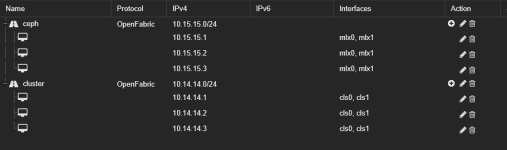
For the Ceph full mesh network, we plan to use a routed setup with SDN Fabrics, using two links between each pair of hosts.
I have read that LACP should not be used in this setup. Instead, all four links should simply be selected in the SDN Fabric configuration.
Additionally, the following option should be enabled to make sure that both links are used at the same time, rather than using the second link only as a backup if the first one fails:
net.ipv4.fib_multipath_hash_policy = 1

Is this understanding correct?
Would this setup be suitable for a professional production environment?
Are there any potential problems with this design? What would you recommend doing differently or improving?
I am particularly unsure about the net.ipv4.fib_multipath_hash_policy = 1 setting. Has anyone implemented this successfully in a similar setup?
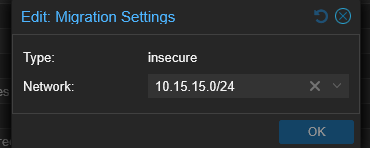
For live migration of VMs, we would also like to use the full mesh network. Is this a good approach?

Some general information about our environment:
  • 1 CPU socket, 3.6 GHz, 16 cores per Proxmox host
  • 384 GB RAM per Proxmox host
  • 5 x 2 TB NVMe drives per Proxmox host
  • Separate boot device for the Proxmox installation
  • Approximately 40–50 VMs will run on this infrastructure
  • Total data volume: approximately 6 TB
  • We do not have 10 Gbit switches, so the servers will only be connected to the LAN at 1 Gbit.
Thank you very much in advance for your help!
 
3 node mesh is probably better suited to a homelab than enterprise, it will work fine if you keep 2 nodes up at all times. I have my homelab set up in this manner and like the SDN option the best for routing

A couple considerations:
What would you do if you want to add a fourth node?
How would you handle a cluster replacement when your current servers become EOL? Keep in mind that the next generation of servers will have network cards with different interfaces, that cant connect directly to your current hardware

Having a switch or two makes things a ton more flexible when you get into these situations which i think are inevitable in an enterprise. if your org needs to be up 24/7/365 i wouldnt recommend this setup, if you can take things down for a weekend without consequence then its suitable.
 
Last edited:
Thanks for your input.
We can be 99% sure that we will not need an additional node in the future. At most, we will upgrade the RAM and disks in the three existing servers.
When these servers reach end of life, we will buy new infrastructure, build a new cluster and migrate the VMs to it.
This is how we have usually done it in the past.
 
Hello I've been running this type of setup for nearly 3 years with zero hassle (followed this guide to set it up https://pve.proxmox.com/wiki/Full_Mesh_Network_for_Ceph_Server), like you we don't ever plan to go more than 3 nodes at a time, so this suits us well since the pricing is stupid expensive in this day and age. Saves a lot money because we don't have to plug 100 Gig Mellanox to switches, just mesh the 100 Gig Mellanox together with DAC cables and it works super well and doesn't cost an arm and leg to buy 100 gig network switches.

Meshed together cluster and ceph in this fashion and the server runs rock solid, ceph latency is ultra low no matter what the server is doing, and running 60ish VMs at the same time and cluster traffic always solid.

1795496516348.png

1795497503510.png

1795496758505.png

Server Migration is super fast takes around 5 seconds to migrate a 12 GB Memory VM as I set the migration settings to use the 100 Gig network

1795497995150.png

Obviously it's better to run Ceph with more server but budget matters as well. Not every company can afford 6-12 nodes in a cluster just to run VMs.
 
Last edited:
Then only thing to look out with a Ceph cluster where the number of nodes is equal to the number of replicas (size) is to give a host enough options to recover to other OSDs on the same host, in case one dies.

E.g. 2 OSDs per host and if only one OSD dies, Ceph can only recover to the same host. As a result, the last remaining OSD will likely run full quickly.
If you have multiple OSDs per host, that risk goes down. For example, in the screenshot shared by @complexplaster27 we see 12 OSDs on 3 nodes → 4 OSDs /node.
So if one OSD fails, the remaining 3 will each get roughly one third of the data that was on the lost OSD. Lowering the risk of one of them running full quite a bit.
 
  • Like
Reactions: UdoB
Then only thing to look out with a Ceph cluster where the number of nodes is equal to the number of replicas (size) is to give a host enough options to recover to other OSDs on the same host, in case one dies.

E.g. 2 OSDs per host and if only one OSD dies, Ceph can only recover to the same host. As a result, the last remaining OSD will likely run full quickly.
If you have multiple OSDs per host, that risk goes down. For example, in the screenshot shared by @complexplaster27 we see 12 OSDs on 3 nodes → 4 OSDs /node.
So if one OSD fails, the remaining 3 will each get roughly one third of the data that was on the lost OSD. Lowering the risk of one of them running full quite a bit.
My bigest concern about ceph is power outage - i did not get any information on shutting down a ceph cluster per script automaitcaly
is there a general script available now ? - the last time (2 years ago) i spoke with IBM ceph engineers they told you have to be sure no power outage occurs as there is no way to clean shutdown the whole cluster ? not every customer has a diesel aggregate available :)

rg
Christian
 
https://pve.proxmox.com/pve-docs/chapter-pveceph.html#pveceph_shutdown

That can be a base to script a clean shutdown.

Generally, and all others, please correct me if you have different experiences, but if you use SSDs with PLP, a cluster dying unexpectedly, should not corrupt the data more than one would except. For example, and data that was cached in the guest OS.
Once power is back, an ordered startup (hosts with MONs first) should bring the cluster back up without major issues.
I can confirm this to be the case because we have a site that has semi frequent full power outages, long enough for the UPS to die and the backup generator to run out of fuel, the enterprise SSDs have always come back and the 3 node cluster has come back online with Ceph rebuilding the storage cluster with no signs of corruption in the VMs.