Random node reboots

tema228

New Member
Oct 27, 2026
3
0
1
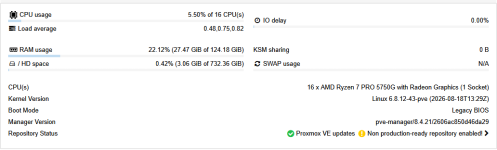
Good afternoon, Proxmox 8.4 is installed; the node is part of a cluster.
There are no logs from when the node went down; just "-- Reboot --"
What was done:
1) BIOS updated
2) amd64-microcode package installed
3) Power supply unit replaced
4) CPU stress test
5) RAM test

Could you tell me what might be causing this?

1793091974574.png
 

Attachments

  • 1793092102419.png
    1793092102419.png
    119.3 KB · Views: 0
Last edited:
It might be due to node fencing, when a node hosts HA resources, and it loses corosync quorum for over 50-60 seconds it will fence itself (reboot). If the network becomes unusable from a majority of nodes in the cluster, that would result in the entire cluster rebooting. See [0] for more info about fencing.

As you know corosync is sensitive to latency changes and network stability and therefore needs a dedicated NIC. The dedicated NIC does not need much bandwidth, 1G is usually recommended.

If that's the case, then ensure to follow the below recommendation:
From Proxmox VE 9 documentation [1]:
  • Recommended to use a dedicated NIC exclusively for Corosync communication.
  • Configure the migration network on a different interface from the Corosync interface:
    Datacenter → Options → Migration Settings. Please make sure to read our wiki 5.14.2. Migration Network for more details [2].
  • Recommended to give Corosync at least a secondary link for redundancy.
  • Recommended to not use a network bond for Corosync's primary link, see [3] for more details.
[0] https://pve.proxmox.com/pve-docs/pve-admin-guide.html#ha_manager_fencing
[1] https://pve.proxmox.com/pve-docs/pve-admin-guide.html#pvecm_cluster_requirements
[2] https://pve.proxmox.com/pve-docs/pve-admin-guide.html#pvecm_migration_network
[3] https://pve.proxmox.com/pve-docs/pve-admin-guide.html#pvecm_corosync_over_bonds

 
Last edited:
It might be due to node fencing, when a node hosts HA resources, and it loses corosync quorum for over 50-60 seconds it will fence itself (reboot). If the network becomes unusable from a majority of nodes in the cluster, that would result in the entire cluster rebooting. See [0] for more info about fencing.

As you know corosync is sensitive to latency changes and network stability and therefore needs a dedicated NIC. The dedicated NIC does not need much bandwidth, 1G is usually recommended.

If that's the case, then ensure to follow the below recommendation:
From Proxmox VE 9 documentation [1]:
  • Recommended to use a dedicated NIC exclusively for Corosync communication.
  • Configure the migration network on a different interface from the Corosync interface:
    Datacenter → Options → Migration Settings. Please make sure to read our wiki 5.14.2. Migration Network for more details [2].
  • Recommended to give Corosync at least a secondary link for redundancy.
  • Recommended to not use a network bond for Corosync's primary link, see [3] for more details.
[0] https://pve.proxmox.com/pve-docs/pve-admin-guide.html#ha_manager_fencing
[1] https://pve.proxmox.com/pve-docs/pve-admin-guide.html#pvecm_cluster_requirements
[2] https://pve.proxmox.com/pve-docs/pve-admin-guide.html#pvecm_migration_network
[3] https://pve.proxmox.com/pve-docs/pve-admin-guide.html#pvecm_corosync_over_bonds

There is a dedicated NIC. The problem is not with the network. I was running Proxmox version 7.4 and had no issues. I’m thinking of rolling back.
 
I was running Proxmox version 7.4 and had no issues. I’m thinking of rolling back.
From my point of view this is only an option if you are living under a rock - and the PVE has no network connectivity. None.

Unfortunately hard reboots are not easy to debug, sometimes.
There are no logs from when the node went down; just "-- Reboot --"
This should not happen, of course. Sometimes a remote log helps to catch messages that could not be stored locally for any reason. I utilize a "remote journal" for this.

I can only imagine a hardware induced trigger event. Did you check the BIOS for error logging? (Simpler BIOSes don't tell you much; Dell iDRAC and others have a luxury amount of hardware related events being logged - the availability depends heavily on the manufacturer...)

The other nodes have the same hardware? Probably you hesitate to create the same trouble there..., but that would be the one possible way to go.
 
Last edited:
I am attaching a file with tests.
Well...

That file gets saved as "px3_diagnostics_summary.zip" - which is a lie not the case. Inside of it there is a *.rar archive. I stopped there.

But then my curiosity won. I installed an appropriate software package - exclusively to be able to read that file and (possibly) to help you.

After extraction I found... a file named "px3_diagnostics_summary.docx". And I have no tooling for that kind of stuff readily available on this machine - and I won't install LibreOffice only to read your report.

Sorry, I'm out...
 
Last edited:
  • Like
Reactions: Onslow and fba