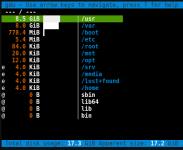
To find data accidentally stored in mount points,
Mount temporarily / to /mnt/tmp mkdir /mnt/tmp chattr +i /mnt/tmp mount --bind / /mnt/tmp gdu /mnt/tmp
To find data accidentally stored in mount points,
Mount temporarily / to /mnt/tmp mkdir /mnt/tmp chattr +i /mnt/tmp mount --bind / /mnt/tmp gdu /mnt/tmp
Do you think it's a good idea if /mnt/tmp exists on most PVE installs so that there is a quick way to do a check for mis-stored data? Seems to me thiis could come in handy in the future. Thoughts?