

Some background.
PVE 9.1.7
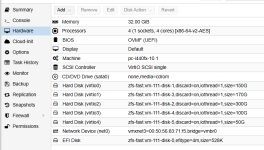
Windows 2022 with SQL Server 2022
Have got 3 x hosts, ZFS data stores with replication of VM to another host currently hourly
PBS running daily snapshot backup to a drive on third cluster node
Not currently got support arrangement with ProMox, on the list to get signed for and done!
PBS drive became full and so backups not running properly
Cove backup within the Windows OS also multiple times daily. Currently 4 hourly
Each night getting a disk I/O error within Windows think related to when backup was kicking in --> "Error detail: ID=153, Source=Disk, Message: The IO operation at logical block address 0x4ddf6e8 for Disk 0 (PDO name: \Device\0000001f) was retried." few of those over maybe 1 second in total.
SQL DBCC checks complaining of some corruption few weeks ago and ended up restoring from BAK files and replaying logs and has seemed OK since then and Cove backups have been reporting 100%
Yesterday consistency check failed again and issues with corrupt log files.
Physical drives are stable
RAID controller stable
ZFS drives stable
Windows VM no complaints except the , CHKDSK when run before was stable
I am looking around here but can't seem to search nicely yet for other SQL best practice with ProxMox beyond https://192.168.10.11:8006/pve-docs/chapter-qm.html#qm_qga_fsfreeze etc.
Any advice appreciated!
Steve
PVE 9.1.7
Windows 2022 with SQL Server 2022
Have got 3 x hosts, ZFS data stores with replication of VM to another host currently hourly
PBS running daily snapshot backup to a drive on third cluster node
Not currently got support arrangement with ProMox, on the list to get signed for and done!
PBS drive became full and so backups not running properly
Cove backup within the Windows OS also multiple times daily. Currently 4 hourly
Each night getting a disk I/O error within Windows think related to when backup was kicking in --> "Error detail: ID=153, Source=Disk, Message: The IO operation at logical block address 0x4ddf6e8 for Disk 0 (PDO name: \Device\0000001f) was retried." few of those over maybe 1 second in total.
SQL DBCC checks complaining of some corruption few weeks ago and ended up restoring from BAK files and replaying logs and has seemed OK since then and Cove backups have been reporting 100%
Yesterday consistency check failed again and issues with corrupt log files.
Physical drives are stable
RAID controller stable
ZFS drives stable
Windows VM no complaints except the , CHKDSK when run before was stable
I am looking around here but can't seem to search nicely yet for other SQL best practice with ProxMox beyond https://192.168.10.11:8006/pve-docs/chapter-qm.html#qm_qga_fsfreeze etc.
Any advice appreciated!
Steve



 0.1.271 seems optimal though 0.1.266 is OK, AFAIK, also. But higher up that wiki page it says "Currently, there are no known issues for version virtio-win 0.1.271."