Hi all!
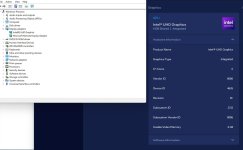
I'm trying so so hard to get the intel iGPU passthrough but always getting Error 43. I'm really not sure if I'm doing something wrong or just that my iGPU is not supported somehow.
I have i9-12900HK, and while CPU passtrought was a breeze, GPU on the other hand is impossible.
The things I did:
After all of that, I set a new PCI device, as shown below:
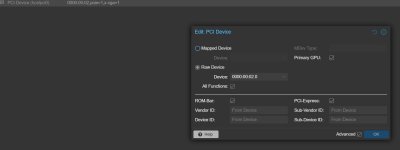
But no matter what I did, I always end up with this:
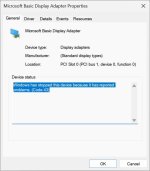
If someone had the same issue and was able to fix it, please share your solution.
Thank you all for reading my post.
I'm trying so so hard to get the intel iGPU passthrough but always getting Error 43. I'm really not sure if I'm doing something wrong or just that my iGPU is not supported somehow.
I have i9-12900HK, and while CPU passtrought was a breeze, GPU on the other hand is impossible.
The things I did:
Code:
Step 1: Edit GRUB
  Execute: nano /etc/default/grub
     Change this line from
   GRUB_CMDLINE_LINUX_DEFAULT="quiet"
     to
   GRUB_CMDLINE_LINUX_DEFAULT="quiet intel_iommu=on i915.enable_gvt=1 iommu=pt pcie_acs_override=downstream,multifunction video=efifb:off video=vesa:off vfio_iommu_type1.allow_unsafe_interrupts=1 kvm.ignore_msrs=1 modprobe.blacklist=radeon,nouveau,nvidia,nvidiafb,nvidia-gpu"
  Save file and exit the text editor

Step 2: Update GRUB
  Execute the command: update-grub

Step 3: Edit the module files
  Execute: nano /etc/modules
     Add these lines:
 vfio
 vfio_iommu_type1
 vfio_pci
 vfio_virqfd
 kvmgt
  Save file and exit the text editor

Step 4: IOMMU remapping
 a) Execute: nano /etc/modprobe.d/iommu_unsafe_interrupts.conf
     Add this line:
    options vfio_iommu_type1 allow_unsafe_interrupts=1
     Save file and exit the text editor
 b) Execute: nano /etc/modprobe.d/kvm.conf
     Add this line:
    options kvm ignore_msrs=1
     Save file and exit the text editor

Step 5: Blacklist the GPU drivers
  Execute: nano /etc/modprobe.d/blacklist.conf
     Add these lines:
    blacklist i915
  Save file and exit the text editor

Step 6: Adding GPU to VFIO
 a) Execute: lspci -v
     Look for your GPU and take note of the first set of numbers
 b) Execute: lspci -n -s (PCI card address)
   This command gives you the GPU vendors number.
 c) Execute: nano /etc/modprobe.d/vfio.conf
     Add this line with your GPU number and Audio number:
   options vfio-pci ids=(GPU number,Audio number) disable_vga=1
  Save file and exit the text editor

Step 7: Command to update everything and Restart
 a) Execute: update-initramfs -u
 b) Then restart the your Proxmox Node
After all of that, I set a new PCI device, as shown below:
But no matter what I did, I always end up with this:
If someone had the same issue and was able to fix it, please share your solution.
Thank you all for reading my post.