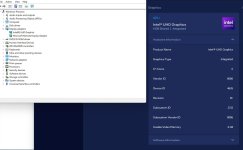
Intel iGPU passthrough to Windows VM.

Armani12

New Member
Jul 24, 2026
10
0
1
Hi all!

I'm trying so so hard to get the intel iGPU passthrough but always getting Error 43. I'm really not sure if I'm doing something wrong or just that my iGPU is not supported somehow.
I have i9-12900HK, and while CPU passtrought was a breeze, GPU on the other hand is impossible.

The things I did:

Code:
Step 1: Edit GRUB 
  Execute: nano /etc/default/grub
     Change this line from
   GRUB_CMDLINE_LINUX_DEFAULT="quiet"
     to
   GRUB_CMDLINE_LINUX_DEFAULT="quiet intel_iommu=on i915.enable_gvt=1 iommu=pt pcie_acs_override=downstream,multifunction video=efifb:off video=vesa:off vfio_iommu_type1.allow_unsafe_interrupts=1 kvm.ignore_msrs=1 modprobe.blacklist=radeon,nouveau,nvidia,nvidiafb,nvidia-gpu"
  Save file and exit the text editor 
  
Step 2: Update GRUB 
  Execute the command: update-grub
  
Step 3: Edit the module files   
  Execute: nano /etc/modules
     Add these lines:
 vfio
 vfio_iommu_type1
 vfio_pci
 vfio_virqfd
 kvmgt
  Save file and exit the text editor 
  
Step 4: IOMMU remapping 
 a) Execute: nano /etc/modprobe.d/iommu_unsafe_interrupts.conf
     Add this line:
    options vfio_iommu_type1 allow_unsafe_interrupts=1
     Save file and exit the text editor 
 b) Execute: nano /etc/modprobe.d/kvm.conf
     Add this line:
    options kvm ignore_msrs=1
     Save file and exit the text editor 
  
Step 5: Blacklist the GPU drivers 
  Execute: nano /etc/modprobe.d/blacklist.conf
     Add these lines:
    blacklist i915
  Save file and exit the text editor 
  
Step 6: Adding GPU to VFIO 
 a) Execute: lspci -v
     Look for your GPU and take note of the first set of numbers
 b) Execute: lspci -n -s (PCI card address)
   This command gives you the GPU vendors number.
 c) Execute: nano /etc/modprobe.d/vfio.conf
     Add this line with your GPU number and Audio number:
   options vfio-pci ids=(GPU number,Audio number) disable_vga=1
  Save file and exit the text editor 
  
Step 7: Command to update everything and Restart 
 a) Execute: update-initramfs -u
 b) Then restart the your Proxmox Node

After all of that, I set a new PCI device, as shown below:
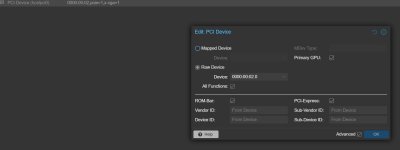

screnshot.jpg

But no matter what I did, I always end up with this:
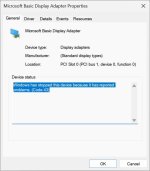
Untitled.jpg


If someone had the same issue and was able to fix it, please share your solution.

Thank you all for reading my post.
 
Hi,

Could you please post the output of the following:
Bash:
pveversion -v
qm config <VMID>
lspci -nnk
I would also check if the `/sys/bus/pci/devices/0000:00:02.0/sriov_totalvfs` exists, you can do `ls -la /sys/bus/pci/devices/0000:00:02.0/sriov_totalvfs` from your Proxmox VE node.
 
Hi,

Could you please post the output of the following:
Bash:
pveversion -v
qm config <VMID>
lspci -nnk
I would also check if the `/sys/bus/pci/devices/0000:00:02.0/sriov_totalvfs` exists, you can do `ls -la /sys/bus/pci/devices/0000:00:02.0/sriov_totalvfs` from your Proxmox VE node.
Thank you Moayad for taking and interest in my issue.

As per your request, please find the logs below:

Code:
root@proxmox:~# pveversion -v
proxmox-ve: 8.4.0 (running kernel: 6.8.12-9-pve)
pve-manager: 8.4.0 (running version: 8.4.0/ec58e45e1bcdf2ac)
proxmox-kernel-helper: 8.1.1
proxmox-kernel-6.8: 6.8.12-9
proxmox-kernel-6.8.12-9-pve-signed: 6.8.12-9
ceph-fuse: 17.2.8-pve2
corosync: 3.1.9-pve1
criu: 3.17.1-2+deb12u1
frr-pythontools: 10.2.1-1+pve2
glusterfs-client: 10.3-5
ifupdown2: 3.2.0-1+pmx11
ksm-control-daemon: 1.5-1
libjs-extjs: 7.0.0-5
libknet1: 1.30-pve2
libproxmox-acme-perl: 1.6.0
libproxmox-backup-qemu0: 1.5.1
libproxmox-rs-perl: 0.3.5
libpve-access-control: 8.2.2
libpve-apiclient-perl: 3.3.2
libpve-cluster-api-perl: 8.1.0
libpve-cluster-perl: 8.1.0
libpve-common-perl: 8.3.1
libpve-guest-common-perl: 5.2.2
libpve-http-server-perl: 5.2.2
libpve-network-perl: 0.11.2
libpve-rs-perl: 0.9.4
libpve-storage-perl: 8.3.6
libspice-server1: 0.15.1-1
lvm2: 2.03.16-2
lxc-pve: 6.0.0-1
lxcfs: 6.0.0-pve2
novnc-pve: 1.6.0-2
proxmox-backup-client: 3.3.7-1
proxmox-backup-file-restore: 3.3.7-1
proxmox-firewall: 0.7.1
proxmox-kernel-helper: 8.1.1
proxmox-mail-forward: 0.3.2
proxmox-mini-journalreader: 1.4.0
proxmox-offline-mirror-helper: 0.6.7
proxmox-widget-toolkit: 4.3.10
pve-cluster: 8.1.0
pve-container: 5.2.6
pve-docs: 8.4.0
pve-edk2-firmware: 4.2025.02-3
pve-esxi-import-tools: 0.7.3
pve-firewall: 5.1.1
pve-firmware: 3.15-3
pve-ha-manager: 4.0.7
pve-i18n: 3.4.2
pve-qemu-kvm: 9.2.0-5
pve-xtermjs: 5.5.0-2
qemu-server: 8.3.12
smartmontools: 7.3-pve1
spiceterm: 3.3.0
swtpm: 0.8.0+pve1
vncterm: 1.8.0
zfsutils-linux: 2.2.7-pve2


root@proxmox:~# qm config 100
bios: ovmf
boot: order=ide2;virtio0
cores: 10
cpu: host
efidisk0: local-lvm:vm-100-disk-0,efitype=4m,pre-enrolled-keys=1,size=4M
hostpci0: 0000:00:02,pcie=1,x-vga=1
ide0: local:iso/virtio-win-0.1.285.iso,media=cdrom,size=771138K
ide2: local:iso/Win11_25H2_English_x64_v2.iso,media=cdrom,size=8273050K
machine: pc-q35-9.2+pve1
memory: 8192
meta: creation-qemu=9.2.0,ctime=1784897164
name: Windows
net0: virtio=BC:24:11:FE:06:5F,bridge=vmbr0
numa: 0
ostype: win11
scsihw: virtio-scsi-single
smbios1: uuid=639b68ec-7b7b-49a2-8c91-0a70439c79c8
sockets: 1
tpmstate0: local-lvm:vm-100-disk-1,size=4M,version=v2.0
virtio0: local-lvm:vm-100-disk-2,discard=on,iothread=1,size=200G
vmgenid: fb357318-3226-486a-85ed-9d91d804b4c3


root@proxmox:~# lspci -nnk
00:00.0 Host bridge [0600]: Intel Corporation 12th Gen Core Processor Host Bridge/DRAM Registers [8086:4641] (rev 02)
        DeviceName: Onboard - Other
        Subsystem: Intel Corporation 12th Gen Core Processor Host Bridge/DRAM Registers [8086:7270]
        Kernel driver in use: igen6_edac
        Kernel modules: igen6_edac
00:02.0 VGA compatible controller [0300]: Intel Corporation Alder Lake-P Integrated Graphics Controller [8086:4626] (rev 0c)
        DeviceName: Onboard - Video
        Subsystem: Intel Corporation Alder Lake-P Integrated Graphics Controller [8086:2212]
        Kernel driver in use: vfio-pci
        Kernel modules: i915, xe
00:06.0 PCI bridge [0604]: Intel Corporation 12th Gen Core Processor PCI Express x4 Controller #0 [8086:464d] (rev 02)
        Subsystem: Intel Corporation 12th Gen Core Processor PCI Express x4 Controller [8086:7270]
        Kernel driver in use: pcieport
00:06.2 PCI bridge [0604]: Intel Corporation 12th Gen Core Processor PCI Express x4 Controller #2 [8086:463d] (rev 02)
        Subsystem: Intel Corporation 12th Gen Core Processor PCI Express x4 Controller [8086:7270]
        Kernel driver in use: pcieport
00:07.0 PCI bridge [0604]: Intel Corporation Alder Lake-P Thunderbolt 4 PCI Express Root Port #0 [8086:466e] (rev 02)
        Subsystem: Intel Corporation Alder Lake-P Thunderbolt 4 PCI Express Root Port [8086:7270]
        Kernel driver in use: pcieport
00:07.1 PCI bridge [0604]: Intel Corporation Alder Lake-P Thunderbolt 4 PCI Express Root Port #1 [8086:463f] (rev 02)
        Subsystem: Intel Corporation Alder Lake-P Thunderbolt 4 PCI Express Root Port [8086:7270]
        Kernel driver in use: pcieport
00:0d.0 USB controller [0c03]: Intel Corporation Alder Lake-P Thunderbolt 4 USB Controller [8086:461e] (rev 02)
        DeviceName: Onboard - Other
        Subsystem: Intel Corporation Alder Lake-P Thunderbolt 4 USB Controller [8086:7270]
        Kernel driver in use: xhci_hcd
        Kernel modules: xhci_pci
00:0d.2 USB controller [0c03]: Intel Corporation Alder Lake-P Thunderbolt 4 NHI #0 [8086:463e] (rev 02)
        DeviceName: Onboard - Other
        Subsystem: Intel Corporation Alder Lake-P Thunderbolt 4 NHI [8086:7270]
        Kernel driver in use: thunderbolt
        Kernel modules: thunderbolt
00:0d.3 USB controller [0c03]: Intel Corporation Alder Lake-P Thunderbolt 4 NHI #1 [8086:466d] (rev 02)
        DeviceName: Onboard - Other
        Subsystem: Intel Corporation Alder Lake-P Thunderbolt 4 NHI [8086:7270]
        Kernel driver in use: thunderbolt
        Kernel modules: thunderbolt
00:14.0 USB controller [0c03]: Intel Corporation Alder Lake PCH USB 3.2 xHCI Host Controller [8086:51ed] (rev 01)
        DeviceName: Onboard - Other
        Subsystem: Intel Corporation Alder Lake PCH USB 3.2 xHCI Host Controller [8086:7270]
        Kernel driver in use: xhci_hcd
        Kernel modules: xhci_pci
00:14.2 RAM memory [0500]: Intel Corporation Alder Lake PCH Shared SRAM [8086:51ef] (rev 01)
        DeviceName: Onboard - Other
        Subsystem: Intel Corporation Alder Lake PCH Shared SRAM [8086:7270]
00:15.0 Serial bus controller [0c80]: Intel Corporation Alder Lake PCH Serial IO I2C Controller #0 [8086:51e8] (rev 01)
        DeviceName: Onboard - Other
        Subsystem: Intel Corporation Alder Lake PCH Serial IO I2C Controller [8086:7270]
        Kernel driver in use: intel-lpss
        Kernel modules: intel_lpss_pci
00:16.0 Communication controller [0780]: Intel Corporation Alder Lake PCH HECI Controller [8086:51e0] (rev 01)
        DeviceName: Onboard - Other
        Subsystem: Intel Corporation Alder Lake PCH HECI Controller [8086:7270]
        Kernel driver in use: mei_me
        Kernel modules: mei_me
00:17.0 SATA controller [0106]: Intel Corporation Alder Lake-P SATA AHCI Controller [8086:51d3] (rev 01)
        DeviceName: Onboard - SATA
        Subsystem: Intel Corporation Alder Lake-P SATA AHCI Controller [8086:7270]
        Kernel driver in use: ahci
        Kernel modules: ahci
00:1c.0 PCI bridge [0604]: Intel Corporation Device [8086:51b8] (rev 01)
        Subsystem: Intel Corporation Device [8086:7270]
        Kernel driver in use: pcieport
00:1c.4 PCI bridge [0604]: Intel Corporation Alder Lake PCI Express x4 Root Port [8086:51bc] (rev 01)
        Subsystem: Intel Corporation Alder Lake PCI Express x4 Root Port [8086:7270]
        Kernel driver in use: pcieport
00:1c.6 PCI bridge [0604]: Intel Corporation Device [8086:51be] (rev 01)
        Subsystem: Intel Corporation Device [8086:7270]
        Kernel driver in use: pcieport
00:1c.7 PCI bridge [0604]: Intel Corporation Alder Lake PCH-P PCI Express Root Port #9 [8086:51bf] (rev 01)
        Subsystem: Intel Corporation Alder Lake PCH-P PCI Express Root Port [8086:7270]
        Kernel driver in use: pcieport
00:1f.0 ISA bridge [0601]: Intel Corporation Alder Lake PCH eSPI Controller [8086:5182] (rev 01)
        DeviceName: Onboard - Other
        Subsystem: Intel Corporation Alder Lake PCH eSPI Controller [8086:7270]
00:1f.3 Audio device [0403]: Intel Corporation Alder Lake PCH-P High Definition Audio Controller [8086:51c8] (rev 01)
        DeviceName: Onboard - Sound
        Subsystem: Intel Corporation Alder Lake PCH-P High Definition Audio Controller [8086:7270]
        Kernel modules: snd_hda_intel, snd_sof_pci_intel_tgl
00:1f.4 SMBus [0c05]: Intel Corporation Alder Lake PCH-P SMBus Host Controller [8086:51a3] (rev 01)
        DeviceName: Onboard - Other
        Subsystem: Intel Corporation Alder Lake PCH-P SMBus Host Controller [8086:7270]
        Kernel driver in use: i801_smbus
        Kernel modules: i2c_i801
00:1f.5 Serial bus controller [0c80]: Intel Corporation Alder Lake-P PCH SPI Controller [8086:51a4] (rev 01)
        DeviceName: Onboard - Other
        Subsystem: Intel Corporation Alder Lake-P PCH SPI Controller [8086:7270]
        Kernel driver in use: intel-spi
        Kernel modules: spi_intel_pci
02:00.0 Non-Volatile memory controller [0108]: Micron Technology Inc 3400 NVMe SSD [Hendrix] [1344:5407]
        Subsystem: Micron Technology Inc 3400 NVMe SSD [Hendrix] [1344:0100]
        Kernel driver in use: nvme
        Kernel modules: nvme
58:00.0 Network controller [0280]: Intel Corporation Wi-Fi 6 AX200 [8086:2723] (rev 1a)
        Subsystem: Intel Corporation Wi-Fi 6 AX200NGW [8086:0084]
        Kernel driver in use: iwlwifi
        Kernel modules: iwlwifi
59:00.0 Ethernet controller [0200]: Intel Corporation Ethernet Controller I226-V [8086:125c] (rev 04)
        Subsystem: Intel Corporation Ethernet Controller I226-V [8086:0000]
        Kernel driver in use: igc
        Kernel modules: igc
5a:00.0 Ethernet controller [0200]: Intel Corporation Ethernet Controller I226-V [8086:125c] (rev 04)
        Subsystem: Intel Corporation Ethernet Controller I226-V [8086:0000]
        Kernel driver in use: igc
        Kernel modules: igc
root@proxmox:~# 


root@proxmox:~# ls -la /sys/bus/pci/devices/0000:00:02.0/sriov_totalvfs
-r--r--r-- 1 root root 4096 Jul 24 21:20 /sys/bus/pci/devices/0000:00:02.0/sriov_totalvfs
root@proxmox:~#
 
Thank you for the output!

I would undo the `i915` blacklist binding so `00:02.0` is handled by node driver again, then post `cat /sys/bus/pci/devices/0000:00:02.0/sriov_totalvfs` and `cat /sys/bus/pci/devices/0000:00:02.0/sriov_numvfs`.

Have you checked the Error 43 [0] in our wiki guide? e.g.:
Code:
Check the security event logs of your Windows VM
Check the dmesg logs of your host machine


[0] https://pve.proxmox.com/wiki/PCI_Passthrough#Error_43
 
Thank you for the output!

I would undo the `i915` blacklist binding so `00:02.0` is handled by node driver again, then post `cat /sys/bus/pci/devices/0000:00:02.0/sriov_totalvfs` and `cat /sys/bus/pci/devices/0000:00:02.0/sriov_numvfs`.

Have you checked the Error 43 [0] in our wiki guide? e.g.:
Code:
Check the security event logs of your Windows VM
Check the dmesg logs of your host machine


[0] https://pve.proxmox.com/wiki/PCI_Passthrough#Error_43
I removed the "i915" from the blacklist config file, and those are the logs:

Code:
root@proxmox:~# cat /sys/bus/pci/devices/0000:00:02.0/sriov_totalvfs
7
root@proxmox:~# cat /sys/bus/pci/devices/0000:00:02.0/sriov_numvfs
0

Yes, I checked that Wiki page, but the Windows VM logs show nothing helpful.
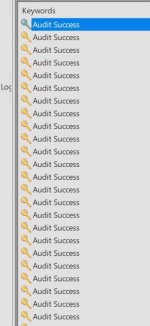
The security event log doesn't have any Critical, Warnings or Errors, just lots of this:

Screenshot 2026-07-24 214100.jpg

As for System logs, they have some errors but none are GPU related.

For DMESG logs of Proxmox host, I don't know how to read those logs. Would you be able to see if there useful information there?

https://pastebin.com/embed_js/hfk30GzA
 
Thank you for log!

If the `8086:4626` is added to `/etc/modprobe.d/vfio.conf ` please also remove it, then update initramfs and reboot the node, then check that `lspci -nnk` shows `i915` instead of `vfio-pci`.
 
Thank you for log!

If the `8086:4626` is added to `/etc/modprobe.d/vfio.conf ` please also remove it, then update initramfs and reboot the node, then check that `lspci -nnk` shows `i915` instead of `vfio-pci`.
Yes, it was added to vfio.conf as:

"options vfio-pci ids=8086:4626 disable_vga=1"

I removed it.

I then updated initramfs ("update-initramfs -u -k all") and reboot.

It also shows i915:

Code:
root@proxmox:~# lspci -nnk
00:00.0 Host bridge [0600]: Intel Corporation 12th Gen Core Processor Host Bridge/DRAM Registers [8086:4641] (rev 02)
        DeviceName: Onboard - Other
        Subsystem: Intel Corporation 12th Gen Core Processor Host Bridge/DRAM Registers [8086:7270]
        Kernel driver in use: igen6_edac
        Kernel modules: igen6_edac
00:02.0 VGA compatible controller [0300]: Intel Corporation Alder Lake-P Integrated Graphics Controller [8086:4626] (rev 0c)
        DeviceName: Onboard - Video
        Subsystem: Intel Corporation Alder Lake-P Integrated Graphics Controller [8086:2212]
        Kernel driver in use: i915
        Kernel modules: i915, xe

But after starting the Windows VM again - still same issue, error 43.
 
Of course. Here it is:

Code:
root@proxmox:~# qm config 100
bios: ovmf
boot: order=ide2;virtio0
cores: 10
cpu: host
efidisk0: local-lvm:vm-100-disk-0,efitype=4m,pre-enrolled-keys=1,size=4M
hostpci0: 0000:00:02,pcie=1,x-vga=1
ide0: local:iso/virtio-win-0.1.285.iso,media=cdrom,size=771138K
ide2: local:iso/Win11_25H2_English_x64_v2.iso,media=cdrom,size=8273050K
machine: pc-q35-9.2+pve1
memory: 8192
meta: creation-qemu=9.2.0,ctime=1784897164
name: Windows
net0: virtio=BC:24:11:FE:06:5F,bridge=vmbr0
numa: 0
ostype: win11
scsihw: virtio-scsi-single
smbios1: uuid=639b68ec-7b7b-49a2-8c91-0a70439c79c8
sockets: 1
tpmstate0: local-lvm:vm-100-disk-1,size=4M,version=v2.0
virtio0: local-lvm:vm-100-disk-2,discard=on,iothread=1,size=200G
vmgenid: fb357318-3226-486a-85ed-9d91d804b4c3
root@proxmox:~#
 
Oh forget that you posted already!


hostpci0: 0000:00:02,pcie=1,x-vga=1
Could you please post the output of:
Bash:
cat /sys/bus/pci/devices/0000:00:02.0/sriov_totalvfs
cat /sys/bus/pci/devices/0000:00:02.0/sriov_numvfs
 
Those are the logs:

Code:
root@proxmox:~# cat /sys/bus/pci/devices/0000:00:02.0/sriov_totalvfs
7
root@proxmox:~# cat /sys/bus/pci/devices/0000:00:02.0/sriov_numvfs
0

Output is same as before, in couple messages up.
 
Thank you!

Could you remove the PCI device from the VM 100 and then run `echo 1 > /sys/bus/pci/devices/0000:00:02.0/sriov_numvfs`? make sure that the VM is stop.

Then post the output of `cat /sys/bus/pci/devices/0000:00:02.0/sriov_numvfs` and `lspci -nnk`
 
I removed the PCI device from VM, but running this command

"echo 1 > /sys/bus/pci/devices/0000:00:02.0/sriov_numvfs"

gives error:

"-bash: echo: write error: No such file or directory"

But directory is there:

Code:
root@proxmox:~# ls /sys/bus/pci/devices/0000:00:02.0 | grep sriov
sriov_drivers_autoprobe
sriov_numvfs
sriov_offset
sriov_stride
sriov_totalvfs
sriov_vf_device
sriov_vf_total_msix
root@proxmox:~#

Of course the Windows VM was not running, fully shutdown.


Code:
root@proxmox:~# cat /sys/bus/pci/devices/0000:00:02.0/sriov_numvfs
0


Code:
root@proxmox:~# lspci -nnk
00:00.0 Host bridge [0600]: Intel Corporation 12th Gen Core Processor Host Bridge/DRAM Registers [8086:4641] (rev 02)
        DeviceName: Onboard - Other
        Subsystem: Intel Corporation 12th Gen Core Processor Host Bridge/DRAM Registers [8086:7270]
        Kernel driver in use: igen6_edac
        Kernel modules: igen6_edac
00:02.0 VGA compatible controller [0300]: Intel Corporation Alder Lake-P Integrated Graphics Controller [8086:4626] (rev 0c)
        DeviceName: Onboard - Video
        Subsystem: Intel Corporation Alder Lake-P Integrated Graphics Controller [8086:2212]
        Kernel driver in use: i915
        Kernel modules: i915, xep
 
i915.enable_gvt=1
Could you remove the `i915.enable_gvt=1` from the kernel CLI and then try the `echo 1 > /sys/bus/pci/devices/0000:00:02.0/sriov_numvfs` again? If still print error, please the output of `dmesg`

You have to initramfs afterwards or reboot the Proxmox VE node.
 
I already removed it before;

Code:
GRUB_DEFAULT=0
GRUB_TIMEOUT=5
GRUB_DISTRIBUTOR=`lsb_release -i -s 2> /dev/null || echo Debian`
#GRUB_CMDLINE_LINUX_DEFAULT="quiet"
GRUB_CMDLINE_LINUX_DEFAULT="quiet intel_iommu=on iommu=pt intel_pstate=disable"
GRUB_CMDLINE_LINUX=""

But there is still error:

Code:
root@proxmox:~# echo 1 > /sys/bus/pci/devices/0000:00:02.0/sriov_numvfs
-bash: echo: write error: No such file or directory
root@proxmox:~#

This is output of dmesg:

https://pastebin.com/5PbhH2Lm

No grub file was changes so I didn't reboot the Proxmox host.
 
Thank you!

Code:
[  759.647977] i915 0000:00:02.0: driver does not support SR-IOV configuration via sysfs
[  812.413565] i915 0000:00:02.0: driver does not support SR-IOV configuration via sysfs
[  916.467261] i915 0000:00:02.0: driver does not support SR-IOV configuration via sysfs
[ 1000.807451] i915 0000:00:02.0: driver does not support SR-IOV configuration via sysfs
[ 1937.654022] i915 0000:00:02.0: driver does not support SR-IOV configuration via sysfs

this means the current i915 can't create SR IOV via sysfs. full passhthourh would be passing `00:02.0` directly to the VM, which is what was tested before and resulted in Code 43 but on windows, could you check Linux to know if the issue from the VM OS? and I would also test an older Proxmox VE kernel.
 
I will check on Linux and report tomorrow.

I tried the same steps on the new 9.2 proxmox, and I installed the old 8.4 proxmox as well.
All the commands we run together were on 8.4.

But both 9.2 and 8.4 had same Code 43.
 
Hello,

I didn't tried with linux coz I was finally able to make it work.

I follow this exact guide:

https://www.derekseaman.com/2024/07...u-vt-d-passthrough-with-intel-alder-lake.html

That means I installed proxmox again, this time v9.2.
Also while doing all those commands, you need to do them in 'sets' like

Code:
apt update && apt install git sysfsutils pve-headers mokutil -y
rm -rf /usr/src/i915-sriov-dkms-*
rm -rf /var/lib/dkms/i915-sriov-dkms
rm -rf ~/i915-sriov-dkms*
find /lib/modules -regex ".*/updates/dkms/i915.ko" -delete

You cannot paste the command one by one.

screen.jpg

This topic can now be closed.