Ich würde nun die virtuellen Kisten sichern
das klappt ja leider gerade noch nicht, ist aber grundvoraussetzung für alles weitere...
Das Backup Problem kommt eventuell durch
thin_pool_autoextend_threshold=70.
Versuche mal manuell zu trimmen oder passe
/etc/lvm.conf eventuell an.
Hier hatte ich mal das hier geschrieben:
https://forum.proxmox.com/threads/local-lvm-wird-voll.145372/
Ich hatte zuvor zum Glück noch ein paar GB nicht zuwiesenen Speicher und habe nun den kompletten Rest "data" zugewiesen.
Dabei hatte ich diese Warning erhalten:
Code:
WARNING: You have not turned on protection against thin pools running out of space.<br>WARNING: Set activation/thin_pool_autoextend_threshold below 100 to trigger automatic extension of thin pools before they get full.
Die Threshold-Settings habe ich hier gefunden: /etc/lvm/lvm.conf
und hier jetzt das hier eingestellt:
thin_pool_autoextend_threshold = 70
thin_pool_autoxtend_percent = 20
Ich habe nun
thin_pool_autoextend_threshold = 80 gesetzt und damit konnte ich immerhin wieder ein Backup von beiden Containern erstellen.
Code:
INFO: starting new backup job: vzdump 100 --node proxmox --storage Backup --notes-template '{{guestname}}' --remove 0 --mode snapshot --compress zstd
INFO: Starting Backup of VM 100 (lxc)
INFO: Backup started at 2026-06-21 13:27:11
INFO: status = running
INFO: CT Name: InfluxDB2
INFO: including mount point rootfs ('/') in backup
INFO: backup mode: snapshot
INFO: ionice priority: 7
INFO: create storage snapshot 'vzdump'
  Logical volume "snap_vm-100-disk-0_vzdump" created.
  WARNING: Sum of all thin volume sizes (213.00 GiB) exceeds the size of thin pool pve/data and the size of whole volume group (<118.74 GiB).
INFO: creating vzdump archive '/mnt/pve/Backup/dump/vzdump-lxc-100-2026_06_21-13_27_11.tar.zst'
INFO: Total bytes written: 16028323840 (15GiB, 172MiB/s)
INFO: archive file size: 2.56GB
INFO: adding notes to backup
INFO: cleanup temporary 'vzdump' snapshot
  Logical volume "snap_vm-100-disk-0_vzdump" successfully removed
INFO: Finished Backup of VM 100 (00:01:31)
INFO: Backup finished at 2026-06-21 13:28:42
INFO: Backup job finished successfully
TASK OK
Code:
INFO: starting new backup job: vzdump 101 --compress zstd --storage Backup --node proxmox --remove 0 --notes-template '{{guestname}}' --mode snapshot
INFO: Starting Backup of VM 101 (lxc)
INFO: Backup started at 2026-06-21 13:29:25
INFO: status = running
INFO: CT Name: Grafana
INFO: including mount point rootfs ('/') in backup
INFO: backup mode: snapshot
INFO: ionice priority: 7
INFO: create storage snapshot 'vzdump'
  Logical volume "snap_vm-101-disk-0_vzdump" created.
  WARNING: Sum of all thin volume sizes (193.00 GiB) exceeds the size of thin pool pve/data and the size of whole volume group (<118.74 GiB).
INFO: creating vzdump archive '/mnt/pve/Backup/dump/vzdump-lxc-101-2026_06_21-13_29_25.tar.zst'
INFO: Total bytes written: 1299394560 (1.3GiB, 98MiB/s)
INFO: archive file size: 310MB
INFO: adding notes to backup
INFO: cleanup temporary 'vzdump' snapshot
  Logical volume "snap_vm-101-disk-0_vzdump" successfully removed
INFO: Finished Backup of VM 101 (00:00:14)
INFO: Backup finished at 2026-06-21 13:29:39
INFO: Backup job finished successfully
TASK OK
Was wäre denn eine sinnvolle Aufteilung sofern man ohne zusätzliche Platte auskommen möchte ?!
Ich habe derzeit:
InfluxDB -> Bootdisk size 14.94 GiB of 34.34 GiB
Grafana -> Bootdisk size 1.23 GiB of 14.66 GiB
HomeAssistant - Bootdisk size 128.00 GiB (42GB genutzt nach eigener Rechnung oben)
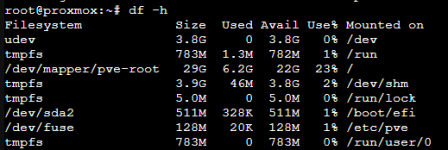
local -> 31G (6.5G genutzt)
-> hier liegt das System ?
local-lvm -> 86.16G (61.8G genutzt)
-> hier liegen
- vm-100 (InfluxDB) 37.58GB
- vm-101 (Grafana) 16.11GB
- vm-135 (HomeAssistant) 137.44GB -> wieso wird hier deutlich mehr angezeigt ?
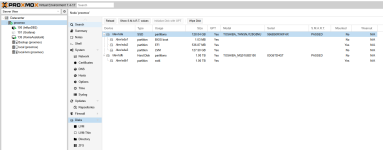
Wenn das alles so stimmt wären meine 128GB ja eigentlich nur 31+86,16 = 117GB ?
Sehe ich das richtig, dass selbst wenn es die beiden Container nicht gäbe das System dennoch überprovisioniert ist ?
Hätte ich nur den Speicher von "local-lvm" (86GB) verteilen dürfen ?
Dann würde ich mit den beiden Containern auf eine andere Platte umziehen und garnicht erst versuchen das alles wieder auf der jetzigen M2 128 GB Platz findet.
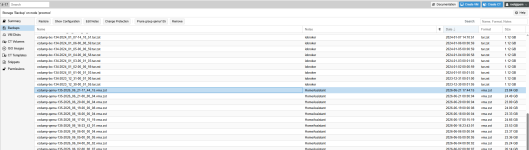
Warum das VM Backup funktioniert kann ich momentan nicht sagen.
na eventuell deswegen ?
Hier habe ich das gelesen:
https://forum.proxmox.com/threads/b...-thin-pool-pve-data-reached.58271/post-268551
Thema ist das LXC Backup das vzdump zuerst lokal ablegt und es dann auf die storage kopiert. Sprich du brauchst lokal für LXC-Dumps den doppelten Speicher. KVM hingegen kopieren direkt.