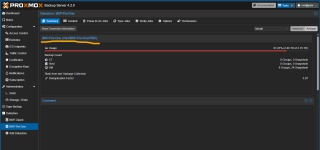
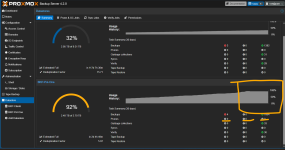
PBS backup space grow up constantly

Nothing.

But we are debugging the "Prune 0" shown on the dashboard. It does not feel right, correct? Perhaps it is a "display"-error in the sense that it shows the number of prunes for the Datastore but not if there is only pruning only of a (sub-) namespace.

I am just guessing, I did not test/verify that...
That's ok. My goal is debug/understand the constant growth of backups.
It's an evidence that the prune work fine, that the number on dashboard it's wrong.
If someone from proxmox want investigate also this issue, I'm available.
But secondary.
 
increasing space usage like this can also be caused by VMs not freeing up unused space properly (i.e., not discarding it). VM backups happen on the block layer - the full VM virtual disk is backed up. if applications inside the VM do a lot of temporary writes, they might dirty a lot of the disk even though within the VM it looks like most space is unused. I'd check the backup task logs to see if there are VMs that have an unexpectedly high rate of change. of course it could also just be natural growth over time - e.g., log files/state/.. accumulating inside the guests.
Hi fabian can I send you some logs to help you understand?
Let me know what you need.

But is it possible that nobody have this problem?
My vm are very simple, windows server DC, some windows 11 client, some linux mint, ecc... no big databases, some small firewalls...
 
Last edited:
And definitely also check the garbage collect logs like mentioned before, because that's the process that should actually clear out space.
 
Hi,

I don't think the GC is the culprit here. From the WebUI screenshot, the GC seems to clean from 50 to 80Gb per day (which is huge if the VM is in low usage[0]).

[0]
Vm are the same, just one has a small database but modification by day are very small, many other vm has no data incremets or better, only os maintenace like updates and so on

That why checking the backup task logs will certainly reveal some details.

Best regards,
 
Last edited:
Hi,

Have you checked your backup task logs like said before ?

Best regards,
Sorry but I'm not skill to understand PBS logs... ths's why I ask help.
I attach a vm backup example, some days, same hour.
If someone can help me to "read" this log exactly, may I learn how to manage this problem.
It's not good, at all... see the storage space going full in some days like dashboad announce.
 

Attachments

Hi fabian can I send you some logs to help you understand?
Let me know what you need.

But is it possible that nobody have this problem?
My vm are very simple, windows server DC, some windows 11 client, some linux mint, ecc... no big databases, some small firewalls...
I try to provide something to evaluare, sorry I'm not skill to understand PBS logs... ths's why I ask help.
I attach a vm backup example, some days, same hour.
If someone can help me to "read" this log exactly, may I learn how to manage this problem.
It's not good, at all... see the storage space going full in some days like dashboad announce.
 

Attachments

Hi,

First you don't need to post the same 2 logs 2 times with different quotes (it's losses of time).

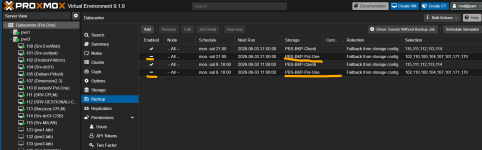
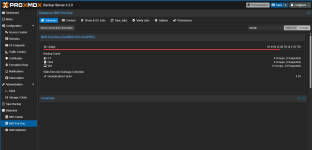
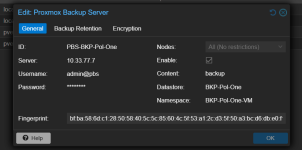
Second, it seems that you created a namespace "BKP-Pol-One-VM" inside a datastore named "BKP-Pol-One-VM" (that's why @UdoB was confused).

Third you need to check at the same time all your backup for the "BKP-Pol-One" datastore and check the "Size:" (which is in bytes if I'm not mistaken) of your VM to find out which one is "eating" your space.

Best regards,
 
  • Like
Reactions: Johannes S
could you also post the config of that VM (110)?
 
FWIW, those logs look okay (those backups uploaded <100 chunks each, and a chunk can be at most 4M). maybe check the other task logs for other VMs? there must be some VM with more churn ;)

maybe you could post all backup tasks for one of the datastores for the last three days, and the last three GC task logs of that datastore as well?
 
The dashboard shows the usage of the underlying file system. Is there anything else using it?

Could you provide the output of these commands? I took the datastore path from your prune logs.

Code:
df -h /mnt/BKP-Pol-One/PBS
du --all --max-depth=1 --human-readable /mnt/BKP-Pol-One/PBS
 
Hi,

First you don't need to post the same 2 logs 2 times with different quotes (it's losses of time).

Second, it seems that you created a namespace "BKP-Pol-One-VM" inside a datastore named "BKP-Pol-One-VM" (that's why @UdoB was confused).

Third you need to check at the same time all your backup for the "BKP-Pol-One" datastore and check the "Size:" (which is in bytes if I'm not mistaken) of your VM to find out which one is "eating" your space.

Best regards,
Sorry for double post, I'm new, sorry again.
On my side the names are correct, I think:
1780474539017.png

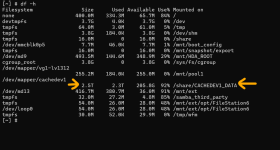
On Qnap, just now after the post that will explain my situation:

1780474599748.png
 
could you also post the config of that VM (110)?
Hi Fabian, before go on... with your suggestion I must understand the situation right now.
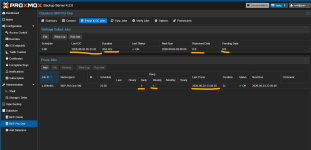
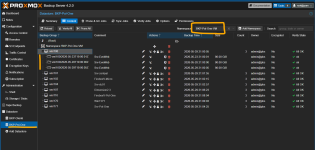
The space was full some days ago (Qnap volume only read, is thin).
I stopped totally backup jobs, you can see the date, I changed them as picture, I run prune/GC manually and left the schedules run next day.
This is the situation today.
I can't understand NOTHING.

1780475045465.png

1780476348307.png

1780474912356.png

1780475109426.png

1780474951358.png

1780474984873.png

Why the space, after DAYS... is still FULL?
Really I can't understand.
 
The dashboard shows the usage of the underlying file system. Is there anything else using it?

Could you provide the output of these commands? I took the datastore path from your prune logs.

Code:
df -h /mnt/BKP-Pol-One/PBS
du --all --max-depth=1 --human-readable /mnt/BKP-Pol-One/PBS
"The dashboard shows the usage of the underlying file system. Is there anything else using it?"
What do you mean?

root@pbs:~# df -h /mnt/BKP-Pol-One/PBS
Filesystem Size Used Avail Use% Mounted on
//10.33.77.40/BKP-Pol-One 2.5T 2.3T 206G 92% /mnt/BKP-Pol-One
root@pbs:~# du --all --max-depth=1 --human-readable /mnt/BKP-Pol-One/PBS
213G /mnt/BKP-Pol-One/PBS/.chunks
11M /mnt/BKP-Pol-One/PBS/ns
4.0K /mnt/BKP-Pol-One/PBS/.lock
8.0K /mnt/BKP-Pol-One/PBS/.gc-status
213G /mnt/BKP-Pol-One/PBS
root@pbs:~#
 
Last edited:
"The dashboard shows the usage of the underlying file system. Is there anything else using it?"
What do you mean?
The dashboard shows the same output as the df (disk-free) command, because normally datastores have their own partition.

This may include more than just the backup data, so the high usage that you are seeing may be something else.

root@pbs:~# df -h /mnt/BKP-Pol-One/PBS
Filesystem Size Used Avail Use% Mounted on
//10.33.77.40/BKP-Pol-One 2.5T 2.3T 206G 92% /mnt/BKP-Pol-One
Here we can see that your datastore is in the PBS directory, but the usage is reported for /mnt/BKP-Pol-One

Is there anything else in /mnt/BKP-Pol-One that takes up a lot of space?

root@pbs:~# du --all --max-depth=1 --human-readable /mnt/BKP-Pol-One/PBS <--- after 20 min, if it will finish... I send you the output.
Computing the precise disk usage is slow which is why the dashboard avoids it.
 
Last edited:
The dashboard shows the same output as the df (disk-free) command, because normally datastores have their own partition.

This may include more than just the backup data, so the high usage that you are seeing may be something else.


Here we can see that your datastore is in the PBS directory, but the usage is reported for /mnt/BKP-Pol-One

Is there anything else in /mnt/BKP-Pol-One that takes up a lot of space?


Computing the precise disk usage is slow which is why the dashboard avoids it.
root@pbs:~# df -h /mnt/BKP-Pol-One/PBS
Filesystem Size Used Avail Use% Mounted on
//10.33.77.40/BKP-Pol-One 2.5T 2.3T 206G 92% /mnt/BKP-Pol-One
root@pbs:~# du --all --max-depth=1 --human-readable /mnt/BKP-Pol-One/PBS
213G /mnt/BKP-Pol-One/PBS/.chunks
11M /mnt/BKP-Pol-One/PBS/ns
4.0K /mnt/BKP-Pol-One/PBS/.lock
8.0K /mnt/BKP-Pol-One/PBS/.gc-status
213G /mnt/BKP-Pol-One/PBS
root@pbs:~#

root@pbs:~#

Maybe I got it a little confusing?
On my mind this is the space storage dedicated.
Can you help me with some commands to well understand my situation?


1780480093821.png
 
Hi,

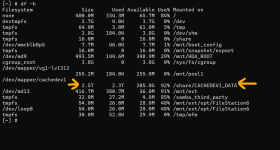
Does your QNAP have the trash bin enabled ?

Best regards,
Yes sure... I was thinkig about that right now.
The GC will delete chunks immediately or it will full trash?!?
I've configured it with 90 days retention because I have also some shared folders on the lan.