Trying to enable nested virtualization results in perfomance loss on vm

May 12, 2026
3
0
1
We have 2 proxmox hosts for around 20vms which are all running Win11 and we want to use WSL2 which requires virtualization support.

Now when I enable nested virtualization as a flag in the hardware config for the machine it doesnt work (windows shows no virtualiation feature enabled). When I set CPU type to host users report that the system gets extremly laggy (which I was able to confirm myself).


I attached pictures of the summary tab of one of the hosts and the hardware tab from one vm.
We do use nvidia vgpus which is why i pinned the kernel 6.14.
Storage is a RAID 5 with SSDs (hardware raid controller)

Does anyone have suggestions what i can do differently or is this a known issue?

P.S. Current config of VM is shown as is with no virtualization enabled.
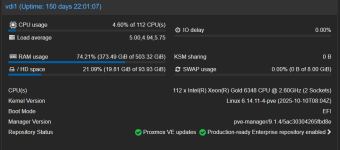
1778585383788.png


1778585216200.png
 
I don't run nested virtualization using Windows guests but do with Linux guests especially with Proxmox, ie, phystical Proxmox -> vitual Proxmox -> Linux guest.

I do use CPU type of 'host' as your screenshot shows. As for number of cores, I see you use '16' which is quite alot, IMO. I use the bare minimum, ie, 2-4 cores.

Maybe the host is running out of cores unless you have one of those 128/256 core CPUs?
 
You are missing three things:

1. Hyper-V enlightenments enabled. Enable as many as you can that are performance driven
2. MBEC support enabled. This is most critical. Your processor supports it but you are not exposing that to the guest
3. A newer kernel (7.0)

Once we did those three things, the performance increase was massive. It was as fast as VMware VCF was before we switched from Broadcom over to Proxmox
 
  • Like
Reactions: munchworker
I don't run nested virtualization using Windows guests but do with Linux guests especially with Proxmox, ie, phystical Proxmox -> vitual Proxmox -> Linux guest.

I do use CPU type of 'host' as your screenshot shows. As for number of cores, I see you use '16' which is quite alot, IMO. I use the bare minimum, ie, 2-4 cores.

Maybe the host is running out of cores unless you have one of those 128/256 core CPUs?
Thank you for your input, the host has 2 xeon processors which amounts to a total of 112 cores. 16 Cores for every machine would be a bit much current setup is 12 cores and the one shown hast 16 cores for testing. Furthermore the VMs are used as development workstations and therefore need as much cores as possible.

Edit: After rereading your post, i get it now (i think). Even if i would reduce it to 10VMs * 12 Cores it would be more than 112 Cores which the host has therefore causing performance issues. I will test if reducing the total core count below maximum helps with performance.
 
Last edited:
You are missing three things:

1. Hyper-V enlightenments enabled. Enable as many as you can that are performance driven
2. MBEC support enabled. This is most critical. Your processor supports it but you are not exposing that to the guest
3. A newer kernel (7.0)

Once we did those three things, the performance increase was massive. It was as fast as VMware VCF was before we switched from Broadcom over to Proxmox
1. I will check Hyper-V enlightenments out
2. MBEC needs exposing, i will test this and post an update
3. For this I need to check if the nvidia vGPU drivers are already supporting this kernel.
 
Create custom CPU model to achieve the best performance with Hyper-V, WSL2, and VBS enabled:

1. Create the file /etc/pve/virtual-guest/cpu-models.conf with the following content:

Code:
# Proxmox VE Custom CPU Models

cpu-model: Icelake-for-Hyper-V
    flags +vmx;+hv-frequencies;+hv-evmcs;+hv-reenlightenment;+hv-emsr-bitmap;+hv-tlbflush-direct
    phys-bits host
    hidden 0
    hv-vendor-id intel
    reported-model Icelake-Server

2. Select either Icelake-for-Hyper-V CPU model in the Proxmox web GUI.
 
Last edited: