

[SOLVED] Anti-Cheat KVM Settings
- Thread starter jgab12
- Start date
You are using an out of date browser. It may not display this or other websites correctly.
You should upgrade or use an alternative browser.
You should upgrade or use an alternative browser.
No but a moderator likely would have to change it unless @jgab12 is aroundShould the [Solved] still be in the title of the thread?
It might be similar, but it looks like they're running it in a separate QEMU so as not to affect the original environment.
https://github.com/Scrut1ny/AutoVirt/issues/116#issuecomment-4063647531
https://github.com/Scrut1ny/AutoVirt/issues/116#issuecomment-4063647531
Last edited:
Atm i lose pretty much all proxmox VM status while stealth-qemu runs and have to remember to post-stop my hookscript after VM shutdown. I'd appreciate if someone could help integrate this into proxmox somehow.
We applied a patch to pve-qemu, built the package, and verified its operation in a test environment.
Although it works, we confirmed that existing PVE virtual machines no longer function properly with their current settings.
I believe the method described here (setting up QEMU separately) is the best approach.
Since VRChat is pretty much the only program I use that requires EAC, I’m going to give up on VRChat.
*Regardless of whether VRChat actually needs EAC or not
Last edited:
We applied a patch to pve-qemu, built the package, and verified its operation in a test environment.Atm i lose pretty much all proxmox VM status while stealth-qemu runs and have to remember to post-stop my hookscript after VM shutdown. I'd appreciate if someone could help integrate this into proxmox somehow.
Although it works, we confirmed that existing PVE virtual machines no longer function properly with their current settings.
I believe the method described here (setting up QEMU separately) is the best approach.
Since VRChat is pretty much the only program I use that requires EAC, I’m going to give up on VRChat.
*Regardless of whether VRChat actually needs EAC or not
Hey everyone!
I've put together a community fork featuring several enhancements that may be of interest to those working with custom QEMU configurations. Please note that it has not been fully tested yet. With this fork, you can use custom OVMF firmware without modifying `arg:` commands, and even configure Proxmox to load a custom QEMU binary for your Windows gaming VM. I've also included a patch that resolves a hookscript issue, allowing it to function correctly when passing through USB ports — eliminating the need to pass an entire USB controller simply to run a hookscript after shutting down your VM from within.
Two New Features
1. Custom OVMF Firmware
No more fumbling with command-line args to use custom UEFI firmware. Just set it in your VM config:
Bash:
qm set 100 --bios 'ovmf,code=/path/to/CODE.fd,vars=/path/to/VARS.fd'
Bash:
qm set 100 --bios 'ovmf,code=local:storage/code.fd,vars=local:storage/vars.fd'Need a custom QEMU build or want to bypass OS detection? You can now specify a custom binary per architecture:
Bash:
qm set 100 --qemu-binary-x86_64 '/usr/local/bin/qemu-custom'
qm set 100 --qemu-binary-aarch64 'local:binaries/qemu-aarch64'Grab the .deb and install it:
Bash:
apt install /path/to/qemu-server_9.5.0-jaminmc_amd64.deb
Bash:
git clone https://github.com/jaminmc/qemu-server.git
cd qemu-server && makeRelease on GitHub
Let me know if you have any feedback!
Last edited:

Hey everyone!
I've put together a community fork featuring several enhancements that may be of interest to those working with custom QEMU configurations. Please note that it has not been fully tested yet. With this fork, you can use custom OVMF firmware without modifying `arg:` commands, and even configure Proxmox to load a custom QEMU binary for your Windows gaming VM. I've also included a patch that resolves a hookscript issue, allowing it to function correctly when passing through USB ports — eliminating the need to pass an entire USB controller simply to run a hookscript after shutting down your VM from within.
***
Let me know if you have any feedback!
This is great, "per architecture" am I correct in understanding it can't be done per VM, it's going to wholesale use the custom QEMU for all x86_64 guests? (all my guests are x86_64 so this is effectively replacing QEMU for all of PVE?)
This is great, "per architecture" am I correct in understanding it can't be done per VM, it's going to wholesale use the custom QEMU for all x86_64 guests? (all my guests are x86_64 so this is effectively replacing QEMU for all of PVE?)
I haven’t tried it yet, but based on the description, it seems that the two options listed under “Two New Features” have been added to the virtual machine settings.
Unless you specify a particular version of QEMU or EDK2 for the virtual machine using these options, it will likely boot using the default versions.
This simply allows you to specify external QEMU and EDK2; it does not mean that what you're looking for will work on its own.
You’ll need to prepare the specific versions of QEMU or EDK2 you want to use separately.
https://github.com/Scrut1ny/AutoVirt
That is correct. Each VM can have a separate OVMF, or even a QEMU binary. I have tested custom OVMF and verified that it will load a specified binary; however, I have not yet set up a custom QEMU on my Proxmox instance.I haven’t tried it yet, but based on the description, it seems that the two options listed under “Two New Features” have been added to the virtual machine settings.
Unless you specify a particular version of QEMU or EDK2 for the virtual machine using these options, it will likely boot using the default versions.
This simply allows you to specify external QEMU and EDK2; it does not mean that what you're looking for will work on its own.
You’ll need to prepare the specific versions of QEMU or EDK2 you want to use separately.
https://github.com/Scrut1ny/AutoVirt
I do realize that the per-architecture setup may not be necessary, as you are specifying a custom binary for a specific VM, but the Proxmox code does have logic that varies per architecture, so keeping it helps avoid breaking things.This is great, "per architecture" am I correct in understanding it can't be done per VM, it's going to wholesale use the custom QEMU for all x86_64 guests? (all my guests are x86_64 so this is effectively replacing QEMU for all of PVE?)
I compiled AutoVirt on a virtual machine with Debian 13 and copied the /opt/AutoVirt folder to the host.
What am I doing wrong?
EDIT: custom QEMU does not support a lot of arguments:
What am I doing wrong?
Bash:
root@pve1:~/cqemu# apt install ./qemu-server_9.5.0-jaminmc_amd64.deb
Note, selecting 'qemu-server' instead of './qemu-server_9.5.0-jaminmc_amd64.deb'
The following packages were automatically installed and are no longer required:
  libzpool6linux  proxmox-headers-6.17.4-2-pve
Use 'apt autoremove' to remove them.

Upgrading:
  qemu-server

Summary:
  Upgrading: 1, Installing: 0, Removing: 0, Not Upgrading: 67
  Download size: 0 B / 355 kB
  Space needed: 19.5 kB / 64.0 GB available

Get:1 /root/cqemu/qemu-server_9.5.0-jaminmc_amd64.deb qemu-server amd64 9.5.0-jaminmc [355 kB]
Reading changelogs... Done
(Reading database ... 142302 files and directories currently installed.)
Preparing to unpack .../qemu-server_9.5.0-jaminmc_amd64.deb ...
Unpacking qemu-server (9.5.0-jaminmc) over (9.1.4) ...
Setting up qemu-server (9.5.0-jaminmc) ...
Processing triggers for dbus (1.16.2-2) ...
Processing triggers for pve-ha-manager (5.1.1) ...
Processing triggers for pve-manager (9.1.6) ...
Processing triggers for man-db (2.13.1-1) ...
Notice: Download is performed unsandboxed as root as file '/root/cqemu/qemu-server_9.5.0-jaminmc_amd64.deb' couldn't be accessed by user '_apt'. - pkgAcquire::Run (13: Permission denied)
root@pve1:~/cqemu#

root@pve1:/etc/pve/qemu-server# qm set 105 --bios 'ovmf,code=/opt/AutoVirt/firmware/OVMF_CODE.fd,vars=/opt/AutoVirt/firmware/OVMF_VARS.fd'
update VM 105: -bios ovmf,code=/opt/AutoVirt/firmware/OVMF_CODE.fd,vars=/opt/AutoVirt/firmware/OVMF_VARS.fd

root@pve1:/etc/pve/qemu-server# qm set 105 --qemu_binary_x86_64 '/opt/AutoVirt/emulator/bin/qemu-system-x86_64'
update VM 105: -qemu_binary_x86_64 /opt/AutoVirt/emulator/bin/qemu-system-x86_64
root@pve1:/etc/pve/qemu-server# qm start 105
swtpm_setup: Not overwriting existing state file.
qemu-system-x86_64: -id: invalid option
stopping swtpm instance (pid 37071) due to QEMU startup error
start failed: QEMU exited with code 1
EDIT: custom QEMU does not support a lot of arguments:
Code:
root@pve1:/etc/pve/qemu-server# qm show 105 --pretty
/opt/AutoVirt/emulator/bin/qemu-system-x86_64 \
  -id 105 \
  -name 'win25,debug-threads=on' \
  -no-shutdown \
  -chardev 'socket,id=qmp,path=/var/run/qemu-server/105.qmp,server=on,wait=off' \
  -mon 'chardev=qmp,mode=control' \
  -chardev 'socket,id=qmp-event,path=/var/run/qmeventd.sock,reconnect-ms=5000' \
  -mon 'chardev=qmp-event,mode=control' \
  -pidfile /var/run/qemu-server/105.pid \
  -daemonize \
  -smbios 'type=1,product=HM80,sku=Default string,manufacturer=BESSTAR TECH LIMITED,uuid=03000200-0400-0500-0006-000700080009,family=Default string,version=5.16,serial=Default string' \
  -smp '30,sockets=1,cores=30,maxcpus=30' \
  -nodefaults \
  -boot 'menu=on,strict=on,reboot-timeout=1000,splash=/usr/share/qemu-server/bootsplash.jpg' \
  -vga none \
  -nographic \
  -global 'kvm-pit.lost_tick_policy=discard' \
  -cpu 'host,hv_ipi,hv_relaxed,hv_reset,hv_runtime,hv_spinlocks=0x1fff,hv_stimer,hv_synic,hv_time,hv_vapic,hv_vpindex,+kvm_pv_eoi,+kvm_pv_unhalt' \
  -m 32768 \
  -object '{"id":"throttle-drive-ide0","limits":{},"qom-type":"throttle-group"}' \
  -object '{"id":"throttle-drive-ide1","limits":{},"qom-type":"throttle-group"}' \
  -object '{"id":"throttle-drive-ide2","limits":{},"qom-type":"throttle-group"}' \
  -global 'ICH9-LPC.disable_s3=1' \
  -global 'ICH9-LPC.disable_s4=1' \
  -readconfig /usr/share/qemu-server/pve-q35-4.0.cfg \
  -device 'vmgenid,guid=6af8e786-fa2f-4858-82d7-ef918cf1b450' \
  -device 'qemu-xhci,p2=15,p3=15,id=xhci,bus=pci.1,addr=0x1b' \
  -device 'usb-tablet,id=tablet,bus=ehci.0,port=1' \
  -device 'vfio-pci,host=0000:03:00.0,id=hostpci0.0,bus=ich9-pcie-port-1,addr=0x0.0,multifunction=on' \
  -device 'vfio-pci,host=0000:03:00.1,id=hostpci0.1,bus=ich9-pcie-port-1,addr=0x0.1' \
  -device 'usb-host,bus=xhci.0,port=1,vendorid=0x03f0,productid=0x0024,id=usb0' \
  -device 'usb-host,bus=xhci.0,port=2,vendorid=0x25a7,productid=0xfa49,id=usb1' \
  -device 'usb-host,bus=xhci.0,port=3,vendorid=0x0951,productid=0x1625,id=usb2' \
  -device 'usb-host,bus=xhci.0,port=4,vendorid=0x231d,productid=0x0200,id=usb3' \
  -device 'usb-host,bus=xhci.0,port=5,vendorid=0x231d,productid=0x0201,id=usb4' \
  -device 'usb-host,bus=xhci.0,port=6,vendorid=0x0b05,productid=0x1bef,id=usb5' \
  -chardev 'socket,id=tpmchar,path=/var/run/qemu-server/105.swtpm' \
  -tpmdev 'emulator,id=tpmdev,chardev=tpmchar' \
  -device 'tpm-tis,tpmdev=tpmdev' \
  -iscsi 'initiator-name=iqn.1993-08.org.debian:01:3681c8f3622' \
  -blockdev '{"detect-zeroes":"on","discard":"ignore","driver":"throttle","file":{"cache":{"direct":true,"no-flush":false},"detect-zeroes":"on","discard":"ignore","driver":"raw","file":{"aio":"io_uring","cache":{"direct":true,"no-flush":false},"detect-zeroes":"on","discard":"ignore","driver":"host_device","filename":"/dev/pve/vm-105-disk-1","node-name":"e97136fe1bc55dd60f8a06116ddad29","read-only":false},"node-name":"f97136fe1bc55dd60f8a06116ddad29","read-only":false},"node-name":"drive-ide0","read-only":false,"throttle-group":"throttle-drive-ide0"}' \
  -device 'ide-hd,bus=ide.0,unit=0,drive=drive-ide0,id=ide0,rotation_rate=1,bootindex=100,write-cache=on' \
  -blockdev '{"detect-zeroes":"unmap","discard":"unmap","driver":"throttle","file":{"cache":{"direct":false,"no-flush":false},"detect-zeroes":"unmap","discard":"unmap","driver":"raw","file":{"aio":"io_uring","cache":{"direct":false,"no-flush":false},"detect-zeroes":"unmap","discard":"unmap","driver":"host_device","filename":"/dev/satadisk2t/vm-105-disk-0","node-name":"e69a07c98bf5dc7f2ce1b20dac2eb24","read-only":false},"node-name":"f69a07c98bf5dc7f2ce1b20dac2eb24","read-only":false},"node-name":"drive-ide1","read-only":false,"throttle-group":"throttle-drive-ide1"}' \
  -device 'ide-hd,bus=ide.2,unit=0,drive=drive-ide1,id=ide1,rotation_rate=1,write-cache=on' \
  -blockdev '{"driver":"throttle","file":{"cache":{"direct":false,"no-flush":false},"driver":"raw","file":{"aio":"io_uring","cache":{"direct":false,"no-flush":false},"driver":"file","filename":"/var/lib/vz/template/iso/virtio-win-0.1.285.iso","node-name":"e31ef86a5309dcbc028e115502e4924","read-only":true},"node-name":"f31ef86a5309dcbc028e115502e4924","read-only":true},"node-name":"drive-ide2","read-only":true,"throttle-group":"throttle-drive-ide2"}' \
  -device 'ide-cd,bus=ide.1,unit=0,drive=drive-ide2,id=ide2' \
  -netdev 'type=tap,id=net0,ifname=tap105i0,script=/usr/libexec/qemu-server/pve-bridge,downscript=/usr/libexec/qemu-server/pve-bridgedown' \
  -device 'e1000,mac=D8:BB:C1:A0:51:84,netdev=net0,bus=pci.0,addr=0x12,id=net0' \
  -rtc 'driftfix=slew,base=localtime' \
  -machine 'hpet=off,type=pc-q35-10.1+pve0' \
  -cpu 'host,-hypervisor,kvm=off'
Last edited:
I don’t remember exactly how I applied the patches, but after patching pve-qemu and pve-edk2-firmware, installing the deb package, and setting it to IDE, it booted up.
https://github.com/proxmox/pve-qemu
https://github.com/proxmox/pve-edk2-firmware
When I pass through USB, I get a BSOD 0x50 (USBXHCI.sys) on Windows 11.
*According to the description in the forked AutoVirt, this apparently occurs when USB2 is not specified, so it seems it wasn't an issue.
https://github.com/ChrisEric1/Hypervisor-Phantom/tree/main
Although this happens, it does boot, and I’ve confirmed that the pci bridge device vendor is listed as 8086.
I think I should specify the PVE versions of QEMU and EDK2 rather than the standard ones, but since I don’t have the instructions I used to create the working versions of QEMU and EDK2 mentioned above, I’m not entirely sure. (I tried again, but it didn’t work, so I’ve decided to give up.)
*If the message “Guest has not initialized the display (yet)” appears, it seems to be due to reasons such as the combination not being available or not being patched.
*I don't remember which patch I applied. I don't even know if I need to apply the deb package.
After that, because of the above issue, I removed the packages, and PVE stopped working properly, so I reinstalled PVE. I don’t know how it was built.
I hope someone will patch these and get them working.
https://github.com/proxmox/pve-qemu
https://github.com/proxmox/pve-edk2-firmware
When I pass through USB, I get a BSOD 0x50 (USBXHCI.sys) on Windows 11.
*According to the description in the forked AutoVirt, this apparently occurs when USB2 is not specified, so it seems it wasn't an issue.
https://github.com/ChrisEric1/Hypervisor-Phantom/tree/main
Although this happens, it does boot, and I’ve confirmed that the pci bridge device vendor is listed as 8086.
I think I should specify the PVE versions of QEMU and EDK2 rather than the standard ones, but since I don’t have the instructions I used to create the working versions of QEMU and EDK2 mentioned above, I’m not entirely sure. (I tried again, but it didn’t work, so I’ve decided to give up.)
*If the message “Guest has not initialized the display (yet)” appears, it seems to be due to reasons such as the combination not being available or not being patched.
*I don't remember which patch I applied. I don't even know if I need to apply the deb package.
After that, because of the above issue, I removed the packages, and PVE stopped working properly, so I reinstalled PVE. I don’t know how it was built.
I hope someone will patch these and get them working.
Last edited:
yes this may help:https://github.com/Scrut1ny/AutoVirt/issues/116I think I should specify the PVE versions of QEMU and EDK2 rather than the standard ones
UPDATE:
I tried this but no success, this is too much for me.
Code:
sis@deb13vm:~/pve-qemu/qemu$ ./qqq.sh
error: patch failed: hw/acpi/aml-build.c:2263
error: hw/acpi/aml-build.c: patch does not apply
error: patch failed: hw/usb/canokey.c:35
error: hw/usb/canokey.c: patch does not apply
error: patch failed: hw/usb/dev-audio.c:73
error: hw/usb/dev-audio.c: patch does not apply
error: patch failed: hw/usb/dev-hid.c:63
error: hw/usb/dev-hid.c: patch does not apply
error: patch failed: hw/usb/dev-hub.c:104
error: hw/usb/dev-hub.c: patch does not apply
error: patch failed: hw/usb/dev-mtp.c:263
error: hw/usb/dev-mtp.c: patch does not apply
error: patch failed: hw/usb/dev-network.c:99
error: hw/usb/dev-network.c: patch does not apply
error: patch failed: hw/usb/dev-serial.c:119
error: hw/usb/dev-serial.c: patch does not apply
error: patch failed: hw/usb/dev-smartcard-reader.c:419
error: hw/usb/dev-smartcard-reader.c: patch does not apply
error: patch failed: hw/usb/dev-storage.c:47
error: hw/usb/dev-storage.c: patch does not apply
error: patch failed: hw/usb/dev-uas.c:170
error: hw/usb/dev-uas.c: patch does not apply
error: patch failed: hw/usb/dev-wacom.c:64
error: hw/usb/dev-wacom.c: patch does not apply
error: patch failed: hw/usb/u2f.c:46
error: hw/usb/u2f.c: patch does not apply
error: patch failed: include/hw/acpi/aml-build.h:4
error: include/hw/acpi/aml-build.h: patch does not apply
./qqq.sh: line 181: fmtr::warn: command not found
sed: can't read : No such file or directory
sis@deb13vm:~/pve-qemu/qemu$
Last edited:
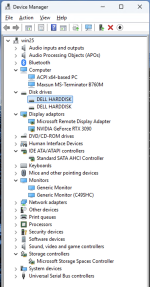
I couldn't get it to work, regular patched qemu doesn't like -id, pve patched qemu hangs at boot "guest has not initialized display"; but jaminmc's thingy fixed proxmox gui going all ?? when using the launch script so i'm happy.yes this may help:https://github.com/Scrut1ny/AutoVirt/issues/116
Might be your hard disks maybe? do they have a believable size? Only difference i see to mine is i passed a real nvme.tried, looks good, but SC still detects VM
Yes, I tried this, it's very convenient for running different VMs with different QEMUs and BIOSes. Thanks, @jaminmc !but jaminmc's thingy fixed proxmox gui going all ?? when using the launch script so i'm happy.
yes they recommend Pass through SATA or M.2 SSD to the VM, but i don't have separate for the now, so i'll try later.Might be your hard disks maybe? do they have a believable size? Only difference i see to mine is i passed a real nvme.
Have you actually got a custom qemu binary to work? patched pve qemu sits stuck at guest has not initialized display, regular qemu says invalid -id param. If yes how did you build it?
If it’s working, I’m interested too…
My understanding is that those who’ve gotten it to work are running it with standard QEMU and launching it from a script—is that correct?
Also, I’m not sure if it works when combining the `intel-edk2-stable202505.patch` and `Intel-v10.2.0.patch`…
I’d like to know which patch was used and how it was applied.
Something like this?
*I’m not very familiar with Linux, so please forgive me if I’m wrong.
It didn't start up and gave a different error...
I once installed a package that launched without displaying the message “The guest has not initialized the display (yet),” but I don't remember how I created it... I'm not really sure.
I have a feeling that the pve-edk2-firmware isn't working properly
My understanding is that those who’ve gotten it to work are running it with standard QEMU and launching it from a script—is that correct?
Also, I’m not sure if it works when combining the `intel-edk2-stable202505.patch` and `Intel-v10.2.0.patch`…
I’d like to know which patch was used and how it was applied.
Something like this?
*I’m not very familiar with Linux, so please forgive me if I’m wrong.
Code:
mkdir /root/tmp/git/ -p
cd /root/tmp/git
rm -rf .git
git init

git clone https://github.com/proxmox/pve-qemu
cd /root/tmp/git/pve-qemu
git clone --depth=1 --branch "v10.2.1" "https://gitlab.com/qemu-project/qemu.git"
cd qemu
git apply < /root/Intel-v10.2.0.patch
git diff HEAD > /root/Intel-v10.2.0.patch_diff
diff /root/Intel-v10.2.0.patch /root/Intel-v10.2.0.patch_diff
meson subprojects download
cd ../
make
cd /root/tmp/git
Code:
git clone https://github.com/proxmox/pve-edk2-firmware
cd /root/tmp/git/pve-edk2-firmware
git clone --depth=1 --branch "edk2-stable202505" "https://github.com/tianocore/edk2.git"
cd edk2
git apply < /root/intel-edk2-stable202505.patch
git diff HEAD > /root/intel-edk2-stable202505.patch_diff
diff /root/intel-edk2-stable202505.patch /root/intel-edk2-stable202505.patch_diff
git submodule update --init
make -C BaseTools
source edksetup.sh
build -t GCC -a X64
build -p OvmfPkg/OvmfPkgX64.dsc -t GCC -a X64 -b RELEASE
cd ../
make
cd /root/tmp/git
Code:
mkdir /root/qemu_mod/pve-qemu-kvm -p
mkdir /root/qemu_mod/tmp -p
mkdir /root/qemu_mod/pve-edk2-firmware -p
mv pve-qemu-kvm* /root/qemu_mod/pve-qemu-kvm
mv pve-edk2-firmware* /root/qemu_mod/pve-edk2-firmware

cd /root/qemu_mod/pve-qemu-kvm
ar -vx pve-qemu-kvm_10.2.1-1_amd64.deb
tar Jxfv data.tar.xz
tar Jxfv control.tar.xz
rm *.xz
ar -vx pve-qemu-kvm-dbgsym_10.2.1-1_amd64.deb
tar Jxfv data.tar.xz
tar Jxfv control.tar.xz
rm *.xz
ls /root/qemu_mod/pve-qemu-kvm/usr/bin

cd /root/qemu_mod/pve-edk2-firmware
ar -vx pve-edk2-firmware-ovmf_4.2025.05-2_all.deb
tar Jxfv data.tar.xz
tar Jxfv control.tar.xz
rm *.xz
ar -vx pve-edk2-firmware_4.2025.05-2_all.deb
tar Jxfv data.tar.xz
tar Jxfv control.tar.xz
rm *.xz
ar -vx pve-edk2-firmware-aarch64_4.2025.05-2_all.deb
tar Jxfv data.tar.xz
tar Jxfv control.tar.xz
rm *.xz
ar -vx pve-edk2-firmware-legacy_4.2025.05-2_all.deb
tar Jxfv data.tar.xz
tar Jxfv control.tar.xz
rm *.xz
ar -vx pve-edk2-firmware-riscv_4.2025.05-2_all.deb
tar Jxfv data.tar.xz
tar Jxfv control.tar.xz
rm *.xz
ls /root/qemu_mod/pve-edk2-firmware/usr/share/pve-edk2-firmware

chmod +x /root/qemu_mod/pve-qemu-kvm/usr/bin/*
chmod +x /root/qemu_mod/pve-edk2-firmware/usr/share/pve-edk2-firmware/*
It didn't start up and gave a different error...
Code:
dpkg -i qemu-server_9.5.0-jaminmc_amd64.deb

cp /root/qemu_mod/pve-edk2-firmware/usr/share/pve-edk2-firmware/OVMF_VARS_4M.fd /root/qemu_mod/tmp/11161_VARS.fd

qm set 11161 --qemu_binary_x86_64 '/root/qemu_mod/pve-qemu-kvm/usr/bin/qemu-system-x86_64'
update VM 11161: -qemu_binary_x86_64 /root/qemu_mod/pve-qemu-kvm/usr/bin/qemu-system-x86_64

qm set 11161 --bios 'ovmf,code=/root/qemu_mod/pve-qemu-kvm/usr/bin/OVMF_CODE_4M.fd,vars=/root/qemu_mod/tmp/11161_VARS.fd'
update VM 11161: -bios ovmf,code=/root/qemu_mod/pve-qemu-kvm/usr/bin/OVMF_CODE_4M.fd,vars=/root/qemu_mod/tmp/11161_VARS.fd

qm start 11161

// args: -cpu host,hv_passthrough,level=32,+vmx
// cpu: host

qemu-system-x86_64: warning: TCG doesn't support requested feature: CPUID[eax=01h].ECX.vmx [bit 5]
qemu-system-x86_64: CPU model 'host' requires KVM or HVF
start failed: QEMU exited with code 1

// args: -cpu host,hv_passthrough,level=32
// cpu: host

qemu-system-x86_64: CPU model 'host' requires KVM or HVF
start failed: QEMU exited with code 1

// args: -cpu max,hv_passthrough
// cpu: max

root@pvetest:/etc/pve/qemu-server# qm start 11161
qemu-system-x86_64: warning: global kvm-pit.lost_tick_policy=discard not used

*The virtual machine starts up, but the display shows the message “If the message ‘Guest has not initialized the display (yet)’”
I once installed a package that launched without displaying the message “The guest has not initialized the display (yet),” but I don't remember how I created it... I'm not really sure.
I have a feeling that the pve-edk2-firmware isn't working properly
Last edited:
Have you actually got a custom qemu binary to work? patched pve qemu sits stuck at guest has not initialized display, regular qemu says invalid -id param. If yes how did you build it?
No, the only that looks working yet is from there
I tried the script that applies the patches from this message, but it seems outdated.I’d like to know which patch was used and how it was applied.
If someone could build a patched PVE QEMU and BIOS, we could use it for gaming VM separately.