Mikrotik CHR traffic stall

ByronG

New Member
Mar 19, 2026
6
0
1
Hi all,


I’m new to the forums and posting here as I’m facing a major issue and could really use some assistance.


P.S. I’m a network engineer rather than a systems administrator, so please bear with me if I miss something that may seem simple from a hypervisor perspective.


I’m currently running a MikroTik CHR (RouterOS 7.20.8 → 7.23beta2) VM on Proxmox and experiencing a persistent issue where latency gradually increases over time, eventually leading to traffic stopping entirely until the VM is rebooted.


I’ve been in contact with MikroTik support, and they indicated there were known virtio-net driver issues in CHR versions prior to 7.23. Based on their recommendation, I upgraded to 7.23beta2.


Since the upgrade, the latency creep issue appears to be resolved. However, after a few hours, the CHR still stalls. A reboot of the CHR restores normal operation.


From my observations, it seems that traffic to and from the CHR stalls, rather than the CHR itself. Scripts and internal processes continue running during the issue, which has allowed me to automate reboots and generate support files for MikroTik.


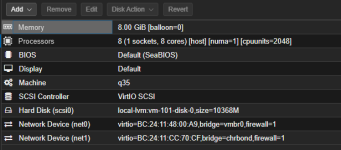
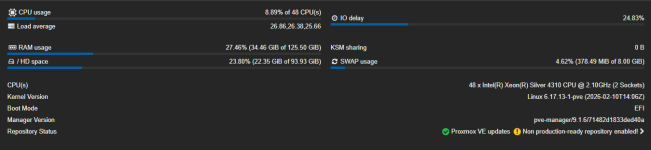
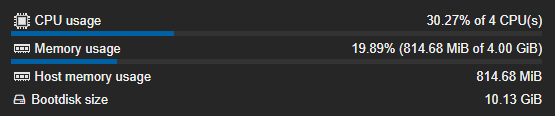
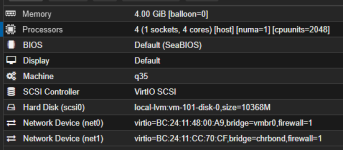
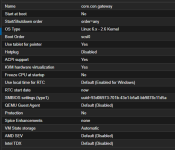
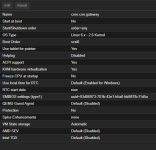
Please see my Proxmox resource allocation and configuration for this VM (attached/screenshots). Any assistance or suggestions would be greatly appreciated.

This issue started about 3 weeks ago maybe even 4. Im using PVE 9.1.6
 

Attachments
  • CHR_options.png
    CHR_options.png
    39.2 KB · Views: 5
  • CHR_resources.png
    CHR_resources.png
    17.9 KB · Views: 4
  • ProxmoxHardware.png
    ProxmoxHardware.png
    31.5 KB · Views: 4
Last edited:
I have already loaded more than one CHR including getting and using a new P10 license and the issues persists between all my CHRs I have created.

Currently I have 2 running - main one for routing and a 2nd one for home VPN access.
 
What are your CHRs doing ?
How many physical cores does your Proxmox server have ?
How many total CPUs are assigned to all of your running virtual machines ?
At one time - years ago , I had about 18 CHR p-unlimited routers running in my Proxmox cluster. I migrated a dozen of my core CHR routers to VyOS vms two years ago because I was seeing some packet loss , high CPU usage and some packet delays and sometimes a CHR lockup or suddenly running very slowwwww. Since the migration from CHR to VyOS routers for my core routers , everything has been much faster and all of the problems I was experiencing have completely gone away. ( Note - these days , I only use CHRs for inline per-customer bandwidth management - everything else is now VyOS. )
- note - make sure you are using virt I/O virtual network interfaces & use MultiQueue on your vm interfaces & set your CPU to "host".
 
Last edited:
What are your CHRs doing ?
How many physical cores does your Proxmox server have ?
How many total CPUs are assigned to all of your running virtual machines ?
At one time - years ago , I had about 18 CHR p-unlimited routers running in my Proxmox cluster. I migrated a dozen of my core CHR routers to VyOS vms two years ago because I was seeing some packet loss , high CPU usage and some packet delays and sometimes a CHR lockup or suddenly running very slowwwww. Since the migration from CHR to VyOS routers for my core routers , everything has been much faster and all of the problems I was experiencing have completely gone away. ( Note - these days , I only use CHRs for inline per-customer bandwidth management - everything else is now VyOS. )
- note - make sure you are using virt I/O virtual network interfaces & use MultiQueue on your vm interfaces & set your CPU to "host".
Hey NorthIdahoTomJones,

Thanks for your reply.

Short version: 48 cores (12-core CPU with hyperthreading = 24 cores × 2 sockets = 48 cores total).

I’ve made sure not to overutilize the CPU cores or “double-park” them. I’ve also checked the RAM allocation and done the necessary calculations—nothing appears to be resource-constrained, and there is sufficient capacity available.

At the moment, my CHR instance stalls and stops passing traffic after a couple of hours. A reboot temporarily resolves the issue, but the problem returns.


- note - make sure you are using virt I/O virtual network interfaces & use MultiQueue on your vm interfaces & set your CPU to "host".
Yip, I have done this already.
 
How many interfaces have you assigned in your Proxmox hypervisor server to your CHRs.
- IMO , don't assign more than 4 interfaces to a CHR.
- IMO , don't assign more than 16 CPUs to a CHR.
- IMO , don't assign multi-queue higher than 4 queues per interface to your CHR interfaces.
- IMO , don't assign more than 16 multi-queues total all interfaces to your CHR.
- IMO , the total multi-queue count of all interfaces should never exceed your ( total CPUs - 2 ).
( If I have a CHR with 3 VirtIO interfaces and 12 CPUs assigned to the CHR , I would use multi-queue=3 on each CHR network interface ).
This is what appears to work the best and be the most stable for the CHRs I have running.
 
How many interfaces have you assigned in your Proxmox hypervisor server to your CHRs.
- IMO , don't assign more than 4 interfaces to a CHR.
- IMO , don't assign more than 16 CPUs to a CHR.
- IMO , don't assign multi-queue higher than 4 queues per interface to your CHR interfaces.
- IMO , don't assign more than 16 multi-queues total all interfaces to your CHR.
- IMO , the total multi-queue count of all interfaces should never exceed your ( total CPUs - 2 ).
( If I have a CHR with 3 VirtIO interfaces and 12 CPUs assigned to the CHR , I would use multi-queue=3 on each CHR network interface ).
This is what appears to work the best and be the most stable for the CHRs I have running.
Ignore the "CHRBOND" name - there is NO bonding on interfaces.

Nic0 and Nic1 are for WAN and LAN, respectively. LAN is for internal routing between all VMs and CHR. WAN is for internet usage and public IP address assignment if any VMs need.

1774292248072.png1774292265156.png
1774292286676.png
 
hmmm , try changing from q35 to i440fx - and also double check that your CHR vms are using a vmbr interface. When your CHR stops routing , does it still have a responsive console KVM interface ? Try removing the cpuunits setting. Try not using any special dedicated network card SR-IOV settings. How busy are your network interfaces on your Proxmox and on you CHRs ? Are you doing any PPPoE or heavy firewall stuff ?
 
hmmm , try changing from q35 to i440fx - and also double check that your CHR vms are using a vmbr interface. When your CHR stops routing , does it still have a responsive console KVM interface ? Try removing the cpuunits setting. Try not using any special dedicated network card SR-IOV settings. How busy are your network interfaces on your Proxmox and on you CHRs ? Are you doing any PPPoE or heavy firewall stuff ?
it was on i440fx
usiing VMBR for WAN networking - LAN bridge is linux bridge, same as vmbr
when stalling - access is not possible via console.
it never had cpu units at first - using it for testing.
no dedicated network cards - using virtio net devices and no sr-iov settings.
traffic on proxmox server itself is about 100 to 150mbps at any given point in time. say 200mbps max (Up and down combined)
no pppoes - but ppp for VPNs quiet a few with ipsec encryp and a few raw rules (6+-) and filter rules(20+-) yes
 
As a test - if you have the time ... Try making a functionally identical router using VyOS. ( note - I suspect you will find VyOS might be faster ). If the CHR is failing ( locking up ) , it might be your Proxmox server itself that is the underlaying problem and somehow CHRs might be having a problem there.
 
As a test - if you have the time ... Try making a functionally identical router using VyOS. ( note - I suspect you will find VyOS might be faster ). If the CHR is failing ( locking up ) , it might be your Proxmox server itself that is the underlaying problem and somehow CHRs might be having a problem there.
I’m currently in the process of moving our services onto our own physical hardware. We’ve got two CCRs ready to replace the CHRs, along with a server to rebuild our VMs.
Hoping this clears things up — if the issue is related to the hosting provider’s hardware, we should see it disappear once the migration is complete.