Ceph - VM with high IO wait

Phreak

New Member
Mar 18, 2026
3
0
1
Hello everyone,

I have spent a lot of time to figure out what is provoking that IO wait. on this cluster VM who do a high amount of IO have a lot of IO wait ( like 30k I/O read, 50% IO wait)

Summary of my setup:

PVE

Code:
proxmox-ve: 9.0.0 (running kernel: 6.17.2-2-pve)
pve-manager: 9.0.18 (running version: 9.0.18/5cacb35d7ee87217)
proxmox-kernel-helper: 9.0.4
proxmox-kernel-6.17.2-2-pve-signed: 6.17.2-2
proxmox-kernel-6.17: 6.17.2-2
proxmox-kernel-6.8: 6.8.12-17
proxmox-kernel-6.8.12-17-pve-signed: 6.8.12-17
amd64-microcode: 3.20250311.1
ceph: 19.2.3-pve4
ceph-fuse: 19.2.3-pve4
corosync: 3.1.9-pve2
criu: 4.1.1-1
frr-pythontools: 10.3.1-1+pve4
ifupdown2: 3.3.0-1+pmx11
intel-microcode: 3.20251111.1~deb13u1
libjs-extjs: 7.0.0-5
libproxmox-acme-perl: 1.7.0
libproxmox-backup-qemu0: 2.0.1
libproxmox-rs-perl: 0.4.1
libpve-access-control: 9.0.4
libpve-apiclient-perl: 3.4.2
libpve-cluster-api-perl: 9.0.7
libpve-cluster-perl: 9.0.7
libpve-common-perl: 9.0.15
libpve-guest-common-perl: 6.0.2
libpve-http-server-perl: 6.0.5
libpve-network-perl: 1.2.3
libpve-rs-perl: 0.11.3
libpve-storage-perl: 9.0.18
libspice-server1: 0.15.2-1+b1
lvm2: 2.03.31-2+pmx1
lxc-pve: 6.0.5-3
lxcfs: 6.0.4-pve1
novnc-pve: 1.6.0-3
openvswitch-switch: 3.5.0-1+b1
proxmox-backup-client: 4.1.0-1
proxmox-backup-file-restore: 4.1.0-1
proxmox-backup-restore-image: 1.0.0
proxmox-firewall: 1.2.1
proxmox-kernel-helper: 9.0.4
proxmox-mail-forward: 1.0.2
proxmox-mini-journalreader: 1.6
proxmox-offline-mirror-helper: 0.7.3
proxmox-widget-toolkit: 5.1.2
pve-cluster: 9.0.7
pve-container: 6.0.18
pve-docs: 9.0.9
pve-edk2-firmware: not correctly installed
pve-esxi-import-tools: 1.0.1
pve-firewall: 6.0.4
pve-firmware: 3.17-2
pve-ha-manager: 5.0.8
pve-i18n: 3.6.4
pve-qemu-kvm: 10.1.2-4
pve-xtermjs: 5.5.0-3
qemu-server: 9.0.30
smartmontools: 7.4-pve1
spiceterm: 3.4.1
swtpm: 0.8.0+pve3
vncterm: 1.9.1
zfsutils-linux: 2.3.4-pve1

Hardware

I have 6 servers on a 3AZ (OVH) setup (2 servers per AZ) with this hardware
  • AMD EPYC GENOA 9354 ( 32C/64T )
  • 512GO DDR5
  • 6 x nvme enterprise grade 7To for OSD
  • 4 x 25Gb network card ( mellanox ) bounded together

Network

I have no other choice to bound the 4 25G port for thaht i ma using openv-switch with balance-tcp mode

1773826978503.png

I have a dedicated interface/vlan for ceph and corosync ( using the bond )


CEPH

  • 1 MGR per node
  • 1 MON per node
  • 6 OSD per node
  • 1 replicated pool ( min 2 max 3 )
Simplified Crush Map :
Code:
root ceph-prod-3az

zone 1
  host a
    osd.0
    osd.1
    osd.2
    osd.3
    osd.4
    osd.5
  host b
    osd.6
    osd.7
    osd.8
    osd.9
    osd.10
    osd.11

zone 2
  host c
    osd.0
    osd.1
    osd.2
    osd.3
    osd.4
    osd.5
  host d
    osd.6
    osd.7
    osd.8
    osd.9
    osd.10
    osd.11

zone 3
  host e
    osd.0
    osd.1
    osd.2
    osd.3
    osd.4
    osd.5
  host f
    osd.6
    osd.7
    osd.8
    osd.9
    osd.10
    osd.11

Crush rule :
Code:
rule 3az_rule {
    id 1
    type replicated
    step take ceph-prod-3az class nvme
    step choose firstn 3 type zone
    step chooseleaf firstn 2 type host
    step emit
}

Problems


I have mainly postgresql databases vm , below this a htop on a vm with high io wait

1773823319582.png


IO View on data disk of this VM
1773823442951.png

A node export view on this VM
1773823578965.png

Vm drive config:

1773827421329.png

What i have verified


  • There is no OSD latency problem
  • Network is not saturated
  • Host is not overloaded ( ~ 20% cpu usage, 50% RAM usage per node )
  • Tuned a bit softnet settings to obliterate packets drops
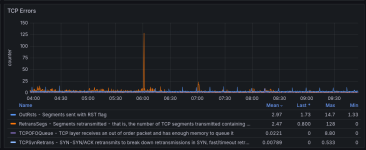
I have noticed some network errors, but seems ok? :


Graph of one node
1773824244932.png

Did someone have experienced that and have an idea ?
 
Last edited:
Looking at the graphs you posted, a few things stand out.

The Ceph pool metrics show almost no writes — IOPS and throughput on `pve_ceph_prod_3az` are nearly 100% read. Cross-AZ write latency is not what's hurting you here. The good news is that Ceph read latency (200–500μs) is actually healthy for this setup.

The IO wait is coming from somewhere above Ceph. A few things are worth addressing.

Wrong disk cache mode for PostgreSQL

Your VM config shows `cache=writeback` on both disks. For PostgreSQL this is the wrong setting.

For RBD-backed disks, `cache=writeback` and `cache=none` don't control a QEMU-level buffer — they control librbd's own client-side write-back cache (`rbd_cache`). With `cache=writeback`, QEMU enables `rbd_cache=true` in the librbd connection, so librbd buffers writes in QEMU process memory before flushing to the OSDs. With `cache=none`, QEMU sets `rbd_cache=false`, and I/O goes directly to the OSDs with no librbd buffer.

For PostgreSQL, `rbd_cache=true` (writeback) creates a redundant caching layer: the same data sits in PostgreSQL's `shared_buffers`, in the guest OS page cache, and again in librbd's in-process buffer — wasting host RAM for a copy that is already held in the guest. There is also a durability concern: librbd's write-back cache buffers writes before flushing to the OSDs; if the QEMU process crashes between a write and the next fsync(), data in that buffer is lost. (Unlike `cache=unsafe`, `cache=writeback` does honor guest fsync() by flushing librbd's cache — the risk window is between individual writes and the fsync.)

The correct setting for database workloads is `cache=none`, which disables librbd's write-back cache and sends I/O directly to the OSDs:

Bash:
# Run on the Proxmox host (takes effect after VM restart):
qm set 108 --scsi0 pve_ceph_prod_3az:vm-108-disk-0,cache=none,discard=on,iothread=1,size=34G,ssd=1
qm set 108 --scsi1 pve_ceph_prod_3az:vm-108-disk-1,cache=none,discard=on,iothread=1,size=1T,ssd=1


OVS bond — check for NIC imbalance​


Your bond config has `other_config:bond-rebalance-interval=0`. With `balance-tcp`, OVS hashes each flow to a NIC based on the TCP 4-tuple. Since Ceph uses long-lived persistent TCP connections between fixed OSD pairs, a hot read path could end up permanently pinned to one 25G NIC. Whether `bond-rebalance-interval=0` disables rebalancing entirely or uses a default is worth checking in your OVS version — but the per-NIC stats will tell you directly whether traffic is imbalanced:

Bash:
ovs-appctl bond/show bond0

# Replace <slave> with the interface names listed under "slave" in bond/show output above:
ethtool -S <slave1> | grep tx_bytes
ethtool -S <slave2> | grep tx_bytes
ethtool -S <slave3> | grep tx_bytes
ethtool -S <slave4> | grep tx_bytes


If one NIC is carrying significantly more traffic than the others, enabling periodic rebalancing will redistribute the load. OVS balance-tcp assigns flows to hash buckets (256 total), and rebalancing moves buckets — along with all their established connections — from overloaded NICs to underloaded ones. Long-lived Ceph connections are affected immediately when their bucket is migrated:

Bash:
ovs-vsctl set port bond0 other_config:bond-rebalance-interval=10000

The TCP Errors graph shows a RetransSegs spike to 128 around 06:00 and a baseline of ~2.5/s retransmits. This could indicate momentary congestion on a hot NIC, though it could also be from other causes (LACP events, Ceph messenger connection recycling). The per-NIC stats will clarify.

PostgreSQL shared_buffers (if the above don't fully resolve it)​


The htop shows 73.4 MiB/s of reads at 87.5% disk utilization going through to Ceph. At ~4KB per random read, that's ~18K IOPS of page cache misses. If PostgreSQL's `shared_buffers` is at or near the default (128MB), most of the active working set doesn't fit in the buffer pool, causing frequent page misses that reach Ceph. Check:

SQL:
SHOW shared_buffers;
SHOW effective_cache_size;

A starting point (adjust to your VM's actual RAM — the standard recommendation is 25%/75%):

Code:
shared_buffers = 6GB          # 25% of VM RAM, assuming ~24GB
effective_cache_size = 18GB   # 75% of VM RAM

This won't eliminate Ceph reads entirely, but should absorb the hot working set in memory and significantly reduce the read IOPS hitting Ceph.


One question: is the 30k IOPS figure from `iostat` inside the VM, or from the Ceph dashboard? The Grafana shows 15–20K at peak on the pool — since both disks are on `pve_ceph_prod_3az`, the pool already aggregates reads from both, so they should be directly comparable. A mismatch suggests the measurements were taken at different times, or that `rbd_cache` is serving some reads client-side before they reach the OSDs.
 
Last edited:
Strange that you also have high memory pressure "PSI some memory". do you have enable numa option on the vm ?

you can also look at host numa stat
Code:
# apt install numactl
# numstat
and look if you don't have a lot of "numa_miss" vs "numa_hit"

on rbd side, you can also give a try to krbd vs librbd, and a little bit faster (maybe 10%).

if you can (I'm not sure with ovh),on the host hardware size, check that your server is set in "max performance". you want the cpu running always at their max frequencies && max_cstate=1 to avoid latencies.

also, where are physically located the 3 AZ at ovh ? is it their new DC at Paris ? or the DC older at Roubaix-Gravelline-Strasbourg ?
What is the latency between sites ? because for write, with queue depth=1, if you have 1ms latency, you can do 1000iops max. I'm not sure about the behaviour of postgresql journal && parallelism


if you use proxmox in hyperconverged, you can also setup local read locality (to avoid to do read across AZ)

Code:
rbd config pool set POOLNAME rbd_read_from_replica_policy localize

and also look at postgresql shared_buffers as thaicov said. (I'm not sure, but maybe memory pressure could be related to too low shared_buffers, so constant rbd read + swap in/out memory pages in shared_buffers)
 
Last edited:
Thanks all for your responses !!

This 3AZ setup is in Paris ( ~ 30km between each zone )

Latency


i have measured latency with ping :
Host - Zonems
Host 1 zone C → Host 2 zone A0.6
Host 1 zone C → Host 4 zone B0.9
Host 1 zone C > Host 6 zone C0.06
Host 1 zone C → Host 5 zone A0.6
Host 1 zone C → Host 3 zone B0.9
Host 3 zone B → Host 1 zone C0.9
Host 3 zone B → Host 2 zone A0.8
Host 2 zone A → Host 1 zone C0.6
Host 2 zone A → Host 3 zone B0.8

disk cache mode​


I didn't know that writeback enable rbd_cache good to know, on a test vm i have tried cache=none and a pg_bench run and i didn't notice i real difference, iowait rapidly grow near 30%.

NIC imbalance​


I have checked nic imbalance and yes one of the 4 nic have 3X rx value than others, i have adjusted rebalance-interval to 10000 now i see that rx value is more homogeneous. i think i have set rebalance-interval=0 because i have read somewhere there are cases that caused packet drops.

PostgreSQL​


I think there are no topics on postgresql config the shared buffer is equal to 50% RAM and effecitve_cache 75% RAM maybe this particular database need more ram but that application were battle tested and was working well on previous vmware setup.

C-STATE

Officially i cannot modify BIOS settings, it is technically possible but i don't want to have problem with OVH support ;)
Yesterday i have noticed that on reading other topics about slow IO, so i have added processor.max_cstate=1 and i currently rebooting each node to try it

Numa

I have read about this subject but do nothing because i don't fully understand what to do exactly.

stats have been reset 1 hour ago as i have rebooted hosts to set processor.max_cstate=1

Node 1
Code:
                           node0           node1           node2           node3
numa_hit                75983484        90862186        88750035        96473790
numa_miss                      0         1842506               0               0
numa_foreign             1842506               0               0               0
interleave_hit               704             802             700             795
local_node              75625908        89483045        88302607        95943651
other_node                357576         3221647          447428          530139

Node 1 topography
Code:
Machine (504GB total)
  Package L#0
    Group0 L#0
      NUMANode L#0 (P#0 63GB)
      Die L#0 + L3 L#0 (32MB)
        L2 L#0 (1024KB) + L1d L#0 (32KB) + L1i L#0 (32KB) + Core L#0
          PU L#0 (P#0)
          PU L#1 (P#32)
        L2 L#1 (1024KB) + L1d L#1 (32KB) + L1i L#1 (32KB) + Core L#1
          PU L#2 (P#1)
          PU L#3 (P#33)
        L2 L#2 (1024KB) + L1d L#2 (32KB) + L1i L#2 (32KB) + Core L#2
          PU L#4 (P#2)
          PU L#5 (P#34)
        L2 L#3 (1024KB) + L1d L#3 (32KB) + L1i L#3 (32KB) + Core L#3
          PU L#6 (P#3)
          PU L#7 (P#35)
      Die L#1 + L3 L#1 (32MB)
        L2 L#4 (1024KB) + L1d L#4 (32KB) + L1i L#4 (32KB) + Core L#4
          PU L#8 (P#4)
          PU L#9 (P#36)
        L2 L#5 (1024KB) + L1d L#5 (32KB) + L1i L#5 (32KB) + Core L#5
          PU L#10 (P#5)
          PU L#11 (P#37)
        L2 L#6 (1024KB) + L1d L#6 (32KB) + L1i L#6 (32KB) + Core L#6
          PU L#12 (P#6)
          PU L#13 (P#38)
        L2 L#7 (1024KB) + L1d L#7 (32KB) + L1i L#7 (32KB) + Core L#7
          PU L#14 (P#7)
          PU L#15 (P#39)
      HostBridge
        PCIBridge
          PCI 81:00.0 (Ethernet)
            Net "eno1n0"
            OpenFabrics "mlx5_2"
          PCI 81:00.1 (Ethernet)
            Net "eno1n1"
            OpenFabrics "mlx5_3"
    Group0 L#1
      NUMANode L#1 (P#1 189GB)
      Die L#2 + L3 L#2 (32MB)
        L2 L#8 (1024KB) + L1d L#8 (32KB) + L1i L#8 (32KB) + Core L#8
          PU L#16 (P#8)
          PU L#17 (P#40)
        L2 L#9 (1024KB) + L1d L#9 (32KB) + L1i L#9 (32KB) + Core L#9
          PU L#18 (P#9)
          PU L#19 (P#41)
        L2 L#10 (1024KB) + L1d L#10 (32KB) + L1i L#10 (32KB) + Core L#10
          PU L#20 (P#10)
          PU L#21 (P#42)
        L2 L#11 (1024KB) + L1d L#11 (32KB) + L1i L#11 (32KB) + Core L#11
          PU L#22 (P#11)
          PU L#23 (P#43)
      Die L#3 + L3 L#3 (32MB)
        L2 L#12 (1024KB) + L1d L#12 (32KB) + L1i L#12 (32KB) + Core L#12
          PU L#24 (P#12)
          PU L#25 (P#44)
        L2 L#13 (1024KB) + L1d L#13 (32KB) + L1i L#13 (32KB) + Core L#13
          PU L#26 (P#13)
          PU L#27 (P#45)
        L2 L#14 (1024KB) + L1d L#14 (32KB) + L1i L#14 (32KB) + Core L#14
          PU L#28 (P#14)
          PU L#29 (P#46)
        L2 L#15 (1024KB) + L1d L#15 (32KB) + L1i L#15 (32KB) + Core L#15
          PU L#30 (P#15)
          PU L#31 (P#47)
      HostBridge
        PCIBridge
          PCI c1:00.0 (Ethernet)
            Net "eno0n0"
            OpenFabrics "mlx5_0"
          PCI c1:00.1 (Ethernet)
            Net "eno0n1"
            OpenFabrics "mlx5_1"
        PCIBridge
          PCI c2:00.0 (NVMExp)
            Block(Disk) "nvme0n1"
        PCIBridge
          PCI c3:00.0 (NVMExp)
            Block(Disk) "nvme2n1"
        PCIBridge
          PCI c4:00.0 (NVMExp)
            Block(Disk) "nvme4n1"
        PCIBridge
          PCI c5:00.0 (NVMExp)
            Block(Disk) "nvme7n1"
        PCIBridge
          PCIBridge
            PCI c7:00.0 (VGA)
        PCIBridge
          2 x { PCI c9:00.0-1 (SATA) }
    Group0 L#2
      NUMANode L#2 (P#2 126GB)
      Die L#4 + L3 L#4 (32MB)
        L2 L#16 (1024KB) + L1d L#16 (32KB) + L1i L#16 (32KB) + Core L#16
          PU L#32 (P#16)
          PU L#33 (P#48)
        L2 L#17 (1024KB) + L1d L#17 (32KB) + L1i L#17 (32KB) + Core L#17
          PU L#34 (P#17)
          PU L#35 (P#49)
        L2 L#18 (1024KB) + L1d L#18 (32KB) + L1i L#18 (32KB) + Core L#18
          PU L#36 (P#18)
          PU L#37 (P#50)
        L2 L#19 (1024KB) + L1d L#19 (32KB) + L1i L#19 (32KB) + Core L#19
          PU L#38 (P#19)
          PU L#39 (P#51)
      Die L#5 + L3 L#5 (32MB)
        L2 L#20 (1024KB) + L1d L#20 (32KB) + L1i L#20 (32KB) + Core L#20
          PU L#40 (P#20)
          PU L#41 (P#52)
        L2 L#21 (1024KB) + L1d L#21 (32KB) + L1i L#21 (32KB) + Core L#21
          PU L#42 (P#21)
          PU L#43 (P#53)
        L2 L#22 (1024KB) + L1d L#22 (32KB) + L1i L#22 (32KB) + Core L#22
          PU L#44 (P#22)
          PU L#45 (P#54)
        L2 L#23 (1024KB) + L1d L#23 (32KB) + L1i L#23 (32KB) + Core L#23
          PU L#46 (P#23)
          PU L#47 (P#55)
    Group0 L#3
      NUMANode L#3 (P#3 126GB)
      Die L#6 + L3 L#6 (32MB)
        L2 L#24 (1024KB) + L1d L#24 (32KB) + L1i L#24 (32KB) + Core L#24
          PU L#48 (P#24)
          PU L#49 (P#56)
        L2 L#25 (1024KB) + L1d L#25 (32KB) + L1i L#25 (32KB) + Core L#25
          PU L#50 (P#25)
          PU L#51 (P#57)
        L2 L#26 (1024KB) + L1d L#26 (32KB) + L1i L#26 (32KB) + Core L#26
          PU L#52 (P#26)
          PU L#53 (P#58)
        L2 L#27 (1024KB) + L1d L#27 (32KB) + L1i L#27 (32KB) + Core L#27
          PU L#54 (P#27)
          PU L#55 (P#59)
      Die L#7 + L3 L#7 (32MB)
        L2 L#28 (1024KB) + L1d L#28 (32KB) + L1i L#28 (32KB) + Core L#28
          PU L#56 (P#28)
          PU L#57 (P#60)
        L2 L#29 (1024KB) + L1d L#29 (32KB) + L1i L#29 (32KB) + Core L#29
          PU L#58 (P#29)
          PU L#59 (P#61)
        L2 L#30 (1024KB) + L1d L#30 (32KB) + L1i L#30 (32KB) + Core L#30
          PU L#60 (P#30)
          PU L#61 (P#62)
        L2 L#31 (1024KB) + L1d L#31 (32KB) + L1i L#31 (32KB) + Core L#31
          PU L#62 (P#31)
          PU L#63 (P#63)
      HostBridge
        PCIBridge
          PCI 03:00.0 (NVMExp)
            Block(Disk) "nvme1n1"
        PCIBridge
          PCI 04:00.0 (NVMExp)
            Block(Disk) "nvme3n1"
        PCIBridge
          PCI 05:00.0 (NVMExp)
            Block(Disk) "nvme6n1"
        PCIBridge
          PCI 06:00.0 (NVMExp)
            Block(Disk) "nvme5n1"
        PCIBridge
          2 x { PCI 08:00.0-1 (SATA) }

Node 2
Code:
                           node0           node1           node2           node3
numa_hit               146924907       127109111       145433246       145334667
numa_miss                      0               0               0               0
numa_foreign                   0               0               0               0
interleave_hit               714             795             706             785
local_node             146219749       125379348       145121207       144783312
other_node                705158         1729763          312039          551355

Node 3
Code:
                           node0           node1           node2           node3
numa_hit                76381512        65817387        60399964        78683224
numa_miss                      0               0               0               0
numa_foreign                   0               0               0               0
interleave_hit               726             759             713             760
local_node              75685128        65723073        59819075        78134445
other_node                696384           94314          580889          548779


Ceph read policy

i have read on ceph doc about rbd_read_from_replica_policy but whate is the drawback of using it ? it seems really what i need.

Graph
One question: is the 30k IOPS figure from `iostat` inside the VM, or from the Ceph dashboard? The Grafana shows 15–20K at peak on the pool — since both disks are on `pve_ceph_prod_3az`, the pool already aggregates reads from both, so they should be directly comparable. A mismatch suggests the measurements were taken at different times, or that `rbd_cache` is serving some reads client-side before they reach the OSDs.

The 30K IOPS is from ceph dashboard, and each screenhosts has been made at the same times. Has you say it'is probably cause of rbd_cache, i can't try to disable writeback to test it on production vm as i want :p
 
Hm, is that still the case for krbd?
@SteveITS: for krbd, `cache=writeback`/`cache=none` has completely different semantics. With librbd (the QEMU RBD block driver), those options control whether librbd's own write-back cache (`rbd_cache`) is enabled — that's what my earlier post described. With krbd, QEMU accesses the image through a `/dev/rbd*` block device, so `cache=writeback` means QEMU uses the host kernel's page cache as a write-back buffer (the traditional meaning for file/block-backed devices). There's no `rbd_cache` involved. The `read_from_replica` option for krbd is a separate mount option (`-o read_from_replica=localize`) and is entirely independent of `cache=`.
 
  • Like
Reactions: SteveITS
@Phreak: good to see the NIC imbalance was confirmed — that's a concrete result. On `rbd_read_from_replica_policy localize`:

How it works: when a read is issued, the Ceph client scores each OSD in the acting set by their CRUSH topology distance from the client, and routes the read to the closest one. An OSD on the same host scores best, then same AZ, then further. This is based on CRUSH hierarchy, not measured network latency.

The prerequisite most people miss: the client needs to know where it is. Each Proxmox node must have `crush_location` set in `/etc/ceph/ceph.conf` identifying which CRUSH bucket it belongs to. Without this, the client has no location information and the policy silently falls back to reading from the primary — same as the default. Check what bucket types your CRUSH hierarchy uses:

Bash:
ceph osd tree | head -40
ceph osd crush rule dump <your-rule-name>

Then set the location on each PVE node in `/etc/ceph/ceph.conf`, using the matching bucket type and name from your CRUSH map. For example, if your zones are named `az1`, `az2`, `az3`:

INI:
[global]

crush_location = az=az1

(Replace `az` with whatever your zone bucket type is called, and the name with the specific zone for that node.)

Then enable the policy on the pool:

Bash:
rbd config pool set pve_ceph_prod_3az rbd_read_from_replica_policy localize

Drawbacks and caveats:​

  • Works only for replicated pools (not EC) and only when the acting set has more than one OSD (degraded PGs fall back to primary automatically).
  • If the chosen local replica isn't ready to serve a read (e.g., the OSD is being backfilled), the request falls back to the primary for that one request — no permanent impact.
  • Read load concentrates on the local AZ's OSDs. With all VMs in an AZ reading locally, those OSDs carry all the read traffic for that zone. Watch per-OSD latency after enabling — if the local OSDs become the new bottleneck, you can switch to `balance` instead, which picks a random replica rather than the nearest one.

Given 0.6–0.9ms cross-zone vs 0.06ms same-zone, this is likely to make a significant difference for the read-heavy PostgreSQL workload once `crush_location` is correctly configured.
 
the client needs to know where it is. Each Proxmox node must have `crush_location` set in `/etc/ceph/ceph.conf`
By default /etc/ceph/ceph.conf is a symlink to /etc/pve/ceph.conf which makes it the same on each cluster node.

AFAIK it is easier to use ceph config set to set the values in the config db for each Proxmox node.

Code:
ceph config set client.HOSTNAME crush_location az=az1
 
  • Like
Reactions: tchaikov
Thanks for explanation but after reading ceph documentation about rbd_read_from_replica_policy, i don't understand why i need to modify my ceph.conf to set crush_location, it's already defined in the crush map on the documentation below the closest OSD is determined by CRUSH map ?

rbd_read_from_replica_policy

Policy for determining which OSD will receive read operations. If set to default, each PG’s primary OSD will always be used for read operations. If set to balance, read operations will be sent to a randomly selected OSD within the replica set. If set to localize, read operations will be sent to the closest OSD as determined by the CRUSH map. Unlike rbd_balance_snap_reads and rbd_localize_snap_reads or rbd_balance_parent_reads and

I have another question about krbd,
  • Do i just need to click on the checkbox in proxmox storage section to enable it ?
  • Why it's not enabled by default if has better performance ?
  • What the drawback of krbd ? i have understand that librbd and krbd doesn't have the same features implemented but it's not clear what feature is working or not.