

Errors when creating or deleting a VM snapshot

Balcony7199

New Member
Mar 13, 2026
2
0
1
Hello, I was trying to create a snapshot of my only vm on proxmox before trying to resize it since I accidentally gave it 3000gb instead of 300 but the snapshot duration time was taking a long time so I stopped it but saw the snapshot is still there so I tried to remove it only for the vm to get locked as a result. I unlocked it from the shell console but it keeps locking itself again when I try to delete the snapshot again and giving me this: command '/usr/bin/qemu-img snapshot -d Immich_VM /mnt/pve/server/images/100/vm-100-disk-0.qcow2' failed: exit code 1

I turned off my vm before trying to delete it in case of any potential issues before getting that error message yet I ran into said error still.
One other attempt at deleting the snapshot gave me this error instead though this isn't appearing for me currently: TASK ERROR: VM 100 qmp command 'blockdev-snapshot-delete-internal-sync' failed - Snapshot with id 'null' and name 'Immich_VM' does not exist on device 'drive-scsi0'

Any help with solving this issue would be greatly appreciated.
 
Hi Balcony7199,

Welcome to the forums!

What filesystem is your VM on, and what is the storage layout?

In the mean time, how pressing is the issue? Do you still have access to the VM, or is it locked in turned off state? Do you have a backup of the photos if worst comes to worst?
 
Hi Balcony7199,

Welcome to the forums!

What filesystem is your VM on, and what is the storage layout?

In the mean time, how pressing is the issue? Do you still have access to the VM, or is it locked in turned off state? Do you have a backup of the photos if worst comes to worst?
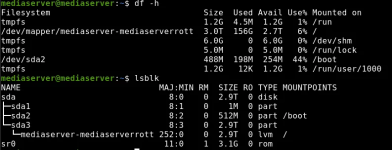
Hello, my VM is running on ubuntu server and format is btrfs I believe if that's what you mean by file system but I'll attach a screenshot of the system below showing the distribution of storage if that helps.

It's not too pressing for me, the server is a family media server I built (my first and only server so far) so that my mom and siblings can view family memories whenever they want to. I have backups of the media on that server on separate hard drives so even if the vm gets corrupted then the worst thing for me is spending a few days rebuilding the server setup to reupload those family images and videos into it. I am able to access the VM still, I just have to unlock it in proxmox and then make it turn on, then I can access what's inside it like normal still.1773512614747.png
 
the server is a family media server I built (my first and only server so far) so that my mom and siblings can view family memories whenever they want to
That's a worthy cause!

VM is running on ubuntu server and format is btrfs (...) file system
Yes, indeed, BTRFS is the file system. Other popular options would have been ZFS, XFS or ext4.

Is this the situation:
  • Proxmox:
    • hostname = mediaserver
    • one harddisk
    • default Proxmox installation with LVM
  • guest:
    • hostname = Immich_VM
    • type = VM (not container)
    • under "Hardware", "Hard disk (scsi0)" = vm-100-disk-0.qcow2, size=3T

I am able to access the VM still, I just have to unlock it in proxmox and then make it turn on, then I can access what's inside it like normal
By that you mean to say:
  • when rebooting Proxmox, the VM 'Immich_VM' is not started
  • 'Immich_VM' is configured to autostart (Options --> "Start at boot" = Yes)
  • 'Immich_VM' does not autostart, because it is locked pending task completion
  • you can remove the lock and then start 'Immich_VM', which runs without a problem
Is that a correct representation of the situation?

Your screenshot is from Proxmox itself, correct? It shows the block devices, but no snapshots. I have very limited experience with BTRFS myself. Besides df and lsblk, output of btrfs filesystem show and mount on the host Proxmox may be helpful. With my limited knowledge of BTRFS and your system, I don't know whether snapshotting is done at that level, or at the LVM level; displaying LVM may help as well.

Would you mind posting those details? Please copy the text instead of a screenshot, and use the </>-button in the editor to create a code-field for pasting. It is a little more trouble for you as problem owner, but much easier for readers of the forum with an inclination to help you. Besides it helps find later people with similar problems to find a possible solution, because the search function can read text, but not pictures.

In short, please paste, in a \[code\]-block, output of:
  • btrfs filesystem show
  • pvs
  • vgs
  • lvs - a
  • mount
It may be that someone else has to help you further from there: I preferably run my systems in containers, and the VMs I do run, are so small and boring that they do not require getting any experience with troubleshooting.